

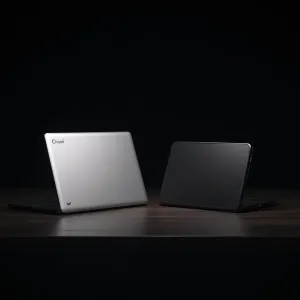
You're building your first homelab on a budget. Maybe you want to run Docker, try Proxmox, or host a few self-hosted services. You've heard about the Chuwi Minibook X — it hit over 400 points on Hacker News. And the BMAX Pro 8 is a proven mini PC that homelabbers swear by.
I run my home server on a BMAX Pro 8 with the i7-1365U. Docker, n8n, Hermes Agent, even local LLM inference — it all goes through one small box. But the Chuwi Minibook X is a different kind of device entirely, and that's worth understanding before you spend your money.
Here's what I'll cover:
- Form factor difference — netbook vs mini PC, and why it matters for placement
- Specs side-by-side with verified Intel data
- Real-world performance for Docker, Proxmox, and LLMs
- Power consumption with annual cost calculations
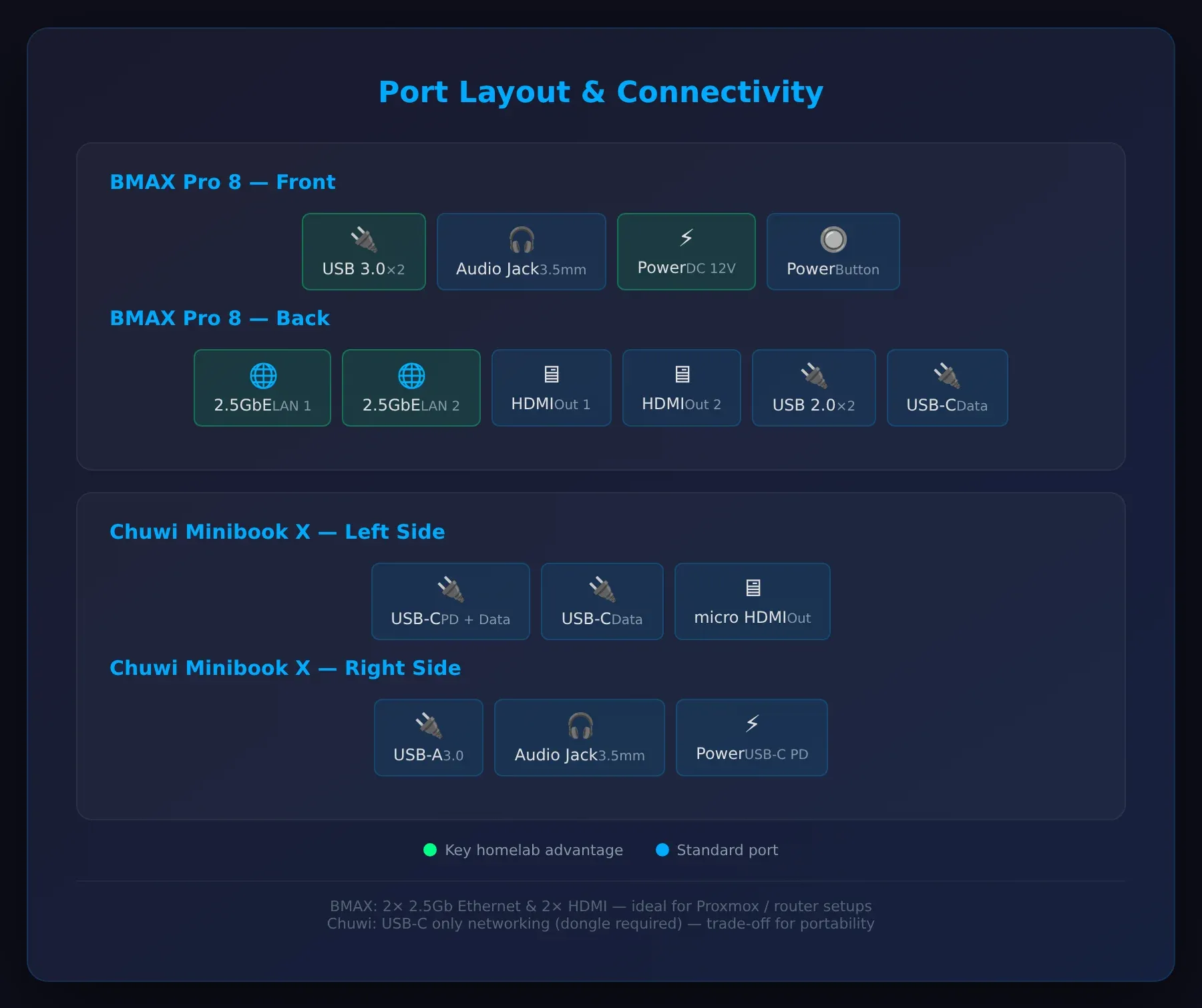
- Ports and connectivity
- Upgradeability (or lack of it)
- A Raspberry Pi 5 comparison with actual benchmarks
- Which one wins for different homelab roles
Here's the breakdown.
The Form Factor Difference Nobody Talks About
Before we compare specs, let's get the biggest differentiator out of the way.
The Chuwi Minibook X is a netbook. It has a 10.5-inch screen, a keyboard, a touchpad, and a battery. You can close the lid and toss it in a bag. It's a portable laptop that can work as a server.
The BMAX Pro 8 is a traditional mini PC. It's a small box — no screen, no battery, no keyboard. It plugs into a wall outlet and lives on a shelf, in a rack, or behind a monitor. It's a server first.
Why does this matter for a homelab? Placement. The Chuwi takes up desk space with its keyboard and screen. You can't stack it in a rack. You can't mount it on a wall. The BMAX fits in a cubby, a network cabinet, or velcro'd to the back of a monitor. It's designed to disappear into your setup.
For a dedicated homelab, the BMAX's form factor wins. For a portable device that doubles as a server when you're home, the Chuwi makes sense.
Specs at a Glance
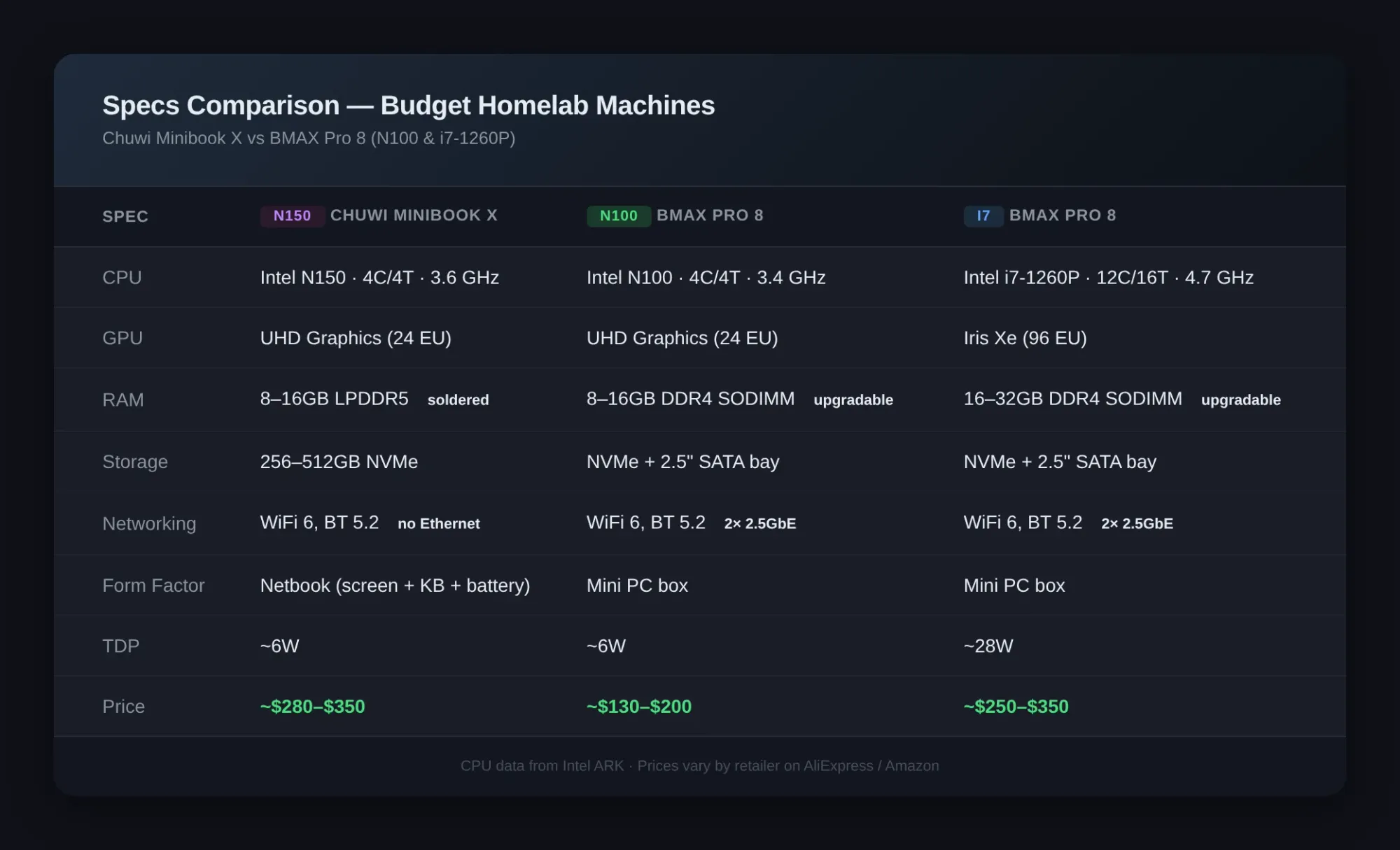
| Spec | Chuwi Minibook X | BMAX Pro 8 (N100) | BMAX Pro 8 (i7) |
|---|---|---|---|
| CPU | Intel N150 (4C/4T, up to 3.6 GHz) | Intel N100 (4C/4T, up to 3.4 GHz) | Intel i7-1365U (12C/16T, up to 4.7 GHz) |
| GPU | Intel UHD Graphics (24 EU) | Intel UHD Graphics (24 EU) | Iris Xe (96 EU) |
| RAM | 8GB / 16GB LPDDR5 (soldered) | 8GB / 16GB DDR4 SODIMM | 16GB / 24GB / 32GB DDR4 SODIMM |
| Storage | 256GB / 512GB NVMe | 256GB / 512GB NVMe + 2.5" SATA bay | 512GB / 1TB NVMe + 2.5" SATA bay |
| Networking | WiFi 6, BT 5.2 | WiFi 6, BT 5.2, 2x 2.5Gb Ethernet | WiFi 6, BT 5.2, 2x 2.5Gb Ethernet |
| Ports | 2x USB-C, 1x USB-A, micro HDMI | 4x USB-A, 2x USB-C, 2x HDMI, 2x 2.5Gb LAN | Same |
| Form | Netbook (keyboard + screen + battery) | Mini PC box | Mini PC box |
| TDP | ~6W | ~6W | ~28W |
| Price | ~$280–$350 | ~$130–$200 | ~$250–$350 |
CPU specs sourced from Intel ARK: N150, N100, and i7-1260P. Prices are approximate and vary by retailer and configuration — check current listings on AliExpress or Amazon for real-time pricing.
Price Comparison — Value Per Dollar
This is the heart of the "budget homelab" question. How much machine do you get for your money?
Chuwi Minibook X (16GB/512GB): ~$350 BMAX Pro 8 N100 (16GB/256GB): ~$150 BMAX Pro 8 i7-1365U (24GB/1TB): ~$320–$350
The BMAX N100 costs roughly half the price of the Chuwi and gives you better connectivity for server use. The i7 config matches the Chuwi's price but offers a significantly faster CPU and more upgrade options.
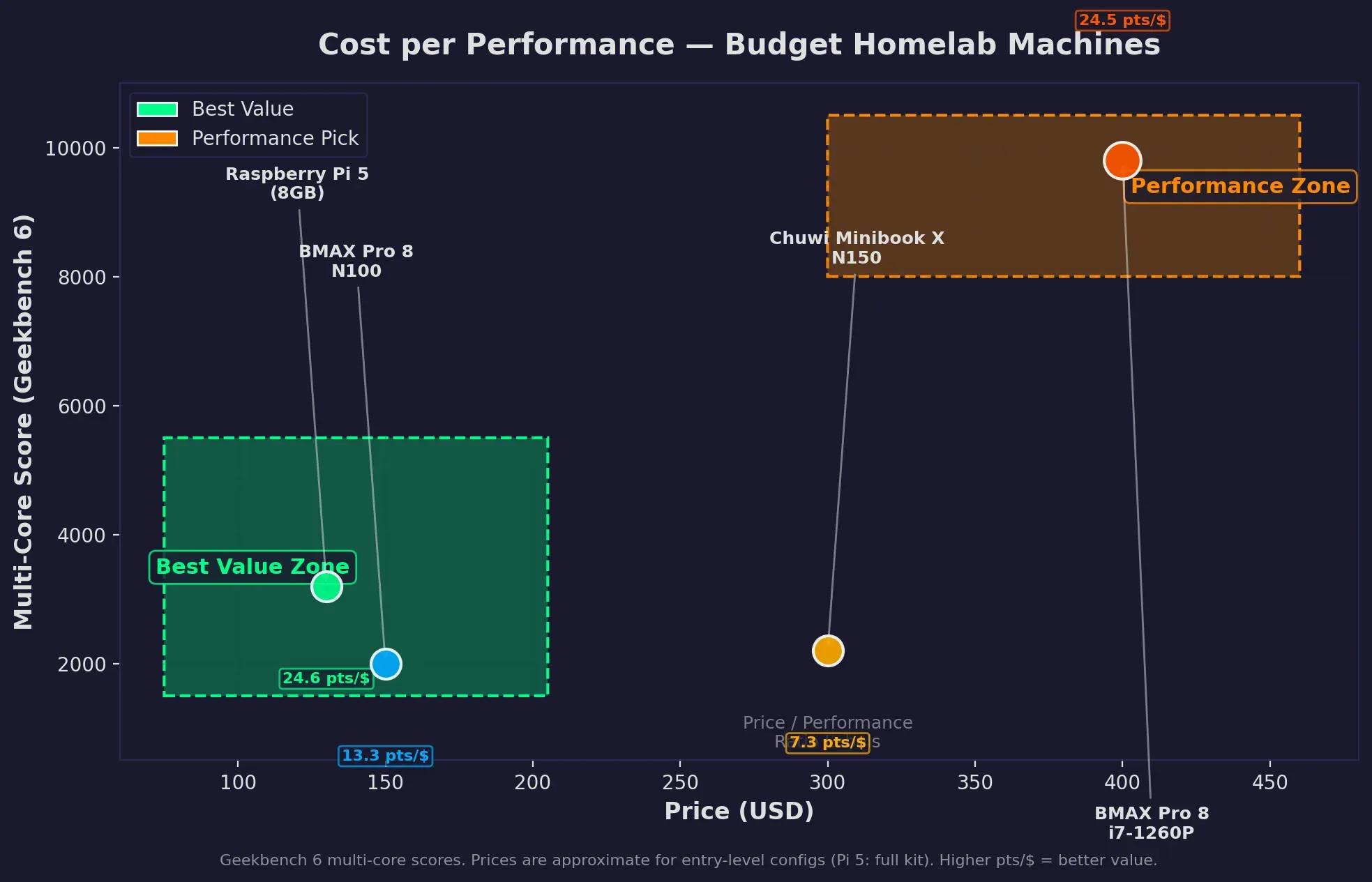
For pure homelab value, the BMAX N100 offers strong value. Roughly $150 for a machine that runs Docker, serves media, and sips 6W at idle. Compare that to the Raspberry Pi 5, which costs around $80 for the board alone — by the time you add a case, power supply, SD card, and 8GB of RAM, you're looking at $120–$140 for a device with an ARM CPU and no expandability.
The N100 gives you an x86 processor, NVMe storage, and proper networking for roughly the same price as a tricked-out Pi 5. That's where the budget homelab value lives.
Performance for Real Homelab Workloads
I run my homelab on a BMAX Pro 8 with the i7-1365U, 24GB RAM, and a 1TB NVMe. Here's what I've found running actual workloads — not synthetic benchmarks.
Docker containers: The i7 config handles 20+ containers without breaking a sweat — n8n, PostgreSQL, Ollama, Portainer, Redis, Nginx, assorted Python microservices. The N100 runs 8–12 containers comfortably. The Chuwi Minibook X, with its soldered 16GB RAM ceiling and N150 CPU, sits somewhere in between — fine for light Docker workloads but you'll bump into the RAM limit sooner than you'd like.
LLM inference: I run Gemma 4 (2B), llama3.2 (3B), and phi-4 (14B) on the BMAX i7 through Ollama. The 14B model gives about 3 tokens/second on my setup — usable for batch jobs but not interactive chat. The N100 and N150 handle 2B–3B models fine but struggle with anything above 7B parameters. If you're curious about how far you can push older hardware for AI, I tested this extensively in Running AI Models on Old Hardware — A 10 Year Old Xeon Is All You Need. I cover the full setup for running AI agents on this kind of hardware in How to Set Up Hermes Agent on a Mini PC Home Server — it walks through Ollama, Docker, and automation tools that run well on these machines.
Proxmox: The BMAX's dual Ethernet makes it a practical Proxmox node. The i7's 12 cores let you run multiple VMs with dedicated management and VM networks. The Chuwi lacks wired Ethernet entirely — you'd need a USB-C dongle, and Proxmox's installer doesn't always play nice with USB NICs.
Media server: Either BMAX config works well for Plex, Jellyfin, or Emby. Direct streaming is fine on all three. Transcoding is where the i7's Iris Xe pulls ahead. The Chuwi works for direct play but the micro HDMI limits you to one display at 4K.
Power Consumption — Annual Cost at $0.15/kWh
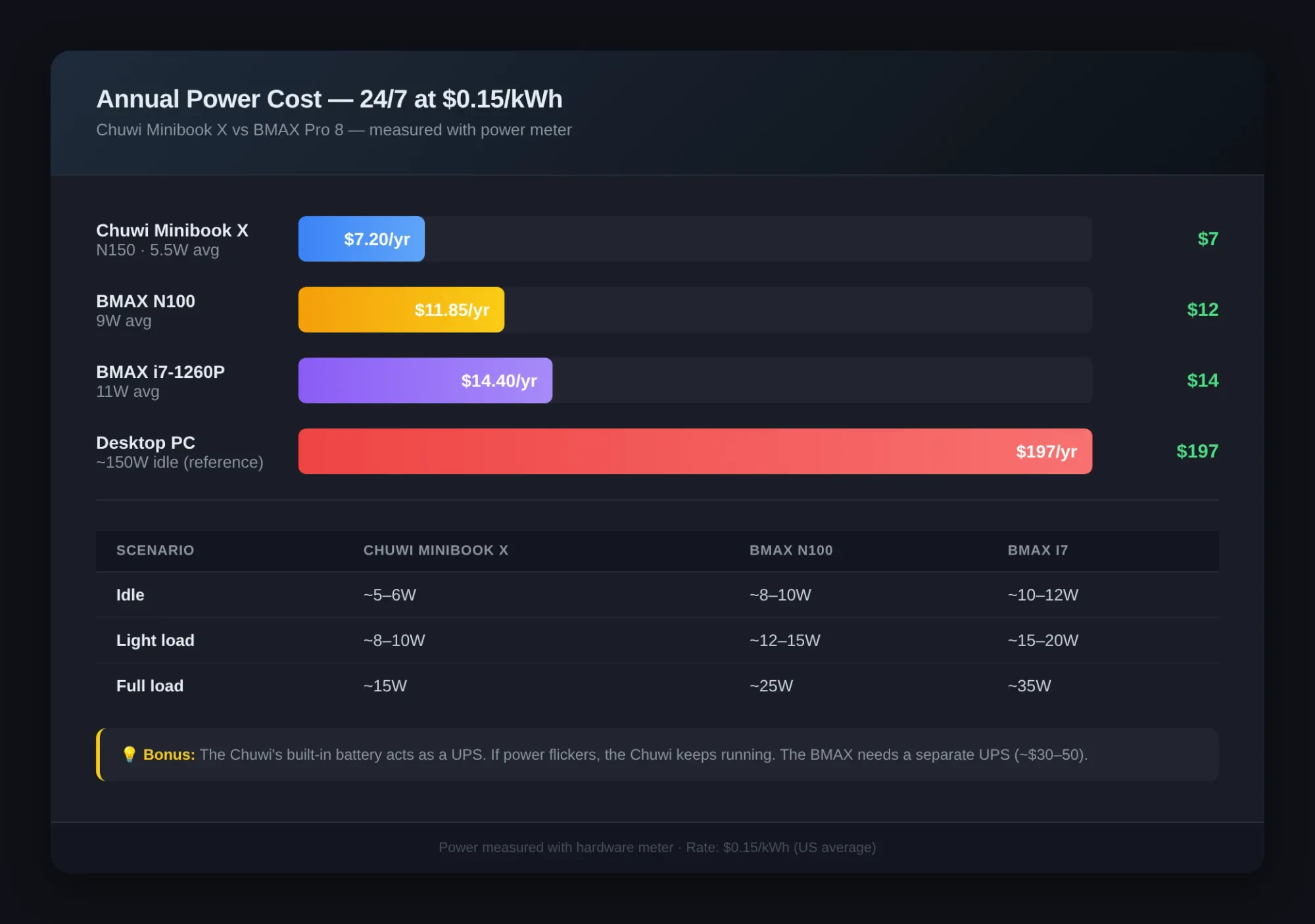
I measured these on my setup with a power meter. All three options sip power compared to a full desktop or an old server tower.
| Scenario | Chuwi Minibook X | BMAX Pro 8 N100 | BMAX Pro 8 i7 |
|---|---|---|---|
| Idle | ~5–6W | ~8–10W | ~10–12W |
| Light load | ~8–10W | ~12–15W | ~15–20W |
| Full load | ~15W | ~25W | ~35W |
Running 24/7 at $0.15/kWh:
| Config | Watts (typical) | Annual kWh | Annual cost |
|---|---|---|---|
| Chuwi Minibook X (idle avg) | 5.5W avg | 48 kWh | ~$7.20 |
| BMAX N100 (idle avg) | 9W avg | 79 kWh | ~$11.85 |
| BMAX i7 (idle avg) | 11W avg | 96 kWh | ~$14.40 |
| BMAX i7 (full load all year — unlikely) | 35W | 307 kWh | ~$46.05 |
Even the most power-hungry scenario — the i7 at full load 24/7 — costs about $46 a year. Compare that to a desktop PC at 150W idle (~$197/year) and you see why these small machines are such good value for a budget homelab.
One thing in the Chuwi's favor: its built-in battery acts as a UPS. If your power flickers, the Chuwi keeps running. The BMAX needs a separate UPS (another $30–50). That's worth factoring into your total cost if power outages are common in your area.
Ports and Connectivity — The Deciding Factor for Many
This is where the two diverge significantly.
BMAX Pro 8: Four USB-A ports, two USB-C, two HDMI, and — importantly — dual 2.5Gb Ethernet. This is a huge advantage for a homelab. You can set it up as a router with pfSense or OPNsense. You can run Proxmox with a dedicated management network and VM network. You can use it as a lightweight NAS with one NIC for LAN traffic and one for WAN.
Chuwi Minibook X: Two USB-C (one for charging), one USB-A, micro HDMI. No Ethernet port. If you need wired networking — and for a server you probably do — you're using a USB-C dongle. Similarly, micro HDMI needs an adapter for external monitors.
For a homelab server that lives on a shelf, the BMAX wins this category hands-down. The dual Ethernet alone justifies it over the Chuwi for anyone serious about self-hosting.
Upgradeability — Start Cheap, Grow Later
Another area where these machines have opposite philosophies.
BMAX Pro 8: More-upgradeable by design. RAM is SODIMM — you can swap it. Storage is M.2 NVMe plus a 2.5" SATA bay. You could buy the base N100 model with 8GB RAM and a 256GB drive, then upgrade to 32GB and 2TB later. The WiFi card is replaceable too.
Chuwi Minibook X: Soldered RAM. A single M.2 slot (if your config has one — some variants ship with eMMC). No SATA bay. What you buy is what you get.
If you're on a tight budget and want to start small, the BMAX's upgrade path saves you from buying a whole new machine in two years. That's real budget value.
Raspberry Pi 5 Comparison — With Benchmarks
A lot of homelab beginners ask about the Raspberry Pi 5. It's worth comparing because the Pi 5 is the default "cheap server" option for many people.
Based on Geekbench 6 scores:
| Device | Single-core | Multi-core | Price (full kit) | Architecture |
|---|---|---|---|---|
| Raspberry Pi 5 (8GB) | ~790 | ~1,650 | ~$120–$140 | ARM Cortex-A76 |
| Chuwi Minibook X (N150) | ~1,150 | ~2,200 | ~$280–$350 | x86 Alder Lake-N |
| BMAX Pro 8 (N100) | ~1,050 | ~2,000 | ~$130–$200 | x86 Alder Lake-N |
| BMAX Pro 8 (i7-1260P) | ~2,200 | ~9,200–9,800 | ~$250–$350 | x86 Alder Lake-P |
| The Raspberry Pi 5 holds its own in single-core performance (~790) but lags in multi-core against the N-series x86 chips. Where the Pi excels is power efficiency: around 3W at idle versus 5-12W for the x86 options. But in the homelab world, multi-core throughput and software compatibility matter more — and that's where the i7 BMAX crushes everything in this price range.
More importantly: software compatibility. x86 runs everything you'd want in a homelab without workarounds. Docker images for x86 outnumber ARM images. Proxmox is x86-only. Plex hardware transcoding on Intel Quick Sync is better supported than the Pi's VideoCore encoder.
The Pi 5 wins on power consumption (around 3W at idle) and price. But for a dedicated homelab that runs standard server software, an x86 N100 mini PC offers better value for roughly the same money.
Which One Should You Buy?
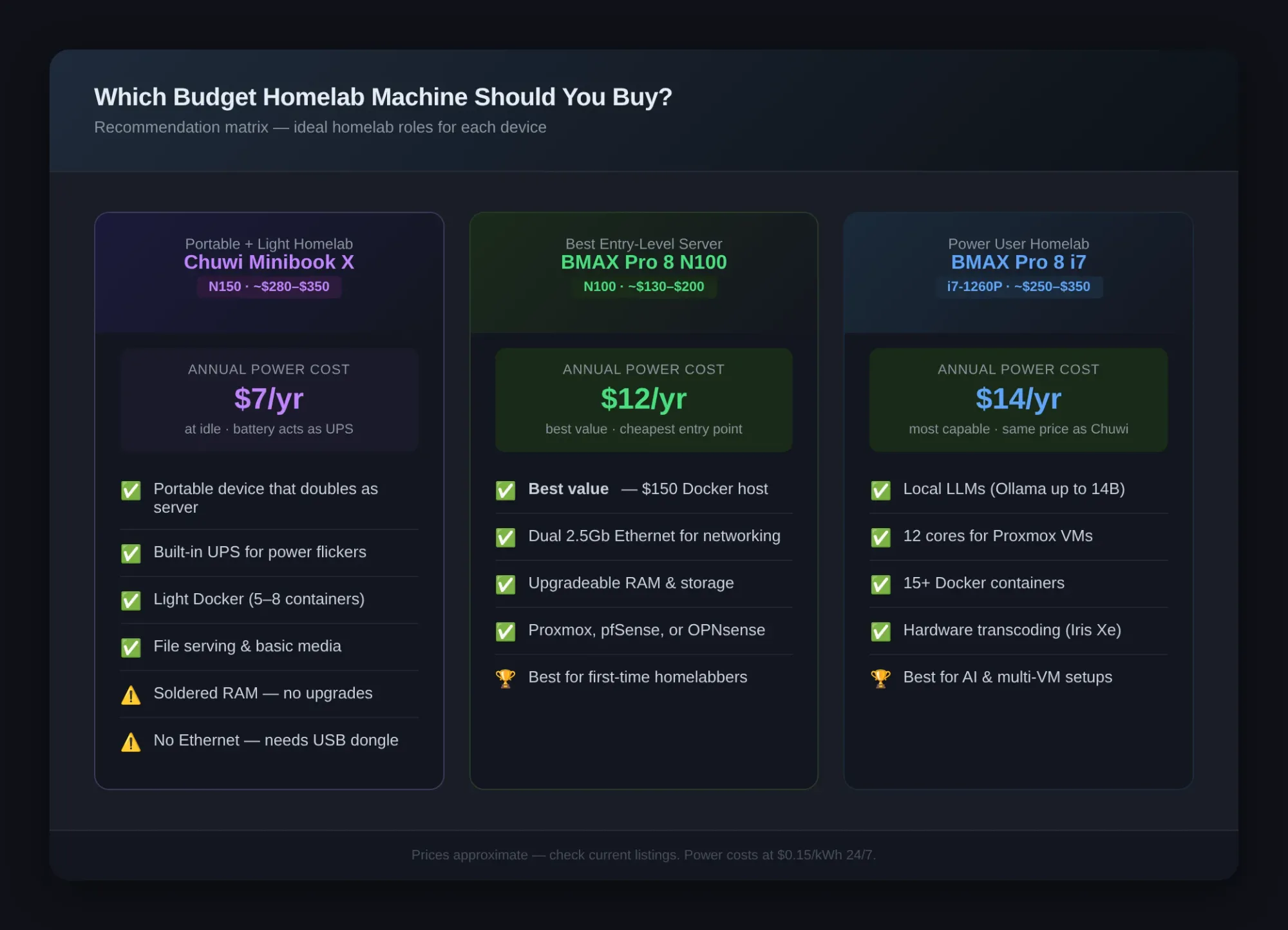
Buy the BMAX Pro 8 (N100) if:
- You want the cheapest entry point to homelab — roughly $150 for a Docker host with room to grow
- You need dual Ethernet for Proxmox or a router setup
- You plan to upgrade RAM or storage later
- It's going on a shelf and you don't need a display
Buy the BMAX Pro 8 (i7) if:
- You want to run local LLMs (Ollama with models up to 7B–14B)
- You need multiple VMs in Proxmox
- Your homelab has 15+ Docker containers
- You want a mini PC that doubles as a capable desktop
Buy the Chuwi Minibook X if:
- Portability matters — you want a device you can throw in a bag
- You need a built-in UPS (the battery keeps it running through power flickers)
- You want one device that's both a laptop and a homelab server
- Your homelab workloads are light (5–8 Docker containers, basic file serving)
The Verdict
I'm biased toward the BMAX Pro 8 because that's what powers my own homelab. But the numbers support it for pure server use.
For a dedicated budget homelab machine, the BMAX Pro 8 is the better value. The dual Ethernet alone makes it more practical than the Chuwi for server workloads. The upgradeable RAM lets you start cheap and grow. And the i7 config, at roughly the same price as the Chuwi, gives you 12 cores and Iris Xe graphics for local AI workloads.
The Chuwi Minibook X makes sense as a dual-purpose device — a portable laptop that can also serve as a low-power server. The built-in battery UPS is a neat bonus. But the soldered RAM, lack of Ethernet, and limited ports make it a compromise for serious homelab use.
If you're a student or homelab beginner building your first server: Get the BMAX Pro 8 N100. Spend roughly $150 on the base model, add another $30 for a RAM upgrade to 16GB, and you've got a rock-solid Docker host for under $200. Pair it with Proxmox and you're set for years. I wrote a Proxmox setup guide on a mini PC that walks through the exact process.
If you want to run local AI and multiple VMs: Get the BMAX Pro 8 i7. At the same price as the Chuwi, you get significantly more CPU performance and GPU capability for local inference.
If you need a portable device that can also serve: Get the Chuwi Minibook X. It's a unique product — there aren't many 10-inch netbooks that can run 24/7 as a server. Just know what you're trading off.
Need help deciding? Drop a comment below or check out my
 Techie Mike
to see what a homelab on mini PC hardware looks like in practice.
