

A manifesto hit the front page of Hacker News last week with a title that stopped me mid-scroll: "Right to Local Intelligence." Around the same time, Jamesob's guide to running SOTA LLMs locally was also being discussed heavily. Two posts, one message: local AI is having a moment.
I've been running local models on a BMAX Pro 8 mini PC for months. Ollama. Open WebUI. A handful of models that live on my SSD, not in someone's data center. The manifesto put words to something I'd felt but never articulated: there's a difference between using AI and owning it.
What "Local Intelligence" Actually Means
Local intelligence is AI that runs on your hardware. Not in a browser tab hitting an API. Not in an app that phones home with every prompt. On your machine. Your CPU, your RAM, your disk.
In practice, this means three things:
The model lives on your drive. When you pull ollama pull llama3.2:3b, you download a ~2 GB file. It sits there. No license check. No authentication. No internet required after the first download. You could disconnect your machine from the network right now and it would keep working.
Inference happens on your machine. Every token is generated locally by your CPU, GPU, or whatever acceleration your setup supports. Nobody logged the prompt. Nobody stored the response. Nobody trained on your conversation.
You control what runs. No model gets updated without your permission. No feature gets deprecated. No "safety" filter gets added that silently changes how the model responds to certain topics. The file on your disk is the file on your disk.
I wrote a full setup guide for Docker + Ollama + Open WebUI if you want the step-by-step. But the point of this post isn't the how. It's the why.
Why Bother?
Cloud AI works fine. ChatGPT is fast. Claude is smart. Gemini has a free tier. Why would anyone go through the trouble of running models locally?
1. Privacy You Can Verify
When you use a cloud AI, you're trusting a company with every prompt you type. Not just the innocent ones — the sensitive ones. The draft about an unreleased product. The debugging session where you pasted real customer data to get context. The question about a medical symptom you googled earlier.
Some providers offer stronger privacy controls for API, business, or opted-out accounts, and OpenAI says API data is not used for training by default. But the details vary by product, plan, and settings. With cloud AI, you still have to trust the provider's systems and policies. And when you want to leave a cloud AI service, your conversation history rarely comes with you. I wrote about the data export problem in depth.
With local models, the audit is trivial. sudo lsof -i shows every network connection. Turn off Wi-Fi and the model still works. No faith required.
2. No Subscription, No Rate Limits
I've been burned by cloud AI pricing. My 45-day experiment with Replit Agent cost me $250 and the agent lied about what it had done. But even mainstream services have this problem in subtler ways.
ChatGPT Plus is $20/month. Claude Pro is $20/month. Cursor is $20/month. Each one has usage caps that kick in when you're mid-session. The model gets throttled. The quality drops. Suddenly you're told to "try again later."
Local AI has none of this. No monthly bill. No rate limit. No "you've exceeded your quota." My BMAX Pro 8 draws 25 watts at idle. Running a 3B model bumps that to maybe 35 watts. At Thai electricity rates (~฿4.5/kWh), that's about ฿120/month — $3.50. For unlimited inference.
3. Your AI Works When the Internet Doesn't
I live in Thailand. Internet here is generally good, better than most of the US honestly, but it does go down. When it does, cloud AI becomes a paperweight. Can't query ChatGPT. Can't use Cursor's AI features. Can't ask Claude to summarize a document.
My local models don't care. They run on the machine in my office. No internet, no problem. This matters more than you'd think if you've never lived somewhere with unreliable connectivity.
4. Less Platform Filtering, More Responsibility
Local models reduce platform-level filtering, but they also put more responsibility on the user. They'll write code that cloud models flag as "potentially unsafe." They'll discuss topics that corporate safety filters block. They'll help you understand how a security vulnerability works, because understanding vulnerabilities is how you learn to defend against them.
I'm not talking about generating harmful content. I'm talking about the quiet censorship that happens when a model decides your question is too spicy and gives you a sanitized non-answer. Cloud AI providers have to play it safe, their brand depends on it. Local models don't have a brand to protect.
What I Actually Run
I don't run some hypothetical ideal setup. I run real hardware with real models. Here's what's on my machine right now:
| Model | Size | RAM Used | What I Use It For |
|---|---|---|---|
| Gemma 4 2B | 1.8 GB | ~3 GB | Quick questions, drafts, small coding tasks |
| Llama 3.2 3B | 2.0 GB | ~4 GB | General-purpose, better at code than Gemma |
| Phi-4 mini | 2.4 GB | ~5 GB | Best small model for code generation |
| Qwen 2.5 14B | 8.5 GB | ~16 GB | Heavy tasks, detailed explanations, complex reasoning |
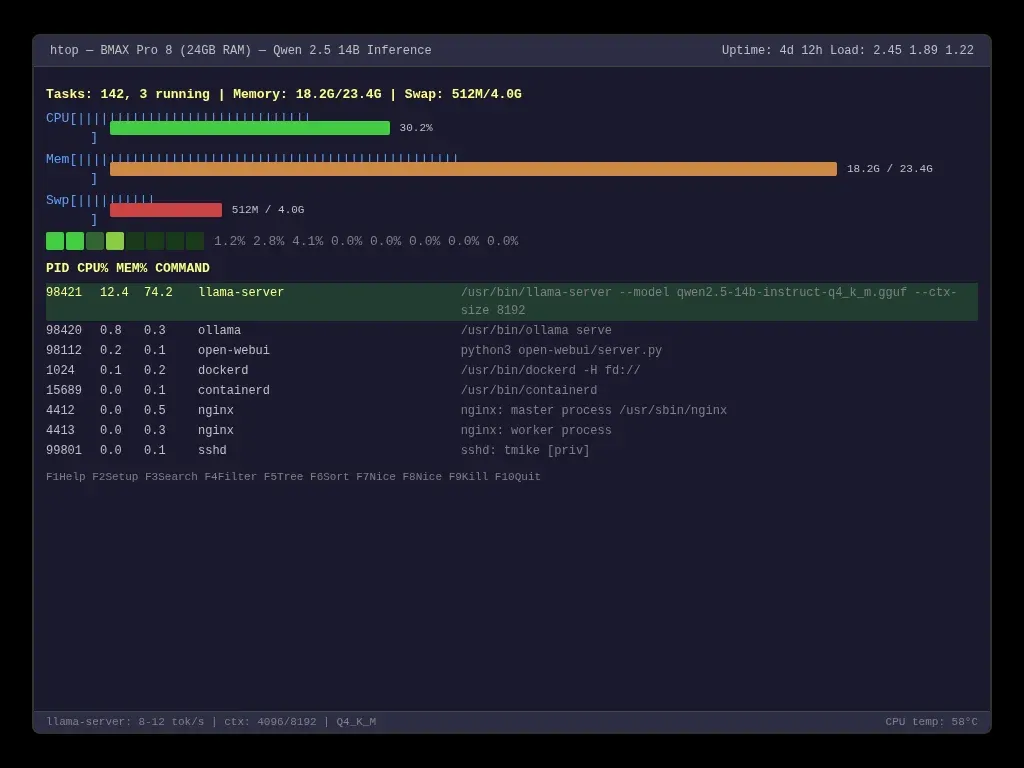
The 14B model is the one I use for serious work. It runs on my BMAX Pro 8's 24 GB of RAM at about 8-12 tokens per second. That's slower than ChatGPT but faster than I can read. For code generation, document summaries, and technical explanations, it's perfectly usable.
Smaller models (2B-3B) run at 15-25 tokens per second — faster than I can type. For quick lookups and simple questions, they're actually more responsive than cloud AI because there's no network latency.
I wrote about the hardware side in detail in my guide to running AI on old hardware. The short version: you don't need a gaming GPU. A $150 used mini PC works.
The Trade-Offs (Honest Assessment)
Local AI is not a drop-in replacement for ChatGPT. If someone tells you it is, they're selling something.
Capability gap. GPT-4o and Claude Sonnet are smarter than any model I can run locally. They handle multi-step reasoning better. They follow complex instructions more reliably. They're better at math, better at nuanced writing, better at understanding ambiguous questions. Local models are catching up, Gemma 4 and Llama 4 are impressive, but there's still a real gap.
Speed on large models. My Qwen 2.5 14B runs at 8-12 tok/s. That's fine for reading. It's annoying for real-time chat. Cloud models stream at 50+ tok/s. If you need instant responses for brainstorming or rapid iteration, local AI will feel sluggish.
Setup overhead. Cloud AI is zero setup. Local AI requires Docker, terminal commands, model downloads, and occasionally fighting with RAM allocation. The Docker + Ollama guide makes it a five-minute process, but it's five minutes you don't spend with cloud AI.
Updates and model management. Cloud models update automatically. Local models sit on your disk until you manually pull a new version. This is a feature (control) and a bug (maintenance).
For my workflow, the hybrid approach works best: local models for quick tasks, drafts, and anything sensitive; cloud API for the genuinely hard problems. Best of both worlds.
What Local AI Teaches You About How LLMs Work
There's an education angle here that I care about as a CS teacher. Running models locally demystifies them in a way that using ChatGPT never can.
When you run ollama run llama3.2:3b --verbose, you see the raw token stream. Each token with its probability. The model's internal uncertainty. You realize there's no "understanding" happening: just statistical prediction, one token at a time.
You learn about quantization because you have to choose between Q4_K_M and Q8_0 when pulling a model. You learn about context windows because you hit the limit and the model forgets what you said three messages ago. You learn about memory bandwidth because htop shows your CPU at 30% while the model crawls, because it's waiting for RAM, not crunching numbers.
These are concepts that CS textbooks mention in passing. Running a local LLM makes them tangible. I've had students who used ChatGPT for months but didn't understand token generation until they watched it happen on their own machine.
The Right to Compute
The manifesto's framing — that local intelligence is a right, not a feature — feels more urgent than I expected it to. Here's why.
Access to the most capable closed AI systems is increasingly concentrated among a small number of large providers: OpenAI, Anthropic, Google, and a few others. Every query you send to them goes through their servers, their filters, their terms of service. They decide what the model can and can't say. They decide how much it costs. They decide whether to log your data.
This isn't a conspiracy theory. It's the business model. Cloud AI is centralized by design: the model lives on their machine, and you pay for access.
Local AI breaks that centralization. It says: I don't need your permission to use AI. I don't need your server. I don't need your terms of service. I have a processor and RAM and a model file. That's enough.
There are regulatory risks too. The EU AI Act. Proposed US state-level restrictions — nearly 700 AI-related bills were introduced across 45 states in 2024 alone. The UK Online Safety Act. None of these currently ban local model inference, but the regulatory direction is toward more control, not less. Having models that run offline, on hardware you own, is insurance against future restrictions.
The practical argument for local AI is privacy and cost. The philosophical argument is autonomy. You should be able to run intelligence on the machine you own without asking permission.
Start With What You Have
You probably already own hardware that can run a local LLM. Any laptop from 2016 onward with 16 GB of RAM can run a 3B model at usable speeds. Any desktop with 32 GB can handle 7B models. Even a Raspberry Pi 5 with 8 GB can run the smallest Gemma and Phi models — slowly, but it runs.
Install Ollama. Pull a model. Try it. The barrier is lower than you think.
If you want the full Docker + Open WebUI setup with GPU passthrough and API access, the complete guide is here. If you're curious about what runs on budget hardware, I've got a
 Techie Mike
But you don't need to read either of those to start. You just need to decide that running AI on your own terms is worth five minutes of setup.
