


File handling is one of those topics that always shows up on Cambridge CS exams. Whether you're sitting IGCSE 0417 or AS/A-Level 9618, you need to know how to open, read, write, and append data in a file using Python. In this post, I'll walk through everything you need, with the kind of worked examples you'll actually see on your paper.
Here's what we'll cover:
- 🔓 Opening files — what the modes mean and when to use each
- 📖 Reading data from files — read, readline, and readlines
- ✍️ Writing data to files — creating and overwriting content
- ➕ Appending data to files — adding to existing files without deleting
- 📁 Closing files properly (and why it matters)
- 🧠 Worked example — a complete student record system Let's get into it.
🔓 Opening Files — The Foundation
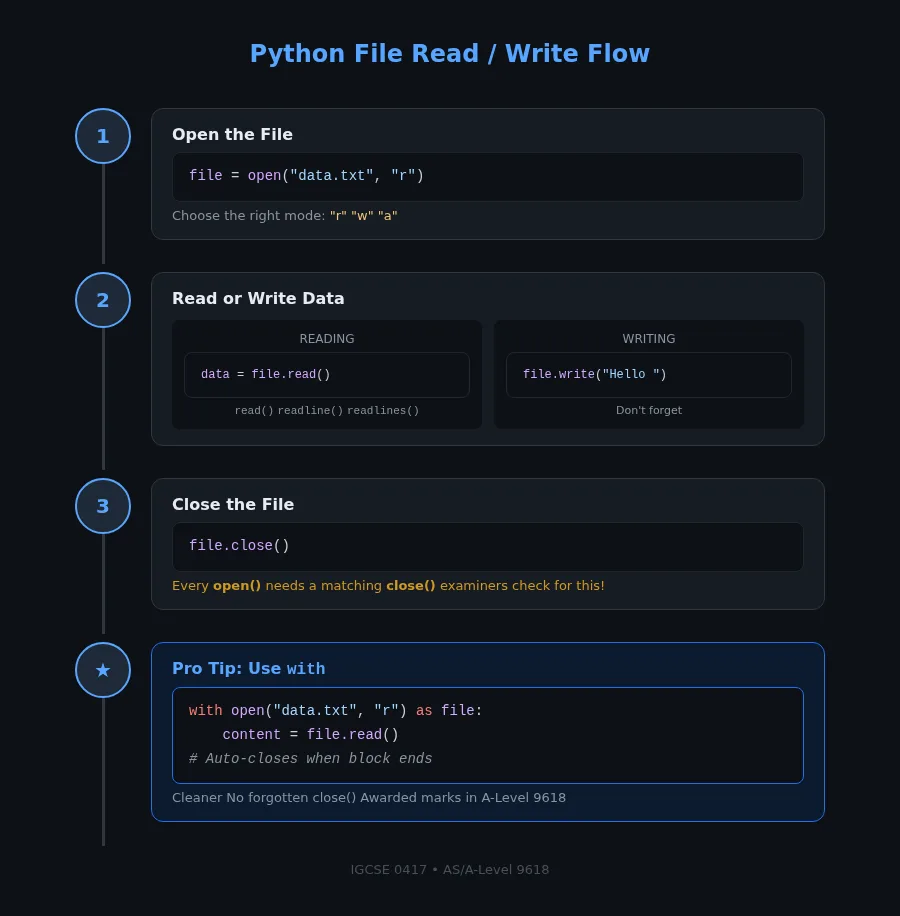
Every file operation in Python starts with the open() function. You give it a filename and a mode, and it returns a file object you can work with.
file = open("students.txt", "r")\nThe three modes you need to know for Cambridge exams:
\n\n| Mode | \nName | \nWhat It Does | \n
|---|---|---|
"r" | \nRead | \nOpens an existing file for reading. Error if file doesn't exist. | \n
"w" | \nWrite | \nOpens a file for writing. Creates the file if it doesn't exist. Overwrites everything if it does. | \n
"a" | \nAppend | \nOpens a file for adding content. Creates the file if it doesn't exist. Keeps existing content. | \n
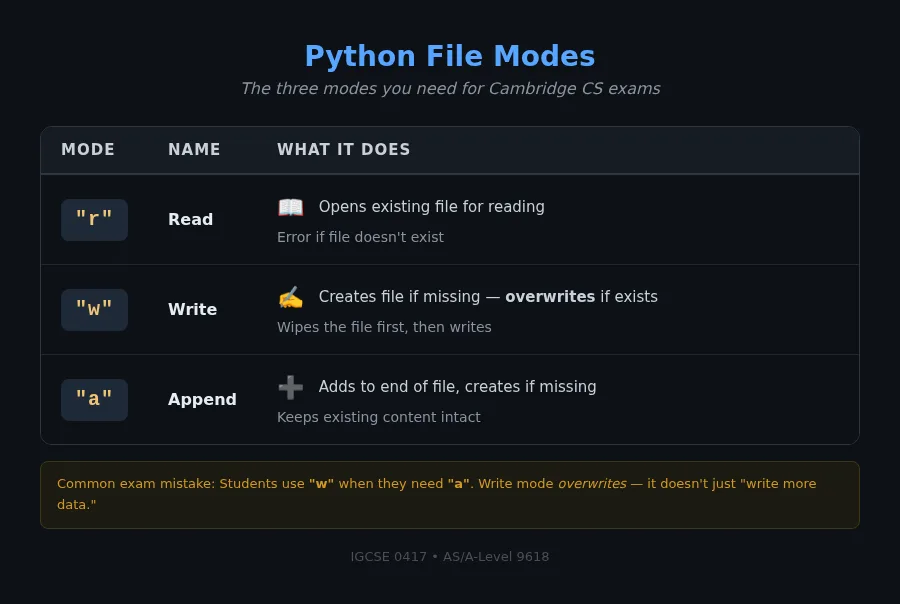
Common Misconception: A lot of students think "w" just writes to the file. It doesn't — it first wipes the file completely, then writes. If you want to keep what's already there, use "a" (append). I've seen exam answers lose marks because they used write mode when they needed append.
Exam-Style Question
A teacher keeps student scores in a file called scores.txt. State the most appropriate file mode to use in each scenario: - (a) To read the scores - (b) To add new scores to the existing file - (c) To create a new file with updated scoresModel Answer: - (a) "r" (read mode) — the file already exists and we only need to read - (b) "a" (append mode) — we're adding data without removing existing scores - (c) "w" (write mode) — we're creating a new version of the file
📖 Reading Data from Files
There are three ways to read from a file in Python, and examiners love testing the difference between them.
read() — The Whole File
file = open("data.txt", "r")\ncontent = file.read()\nprint(content)\nfile.close()\nThis reads the entire file as a single string. Use it for small files where you want everything at once.
readline() — One Line at a Time
file = open("data.txt", "r")\nline = file.readline()\nwhile line != "":\n print(line.strip())\n line = file.readline()\nfile.close()\nReads one line each time you call it. When there's nothing left, it returns an empty string. In A-Level (9618), this maps to the serial file reading pattern — read until EOF.
readlines() — All Lines as a List
file = open("data.txt", "r")\nlines = file.readlines()\nfor line in lines:\n print(line.strip())\nfile.close()\nReturns every line as a list of strings. Each string includes the newline character (\\n), which is why I use .strip() to clean them up.
Common Misconception: Students often use read() when they need readline(). If the exam asks you to "read records one at a time until the end of file," they want the readline() pattern with a loop. Not read(). Not readlines(). The mark scheme is specific about this for 9618 Paper 2.
Exam-Style Question (A-Level 9618)
A file called employees.txt contains employee names, one per line. Write Python code to read and display each name on a separate line.Model Answer:
file = open("employees.txt", "r")\nemployee = file.readline()\nwhile employee != "":\n print(employee.strip())\n employee = file.readline()\nfile.close()\nThe mark scheme checks for: - ✔️ Correct mode — "r" - ✔️ Loop that reads until end of file (empty string check) - ✔️ .strip() to remove newline characters - ✔️ file.close() at the end
✍️ Writing Data to Files
Writing is straightforward, but there's a catch — "w" mode wipes the file first.
file = open("output.txt", "w")\nfile.write("Hello, world!\\n")\nfile.write("This is line two.\\n")\nfile.close()\nEach write() call adds text at the current position. Notice the \\n — you need to add newline characters yourself. Python's write() doesn't add them automatically.
Important for exams: If output.txt already existed, it's now gone. Everything got replaced. If you need to add to an existing file, you want append mode below.
Exam-Style Question (IGCSE 0417)
A program stores the names of students in a file called class_list.txt. Write Python code to write three student names to this file.Model Answer:
file = open("class_list.txt", "w")\nfile.write("Alice\\n")\nfile.write("Bob\\n")\nfile.write("Charlie\\n")\nfile.close()\nCommon Misconception: Students forget the \\n at the end of each line. Without it, all the names run together on one line like "AliceBobCharlie" — and that loses marks.
➕ Appending Data to Files
Append mode is "a". It's write mode, but without the wipe.
file = open("log.txt", "a")\nfile.write("New entry: user logged in\\n")\nfile.close()\nIf log.txt already has 10 lines, this adds line 11 at the bottom. If it doesn't exist, Python creates it for you.
Exam-Style Question
A program records temperature readings in temps.txt. Write code to add the value 25.5 to the end of this file without deleting existing data.Model Answer:
file = open("temps.txt", "a")\nfile.write("25.5\\n")\nfile.close()\n📁 Closing Files Properly
Every open() should have a matching close(). Here's why:
- Data might not be saved yet — writes are often buffered. The file might look empty until you close it.
- File handles are limited — open too many files without closing, and your program will crash.
- Locked files — other programs might not be able to access the file while your program has it open.
Best Practice — with Statement:
with open("data.txt", "r") as file:\n content = file.read()\n print(content)\n# File is automatically closed here\nThe with statement closes the file automatically when the block ends. It's cleaner and you can't forget to close. For A-Level 9618, this is considered good practice and they will award marks for it.
Common Misconception: Some students think close() is optional. It's not. An unclosed file can lose data. In exams, always include close() or use a with statement.
🧠 Worked Example — Student Record System
Let's bring it all together. Here's a complete program that would fit an A-Level 9618 Paper 2 question — a student record system using file handling.
The Scenario: A school needs a program that: 1. Reads existing student names and scores from a file 2. Displays them 3. Adds a new student record 4. Creates a backup file
# Step 1: Read existing records\nwith open("students.txt", "r") as file:\n print("Current students:")\n line = file.readline()\n while line != "":\n name, score = line.strip().split(",")\n print(f" {name} — {score}")\n line = file.readline()\n\n# Step 2: Add a new student\nnew_name = input("Enter student name: ")\nnew_score = input("Enter score: ")\n\nwith open("students.txt", "a") as file:\n file.write(f"{new_name},{new_score}\\n")\n\n# Step 3: Create a backup\nwith open("students.txt", "r") as source:\n data = source.read()\n\nwith open("students_backup.txt", "w") as backup:\n backup.write(data)\n\nprint("Done! Student added and backup created.")\nWhat this teaches: - Reading serially with readline() and a loop (exactly what 9618 asks for) - Appending new records without overwriting existing data - Reading from one file and writing to another (a common exam pattern)
How This Maps to the Syllabus
For IGCSE ICT (0417), file handling questions are straightforward — you'll typically be asked to write or read a simple text file. Focus on getting the mode right and remembering the \\n.
For AS & A-Level Computer Science (9618), the bar is higher. You need to demonstrate: - Understanding serial file access (sequential reading until EOF) - Writing structured data (e.g., comma-separated records) - Appropriate file mode selection - Proper file closure (either explicit close() or with block)
I've been teaching this for over a decade, and the single biggest mark-loser on 9618 file handling questions is forgetting to close the file. It's such a simple thing, but examiners specifically check for it. Add it to your checklist before you move to the next question.
📝 Summary
Here are the key takeaways for your Cambridge exam:
"r"— read only, file must exist"w"— write, creates or overwrites the file"a"— append, adds to the end, creates if missing- Always close — use
file.close()orwith open() readline()loop — for serial file processing (9618 standard)- Don't forget
\\n— write doesn't add newlines automatically
For more Cambridge exam prep, check out my guide on Cambridge AS & A Level Computer Science Paper 2 — Records, Files & Programming Techniques. If you're still getting comfortable with Python basics, my post on why Python uses indentation explains a concept that trips up most beginners.
Got questions or stuck on a specific exam question? Drop a comment below and I'll help you work through it.
