

A student shows me a Python program and says, "It doesn't work."
That is the whole bug report.
No error message. No explanation of what the program is meant to do. No clue whether it ever worked, whether they changed anything, or whether they even ran it again after the last edit. I have to drag the story out of them one question at a time, like I'm interviewing a very tired witness.
This is not a small classroom habit. It is a technical communication problem, and it follows students straight into university, internships, GitHub issues, team chats, and software jobs.
Most CS courses spend a lot of time on syntax, algorithms, and debugging. They spend far less time on the moment just before debugging becomes collaborative: the point where you have to explain the problem to another human. That missing skill matters more than students realise. A clear help request saves time, gets better answers, and often helps you solve the problem before anyone replies.
I would go further than that: I think a student who can describe a bug clearly is usually closer to being job-ready than a student who can memorise one more sorting algorithm but cannot explain what broke.
Why this skill matters more than students think
The Cambridge IGCSE Computer Science syllabus for 2026-2028 says practical problem-solving and programming should be integral to the course, and that learners should have the opportunity to write, run, test, and debug their own programs.
The human side is what happens when testing and debugging stall.
If you cannot explain what you expected, what happened instead, and what you already tried, your teacher, classmate, or teammate starts from zero every time. Good questions lower that cost. Bad questions spread confusion.
This also scales beyond school surprisingly fast. The same habits show up in:
- asking a teacher why your pseudocode answer lost marks
- posting on Stack Overflow
- filing a GitHub issue for a broken project
- asking for help in a company Slack channel
- handing over a bug to another developer during a team project
That is why this is not just "how to ask nicely." It is part of technical work.
The three mistakes that waste the most time
Asking about the guess instead of the real problem
This is the classic XY problem.
The short version is simple: you want to solve X, you get stuck, you guess that Y might be the way to do it, then you ask for help with Y instead of explaining X. The person helping you sees a strange sideways question and has no idea what you are actually trying to achieve.
A student version of this sounds like:
"How do I make Python ignore line 14?"
Maybe line 14 is not the real issue. Maybe the real issue is that the student is trying to skip invalid input, or they misunderstood a loop condition, or they are patching around data that should have been cleaned earlier.
If you only ask about the guessed fix, people can spend ten minutes helping with the wrong thing.
I see this constantly when students jump straight to a supposed solution instead of describing the goal. They ask, "How do I stop this traceback from showing?" when the real question is, "Why is my file not opening?" They ask, "How do I force this variable to become an integer?" when the real question is, "Why is my comparison failing?"
If you remember one rule from this post, make it this one: explain the actual task before you explain your attempted fix.
Being too vague
"My code is wrong" is not a useful starting point.
Neither is "Please help asap" or "Why doesn't this work?"
The Stack Overflow help page on asking good questions still pushes the same basic idea it has pushed for years: search first, then ask a question that summarises the specific problem. That works because specific questions are answerable. Vague questions are not.
A vague question forces the helper to guess:
- what language or tool you are using
- what output you expected
- what output you got
- whether there was an error message
- whether the bug happens every time
- whether your code is complete enough to run
By the time all of that gets clarified, the conversation has already become slower and more irritating than it needed to be.
Hiding the context and the attempt
Students sometimes think showing failed attempts makes them look weak. In reality, hiding them makes the question harder to answer.
What you tried is part of the technical evidence.
If you already tested two different loops, changed the file path, and confirmed the CSV exists, that matters. It stops people suggesting the same dead ends again. It also proves you are not asking someone else to do the whole task for you.
The same goes for error messages. Do not paraphrase them into mush.
"Python had some syntax problem" is far less useful than pasting the actual traceback and saying which line you think it points to.
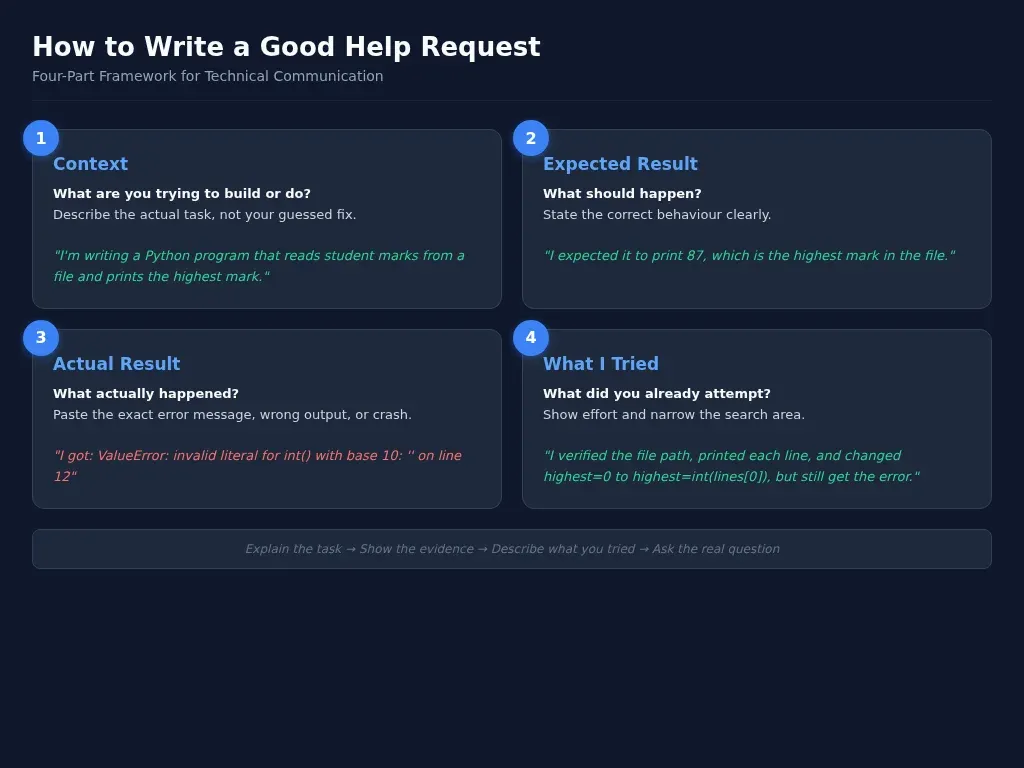
A simple framework for writing a good help request
When students ask me for a template, I give them four parts.
1. Context
Start with what you are trying to build or do.
Not your guessed fix. The real task.
Good: "I'm writing a Python program for an IGCSE-style file handling task. It should read names and marks from a text file, then print the highest mark."
Bad: "How do I make line 8 skip to line 12?"
The first version gives the helper a map. The second throws them into a random alley.
2. What you expected
Say what the program, query, script, or system should do.
For example: "I expected it to print the highest mark in the file, which should be 87."
This sounds basic, but it matters. Debugging without a clear expected result turns into guesswork.
3. What actually happened
Now give the observed behaviour.
That could be:
- the exact error message
- the wrong output
- no output
- a crash
- a hang
- inconsistent behaviour between runs
Be literal. Paste the traceback. Quote the output. Name the line number if you have one.
4. What you already tried
Finish with the attempt.
For example: "I checked whether the file path was correct, printed each line to confirm the file was reading, and changed highest = 0 to highest = int(lines[0]), but I still get a ValueError on the blank final line."
That sentence does two useful things. It shows effort, and it gives the helper a narrower search area.
Put those four parts together and the question becomes much easier to answer.
A minimal reproducible example saves time
On Stack Overflow, the standard advice is to provide a Minimal, Reproducible Example.
Minimal means you cut the code down to only the part that still shows the problem.
Complete means someone else has everything they need to run it.
Reproducible means you tested it yourself and confirmed the problem still happens.
It feels fiddly at first, but it pays off fast.
When students trim a 140-line program down to 18 lines and the bug disappears, they often solve the problem before they even send the question. The act of isolating the bug is already a debugging method.
It also makes helpers more willing to engage. Eighteen lines will get read far more often than a full coursework dump.
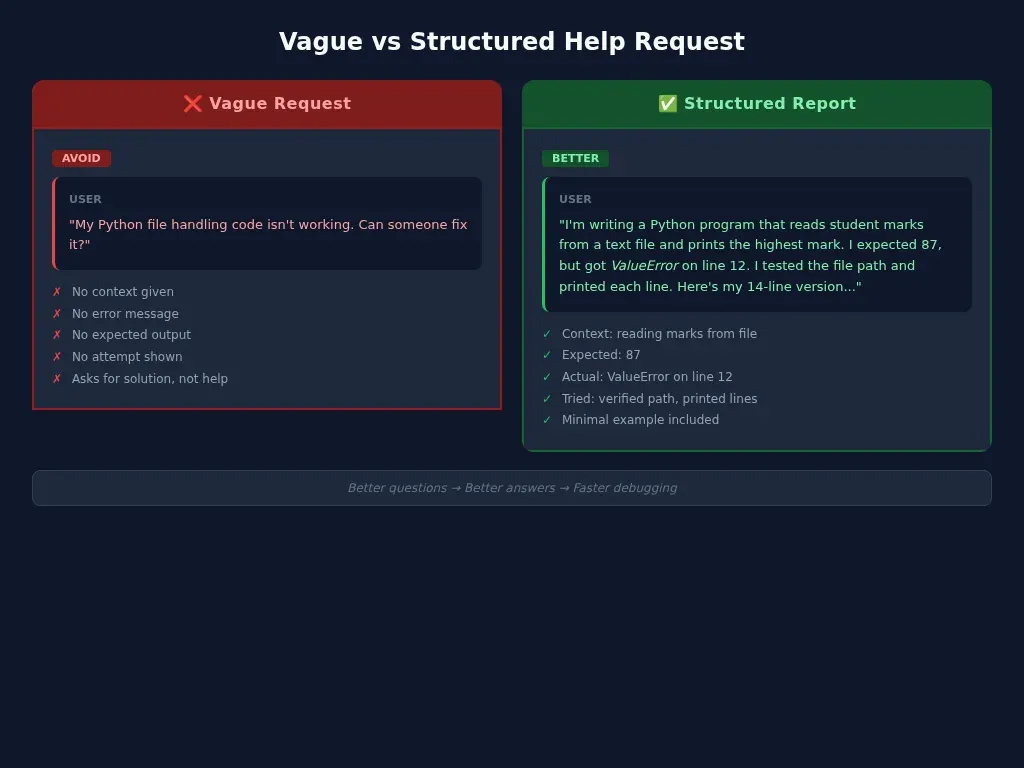
Bad question vs good question
Here is the kind of message that usually goes nowhere:
"My Python file handling code isn't working. Can someone fix it?"
That gives the helper almost nothing.
Now compare it with this:
"I'm writing a Python program that reads student names and marks from a text file, then prints the highest mark. I expected it to print 87, but instead I get ValueError: invalid literal for int() with base 10: '' on line 12. I tested the file path and printed each line, and I think the problem is the blank line at the end of the file. Here's the 14-line version that still causes the error."
That second version is just structured.
And structure is the whole game here.
I would rather read a blunt, slightly messy question like that than a polished message that hides the real issue.
What this looks like in a professional setting
Students sometimes think this advice only applies to forums. It does not.
In software work, asking for help usually becomes one of these:
- a bug report
- a GitHub issue
- a pull request comment
- a handover note
- a message in a team chat
GitHub's own issue flow is built around the same basics: write a title, then describe the issue in the body. That is not bureaucracy. It is an attempt to make problems legible.
A strong junior developer still gets stuck.
A strong junior developer is someone who can say:
- what they were trying to do
- what environment they were using
- what steps reproduce the bug
- what they expected
- what they saw instead
- what they already checked
That person is easier to help, easier to trust, and easier to work with.
This is one reason I keep pushing technical communication in CS classes. Industry does not reward silent confusion. It rewards people who can surface a problem clearly enough for a team to act on it.
A checklist students can actually use
Before you ask for help, check whether your message includes these points:
- What are you trying to do?
- What language, tool, or platform are you using?
- What did you expect to happen?
- What actually happened?
- What is the exact error message?
- What have you already tried?
- Can you shrink it to a minimal reproducible example?
- Are you asking about the real problem, or just your guessed fix?
If two or three of those are missing, stop and rewrite the question.
That rewrite is not wasted time. It is often the moment the bug becomes obvious.
If you want practice reading error messages before you ask for help, my guide on
 Techie Mike
is a good place to start. If you need a more structured approach to catching problems earlier, I also wrote about
 Techie Mike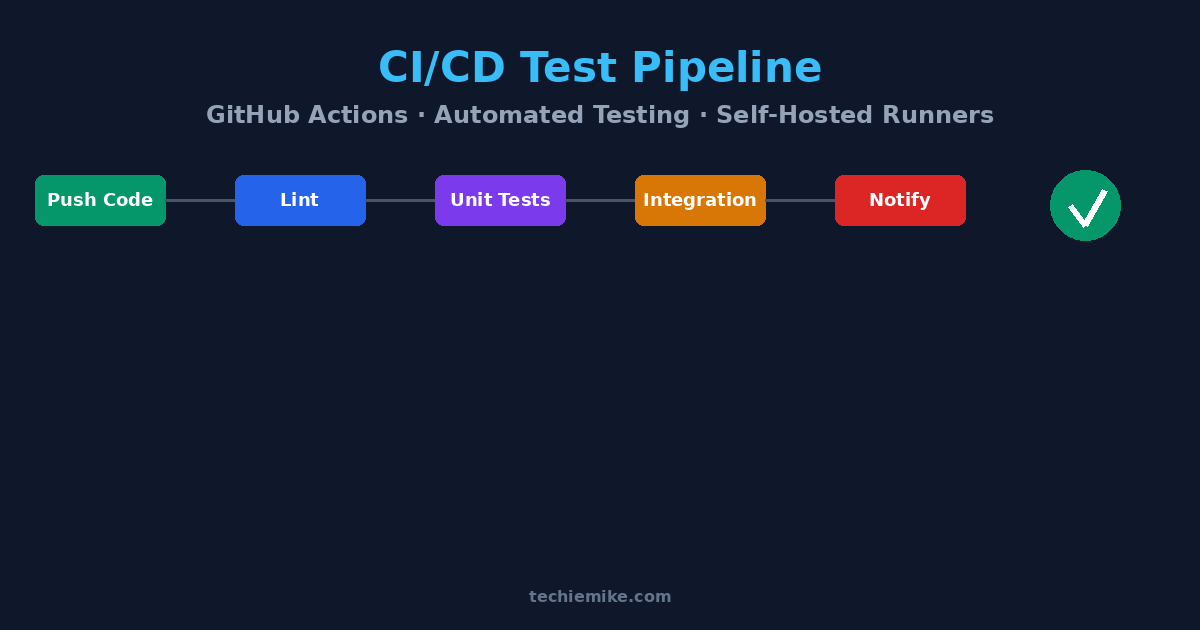
And if you keep losing useful debugging context across chats and tabs,
 Techie Mike
is worth bookmarking.
The habit that saves the most time
The strongest students I teach are not always the fastest coders.
They are usually the ones who stop, gather the evidence, and explain the bug properly.
That sounds almost too simple, but it changes everything. Better questions lead to better answers. Better answers lead to faster debugging. Faster debugging leaves more time for the work that actually matters.
So the next time your instinct is to type, "It doesn't work," do one more pass.
State the task. Show the evidence. Explain what you tried. Ask the real question.
That is not just asking for help.
That is technical communication, and it is one of the most practical skills a CS student can build.