

When your Python program crashes, it's not the end of the world. It's the start of a clue.
I've seen students freeze when that red error text appears in their IDE. They stare at it, panic, and close the terminal. Here's the thing — that traceback is the most helpful thing Python will ever give you. It tells you exactly what went wrong and where. You just need to know how to read it.
Here's what we'll go through:
- How a Python traceback is structured — read it from the bottom up
- The most common error types you'll hit in Paper 4 tasks
- A systematic debugging approach that works in exams
- Real Paper 4 scenarios with before-and-after code
If you've already looked at my Cambridge AS & A Level Computer Science June 2025 Paper 2 — Records, Files & Programming Techniques, you'll know that Paper 4 expects you to write and debug real Python code under time pressure. (Paper 2 uses pseudocode — Python is only used in the final 15-mark scenario question. This guide focuses on Paper 4, where Python is the language throughout.) This post gives you the toolkit to handle the debugging part.
How a Traceback Is Structured
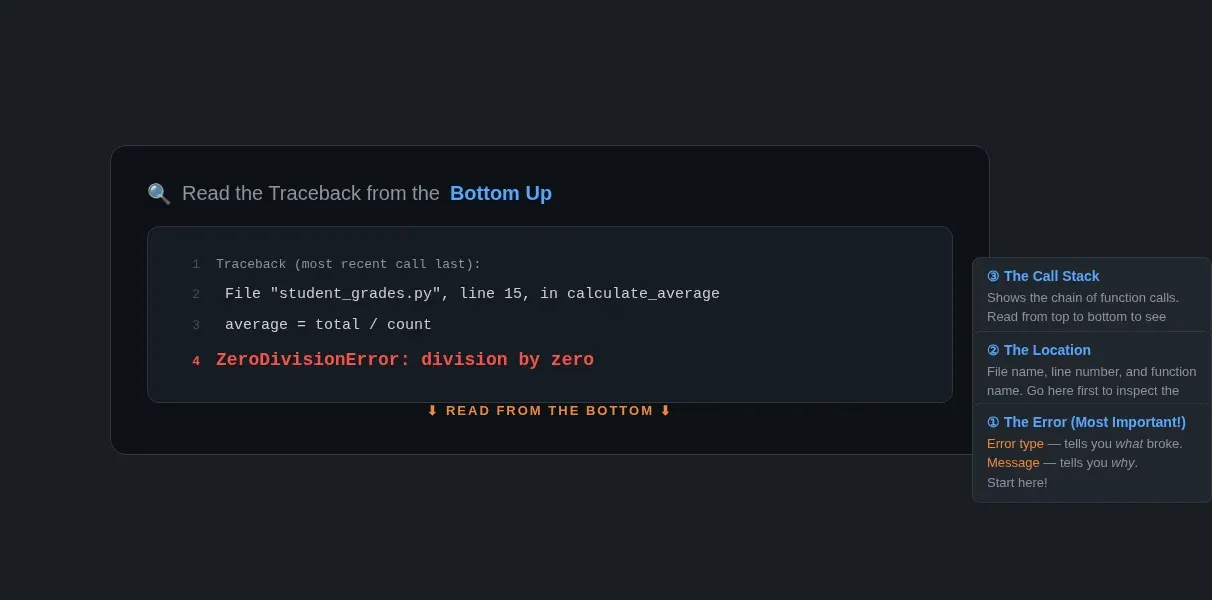
Here's a real traceback. Read it from the last line first:
Traceback (most recent call last):
  File "student_grades.py", line 15, in calculate_average
    average = total / count
ZeroDivisionError: division by zero
The last line is always the error type and message — that's your headline. Above it, Python shows you the call stack — each file and line number that led to the error. The very first function that raised the error is at the bottom.
Rule of thumb: start at the bottom. The last line tells you what broke. The line above tells you where it broke.
I tell my students to think of it like a post-mortem report. The cause of death is at the bottom. The chain of events leading up to it is above.
Common Error Types — Exam-Relevant Examples
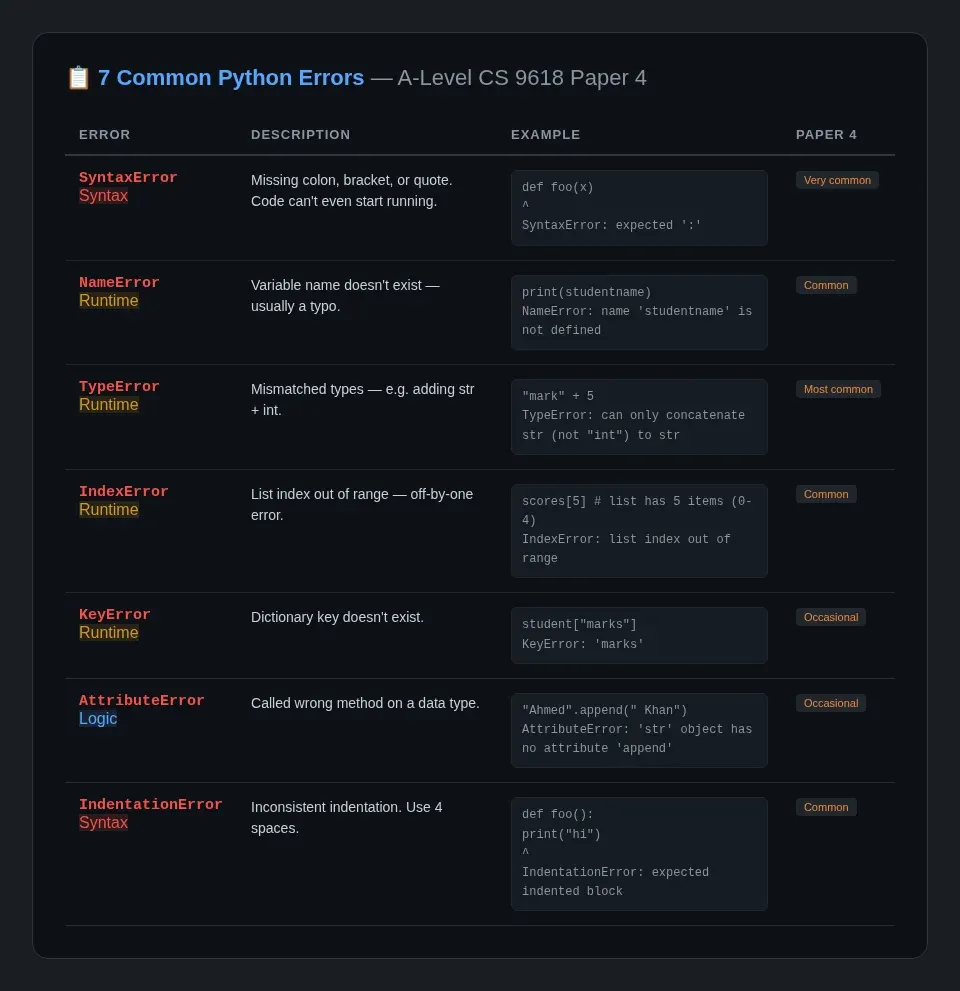
These are the errors you'll most likely encounter in Paper 4 tasks. I've grouped them with examples that look like real exam questions.
SyntaxError
def calculate_average(scores)
    total = sum(scores)
    return total / len(scores)
Traceback:
  File "q2.py", line 1
    def calculate_average(scores)
                                 ^
SyntaxError: expected ':'
What happened: missing colon after the function definition. Python can't even start running this code.
The fix: Python tells you the exact line and puts a ^ under the problem spot.
When it appears in Paper 4: Under time pressure, students forget colons, closing brackets, or quotation marks. Always run your code once before the invigilator collects your work — syntax errors are the easiest to catch and fix.
NameError
student_name = input("Enter name: ")
print("Student:", studentname)
Traceback:
  File "register.py", line 2, in <module>
    print("Student:", studentname)
NameError: name 'studentname' is not defined
What happened: Typo — studentname instead of student_name. Python can't find a variable with that name.
The fix: Spell the variable name correctly. This is my most commonly-made error even after 11 years of teaching. We all do it.
When it appears in Paper 4: You're writing a lot of code quickly and variable names get long — studentRecordTemp vs studentRecord etc. Use your IDE's autocomplete to avoid this.
TypeError
exam_mark = input("Enter mark: ")
result = exam_mark + 5
Traceback:
  File "marks.py", line 2, in <module>
    result = exam_mark + 5
TypeError: can only concatenate str (not "int") to str
What happened: input() always returns a string. You tried to add an integer to it. Python won't let you mix types like that.
The fix: Convert with int() or float():
exam_mark = int(input("Enter mark: "))
result = exam_mark + 5
When it appears in Paper 4: This is the single most common runtime error in student programs. Any time your code reads input and then does maths with it, you need a type conversion.
IndexError
scores = [67, 82, 74, 91, 55]
for i in range(1, 6):
    print(scores[i])
Traceback:
  File "scores.py", line 3, in <module>
    print(scores[i])
IndexError: list index out of range
What happened: The list has 5 elements (indices 0–4), but your loop tries to access index 5. Python lists start at 0.
The fix: range(len(scores)) or range(5) would also work, but the simplest approach is to iterate directly:
for score in scores:
    print(score)
Direct iteration avoids off-by-one errors entirely and is the style examiners prefer for simple traversal.
When it appears in Paper 4: Index errors are common when you're working with arrays (lists) in data-processing tasks. Off-by-one errors in loops are the usual culprit.
KeyError
student = {"name": "Ali", "grade": "A"}
print(student["marks"])
Traceback:
  File "students.py", line 2, in <module>
    print(student["marks"])
KeyError: 'marks'
What happened: You tried to access a dictionary key that doesn't exist.
The fix: Check keys exist first, or use .get():
print(student.get("marks", "No marks found"))
When it appears in Paper 4: Dictionary access errors show up in tasks where you're managing records or look-up tables.
AttributeError
name = "Ahmed"
name.append(" Khan")
Traceback:
  File "names.py", line 2, in <module>
    name.append(" Khan")
AttributeError: 'str' object has no attribute 'append'
What happened: Strings don't have an append() method. That's for lists.
The fix: Use string concatenation: name = name + " Khan"
When it appears in Paper 4: Calling the wrong method on the wrong data type is surprisingly common when you're switching between string and list processing in the same task.
IndentationError
def show_menu():
print("1. Add student")
    print("2. Find student")
Traceback:
  File "menu.py", line 2
    print("1. Add student")
        ^
IndentationError: expected an indented block after function definition
What happened: The code inside the function isn't indented. Python uses indentation to define blocks — unlike pseudocode which uses explicit keywords.
The fix: Indent the body of the function consistently:
def show_menu():
    print("1. Add student")
    print("2. Find student")
When it appears in Paper 4: Any time you're writing code with functions, loops, or conditions. Mixed tabs and spaces are a common cause — stick to 4 spaces everywhere and configure your IDE to convert tabs to spaces.
A Systematic Approach to Debugging
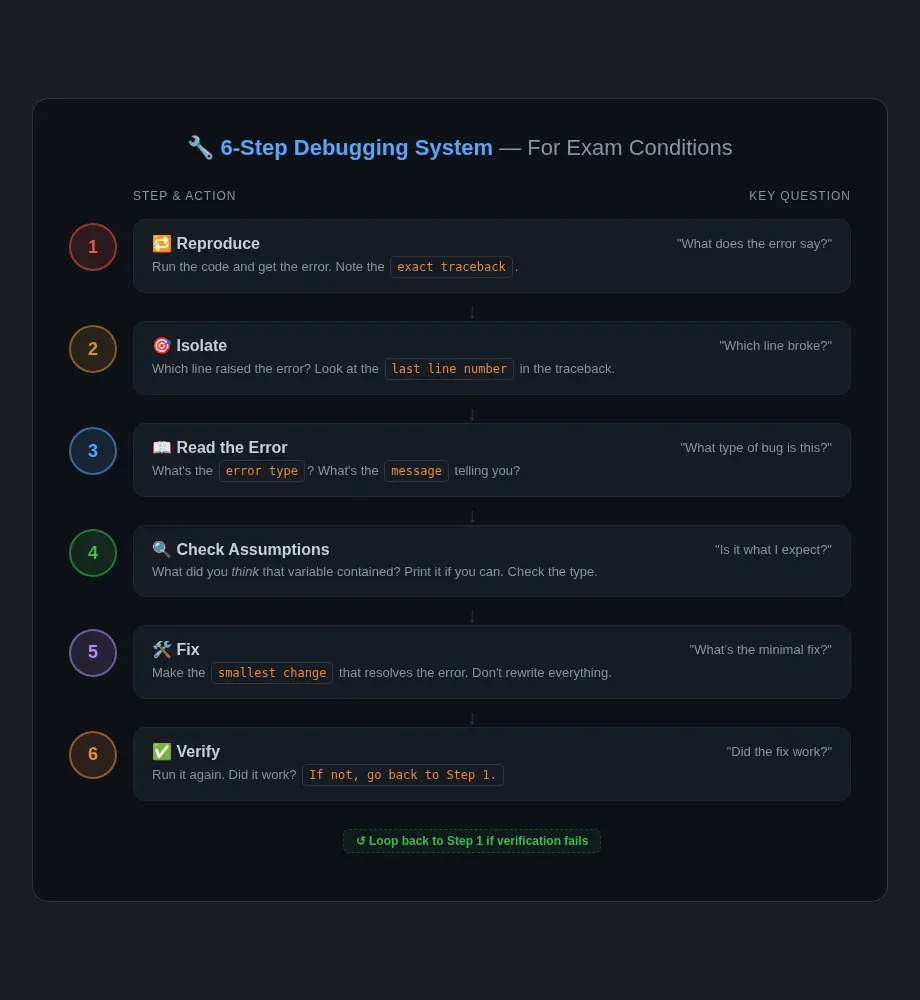
In timed exam conditions, you can't afford to stare blankly at your code. Here's the system I teach my students:
- Reproduce — Run the code and get the error. Note the exact traceback.
- Isolate — Identify which line actually raised the error (the last line number in the traceback).
- Read the error — What type of error is it? What's the message telling you?
- Check your assumptions — What did you think that variable contained? Is it actually that type? Print it if you can.
- Fix — Make the smallest change that resolves the error.
- Verify — Run the code again. Did it work? If not, go back to step 1.
I've been teaching this approach for over a decade and it works because it stops you from making random changes in the hope something sticks.
Cambridge 9618 Paper 4: What Examiners Look For
Cambridge Paper 4 (9618) is a practical programming paper. You get a task description and you write a program to solve it. Here's what examiners expect:
- The program compiles without syntax errors — zero marks for code that doesn't run
- Exceptions are handled — good practice is to wrap file operations and user input in
try/exceptblocks - Test data works — your program handles edge cases without crashing
- Runtime errors are fixable — examiners expect you to spot and fix common errors during the exam
The Cambridge AS & A Level Computer Science June 2025 Paper 2 — Development Life Cycles, Maintenance & Testing post covers the theory behind testing. Paper 4 is where you apply it.
The Cambridge AS & A Level Computer Science June 2025 Paper 2 — Algorithms, Data Structures & Sorting walkthrough covers how exam-style programming tasks are structured at AS Level, which follows the same logical approach.
Putting It All Together — A Worked Example
Here's a scenario you might see in Paper 4. The task is: Read 10 exam marks from user input, calculate the average, and output the result.
Broken code:
total = 0
for i in range(1, 11):
    mark = input("Enter mark: ")
    total = total + mark
average = total / 10
print("Average:", average)
First run:
Enter mark: 67
Enter mark: 82
Traceback (most recent call last):
  File "q2_avg.py", line 4, in <module>
    total = total + mark
TypeError: can only concatenate str (not "int") to str
Step 1 — Reproduce: Done. Step 2 — Isolate: Line 4. Step 3 — Read the error: TypeError — we're adding a string to an integer.
Step 4 — Check assumptions: input() returns a string. total starts as an int (0). Adding a string to an int fails.
Step 5 — Fix:
total = 0
for i in range(10):
    mark = int(input("Enter mark: "))
    total = total + mark
average = total / 10
print("Average:", average)
I also fixed the range — range(1, 11) gives 10 iterations but range(10) is simpler and starts from 0, which is what most exam markers expect to see.
Step 6 — Verify: Run it again. If you enter 0 for a mark, does it still work? Actually — average = total / 10 works even with zeroes in the data. No division-by-zero danger here because we always divide by 10 regardless of the input.
But what if the task said "until the user enters 'done'" instead of exactly 10 marks? Then you'd need a count variable and your divide-by-zero risk returns. That's where try/except comes in:
total = 0
count = 0
try:
    for i in range(10):
        mark = int(input("Enter mark: "))
        total = total + mark
        count = count + 1
    average = total / count
    print("Average:", average)
except ZeroDivisionError:
    print("No marks entered — cannot calculate average.")
except ValueError:
    print("Invalid input — enter a number.")
This is the kind of code that shows good programming practice in Paper 4 — it handles real-world edge cases without crashing.
Key Takeaways
- Read tracebacks from the bottom up — the error type and line number are your starting point
- Learn the 7 common error types — SyntaxError, NameError, TypeError, IndexError, KeyError, AttributeError, IndentationError
- Use the 6-step debugging approach — reproduce, isolate, read, check assumptions, fix, verify
- Handle exceptions in Paper 4 — robust code that doesn't crash on bad input reflects careful programming
- Run your code before you submit — fix syntax errors first, then runtime errors
For more on the testing theory behind this, see
 Techie Mike
And if you want to see how debugging plays out when AI tools do the coding, my
Techie Mike
covers what happens when the bugs are someone else's to fix.
For more on Paper 4 file-handling tasks, see
Techie Mike
— a common scenario where robust exception handling makes the difference between a program that crashes and one that scores marks.
