


Remember the first season finale of Mr. Robot? Elliot and fsociety actually did it — they took down Evil Corp. Over 70% of the world's consumer and student debt? Gone. Global financial markets? In shambles. And the whole thing was untraceable.
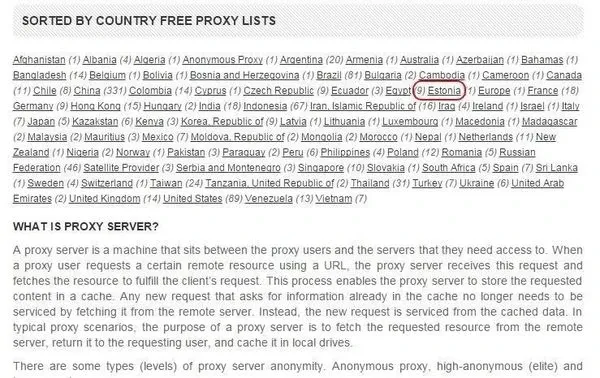
In the episode, Lenny (Krista's boyfriend) reveals that Elliot had hacked him, but couldn't prove it because Elliot routes his traffic through an Estonian proxy. "He's nearly untraceable," Lenny says.
The show gets a surprising amount right about how real-world hackers hide their tracks. Let's break down exactly how fsociety's proxy setup worked, and then I'll show you how to do the same thing on your own system using Kali Linux and proxy chains.
How Proxies Actually Work
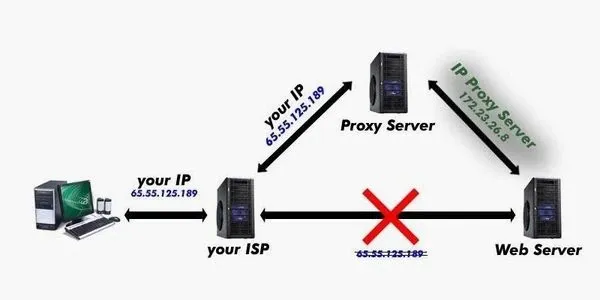
Every time you connect to a website, your IP address tags along with the request. Think of it like return address on an envelope. If you send a threatening letter to someone, they just look at the return address to find you.
A proxy works like a middleman. You send your traffic to the proxy server, and then the proxy forwards it to the destination. The destination only sees the proxy's IP address, not yours. Your return address is hidden.
There are different types of proxies — transparent (doesn't hide your IP at all), anonymous (hides your IP but advertises itself as a proxy), and high-anonymous/elite (hides your IP and doesn't identify as a proxy). For real anonymity, you want elite proxies.
Why Tor Wasn't Good Enough for Elliot
The show makes a smart point about Tor. In the pilot, Elliot confronts a coffee shop owner who's a child photographer. He explains: "Whoever's in control of the exit nodes is also in control of the traffic, which makes me the one in control."
This is absolutely true. Tor exit nodes can be monitored. Law enforcement agencies, the NSA, and well-funded threat actors run Tor exit nodes specifically to watch traffic. If your traffic exits through a node they control, your cover is blown.
Elliot needed more control. That's why he used a specific proxy in Estonia — he likely controlled the proxy server himself, or at least chose one outside of US/EU jurisdiction where law enforcement couldn't easily compel logs.
Building Your Own fsociety Proxy Setup
Let's replicate Elliot's setup using modern Kali Linux. This works on any Debian-based Linux distro, but I'll use Kali since that's what the cybersecurity crowd runs.
What You'll Need
- Kali Linux (latest — 2024.x or newer) — Download from kali.org
- A list of proxies — I'll show you where to find fresh ones
- Terminal — That's it. Everything is command line.
Proxychains is installed by default in modern Kali. If yours doesn't have it:
sudo apt update && sudo apt install proxychains4 -y
Step 1: Find Working Proxies
You need a list of SOCKS4, SOCKS5, or HTTP proxies. The original post mentioned sites like Hide My Ass, Proxy4Free, and Hide.me — and they still work, but the landscape has changed. Here are the best sources in 2026:
- Free Proxy List — free-proxy-list.net (updated every 10 minutes)
- ProxyScrape — proxyscrape.com (offers free proxy lists in plain text)
- Geonode — geonode.com (filter by country, anonymity level)
- Spys.one — One of the oldest and most reliable
For the fsociety experience, try filtering by Russia or Estonia. Proxies in countries with looser cybercrime laws are harder to trace back to you. Also filter for elite anonymity — that's the highest level.
Step 2: Configure Proxychains
Proxychains uses a config file at /etc/proxychains4.conf (or /etc/proxychains.conf on older installs). Let's set it up:
sudo leafpad /etc/proxychains4.conf
Or if you prefer nano:
sudo nano /etc/proxychains4.conf
Here's what you need to change:
- Disable Tor — The default config points to Tor (
127.0.0.1:9050). Comment it out with a#. - Set the chain type — Near the top of the file, you'll see options: -
strict_chain— All proxies in the list are used in order. One fails, the whole chain fails. -dynamic_chain— Uses proxies from the list but skips dead ones. More reliable. -random_chain— Picks a random proxy from the list for each connection.
For Elliot's setup, strict_chain with a carefully curated list is most realistic. For everyday use, dynamic_chain is better.
- Add your proxies — At the bottom of the file, add them in this format:
socks5 123.45.67.89 1080
socks4 98.76.54.32 4145
http 12.34.56.78 3128
Save and close the file.
Step 3: Test Your Proxy Chain
Before you do anything real, test that it works:
proxychains4 curl -s ifconfig.me
This should return the IP address of your proxy, not your real one. Run it without proxychains4 to see your real IP:
curl -s ifconfig.me
If both commands return different IPs, congratulations — you're proxied.
Step 4: Browse Through Your Proxy
On modern Kali, the default browser is Firefox ESR (they dropped Iceweasel years ago). To browse through proxychains:
proxychains4 firefox
Your browser now routes through the proxy. Check by visiting whatismyip.com — it should show the proxy's location, not yours.
Real-World Proxy Considerations
Speed and Reliability
Free proxies are slow and unreliable. They're fine for testing and learning, but any real opsec work calls for paid proxies or a VPN with SOCKS5 support. Expect 50-80% bandwidth reduction through free proxies.
Logging Risks
You have no idea who runs a free proxy. Some are run by security researchers (benign), some by law enforcement (trap), and many by other hackers (malicious). A malicious proxy can: - Inject malware into your downloads - Log your credentials - MITM your HTTPS traffic with forged certificates
Never use free proxies for anything involving passwords, bank accounts, or personal information.
Chain Length
More hops = harder to trace but slower performance. The tor standard is 3 hops. For most purposes, 2-3 proxies in a chain is plenty. Beyond 5 and you're waiting ages for pages to load.
Beyond Proxies: The Full fsociety Anonymity Stack
Elliot didn't just use a proxy. He used a layered approach. Here's the real-world equivalent:
| Layer | Mr. Robot Method | Real-World Tool |
|---|---|---|
| Network isolation | Air-gapped laptop | Tails OS or Whonix |
| IP hiding | Estonian proxy | Proxychains + VPN |
| Encryption | Custom encryption | PGP + TLS |
| OpSec | Burner phones | Disposable VMs |
| Physical | Abandoned arcade | Avoid geography-based tracking |
For maximum paranoia (Elliot-level opsec), you'd use:
- Whonix on VirtualBox — Routes all traffic through Tor
- Proxychains on top — Adds an extra hop before Tor exit nodes
- VPN before everything — Encrypts your traffic to your VPN provider
- Tails from a USB — Leaves no trace on the host machine
Is This Actually Untraceable?
Let's be real: nothing is truly untraceable. The Mr. Robot finale would've been much shorter if they could've just tracked Elliot through his heat signature, phone pings, or the dozens of other digital footprints we leave.
A well-configured proxy chain makes you difficult to trace — too difficult for most attackers and even many law enforcement agencies. But nation-state actors (NSA, GCHQ, etc.) have capabilities that can deanonymize even careful users through traffic correlation, timing analysis, and global surveillance.
The goal isn't perfect anonymity. It's raising the cost of tracing you higher than your adversary is willing to pay.
Wrapping Up
The Mr. Robot writers did their homework. Elliot's proxy setup, his distrust of Tor exit nodes, and his layered approach to anonymity all reflect real-world cybersecurity practices. The tools have changed (Iceweasel → Firefox ESR, proxychains → proxychains4), but the principles are exactly the same.
Want to go deeper? Check out my guides on setting up Whonix for bulletproof anonymity and using PGP for encrypted communications. And if you haven't watched Mr. Robot yet — stop reading and go watch it. It's the best hacking show ever made, hands down.
