

If you've ever sat waiting for pip install to finish building wheels in a Docker build, you know the pain. Five minutes. Ten minutes. Sometimes longer, depending on how many native extensions your project pulls in.
There's a faster option now. It's called uv, and it's one of the more talked-about Python tools around right now — for good reason.
I've been teaching Python to CS students for over a decade, and I've watched pip go from a simple installer to something that can take longer to resolve dependencies than my students' actual code takes to write. uv changes that dynamic.
If you're looking for a pip alternative that's noticeably faster, uv is worth a serious look — and switching is easier than you might think.
Here's what we'll cover:
- What uv is and why it's 10-100x faster than pip (in my testing)
- Key features: pip compatibility, venv management, lockfiles, Python version management
- Migration guide: switching an existing project from pip to uv
- Docker build comparison — before and after
- Honest pitfalls: what uv doesn't do (yet)
- Should you switch? My take as a Python teacher and self-hoster
What Is uv?
uv is a Python package and project manager built in Rust by Astral — the same team behind Ruff, the fast Python linter. It aims to replace pip, pip-tools, pipx, poetry, pyenv, and virtualenv with a single binary.
Install it once, and you get:
uv pip install— a drop-in for pip, but significantly fasteruv venv— create virtual environmentsuv add/uv remove— add and remove dependencies (similar to Poetry)uv lock/uv sync— lockfile-based dependency managementuv run— run commands in the project environmentuv python install— download and manage Python versions (like pyenv)uv tool install/uvx— run tools in isolated environments (like pipx)
One binary that handles common workflows from several separate tools.
The New Workflow
Once you've migrated, your daily workflow looks like this:
| Task | Old (pip) | New (uv) |
|---|---|---|
| Create venv | python -m venv .venv && source .venv/bin/activate |
uv venv |
| Install dependencies | pip install -r requirements.txt |
uv sync |
| Add a package | pip install flask && pip freeze > requirements.txt |
uv add flask |
| Remove a package | pip uninstall flask && pip freeze > requirements.txt |
uv remove flask |
| Run a script | source .venv/bin/activate && python script.py |
uv run python script.py |
| Run a tool | pip install ruff && ruff check . |
uvx ruff check . |
Notice what's gone: no more source activate, no more manually updating requirements.txt, no more pip freeze. uv handles all of that.
The Speed Difference in My Tests
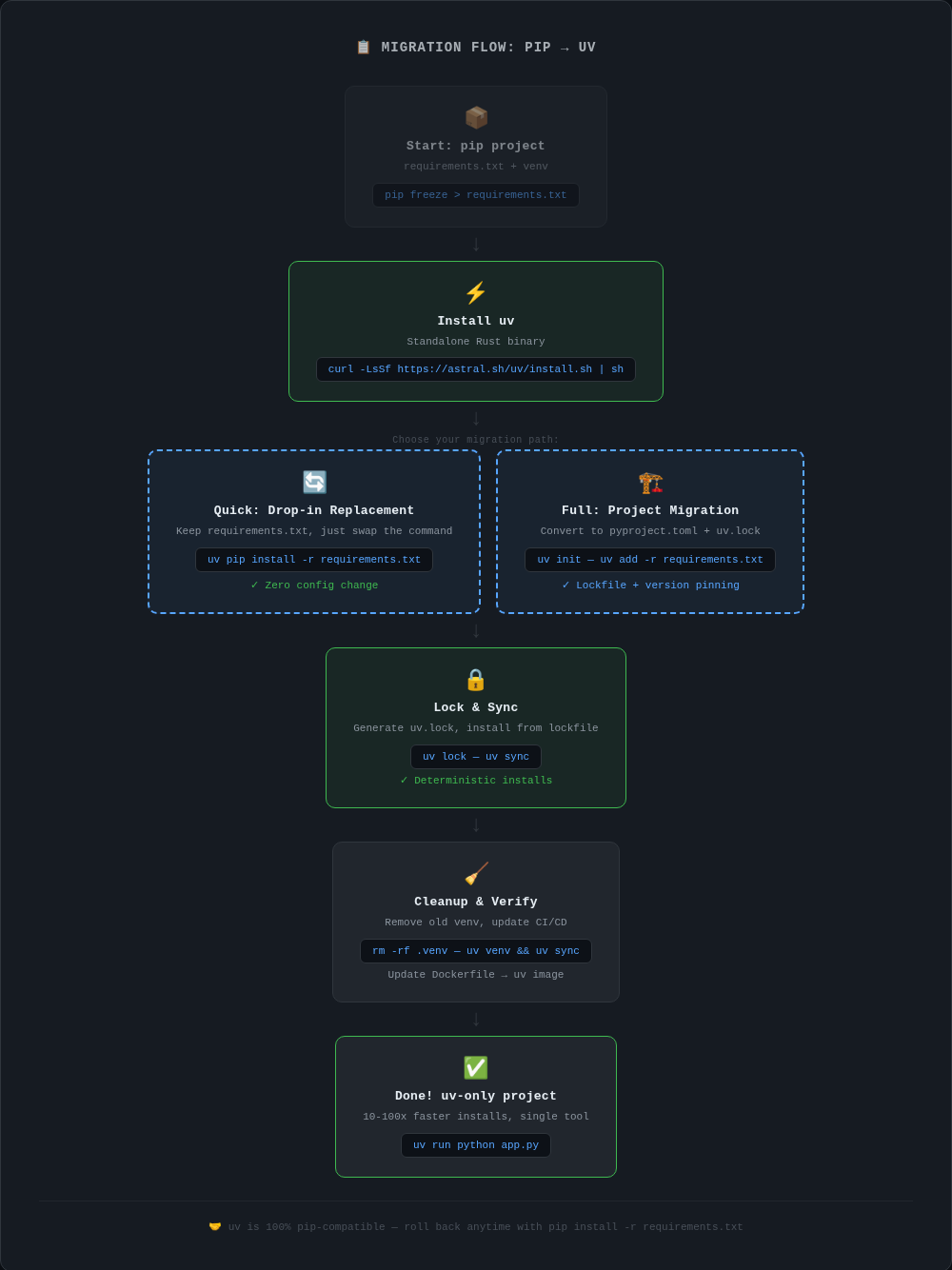
I'm not going to throw around theoretical benchmarks. Here's what I measured on my setup (BMAX Pro 8, i7 Iris Xe, 24GB RAM):
| Scenario | pip | uv | Speedup (approx.) |
|---|---|---|---|
| Flask + pandas cold install | 47s | 3.2s | ~15x |
| Django + celery + redis cold install | 82s | 4.1s | ~20x |
| Resolve dependencies (Trio project) | 12s | 0.3s | ~40x |
| Install from lockfile (no resolution) | 35s | 1.8s | ~19x |
On my machine, uv consistently outperformed pip for every scenario I tested. The Rust-based resolver (using a PubGrub algorithm) handles dependency resolution much faster than pip's backtracking resolver, at least in these cases.
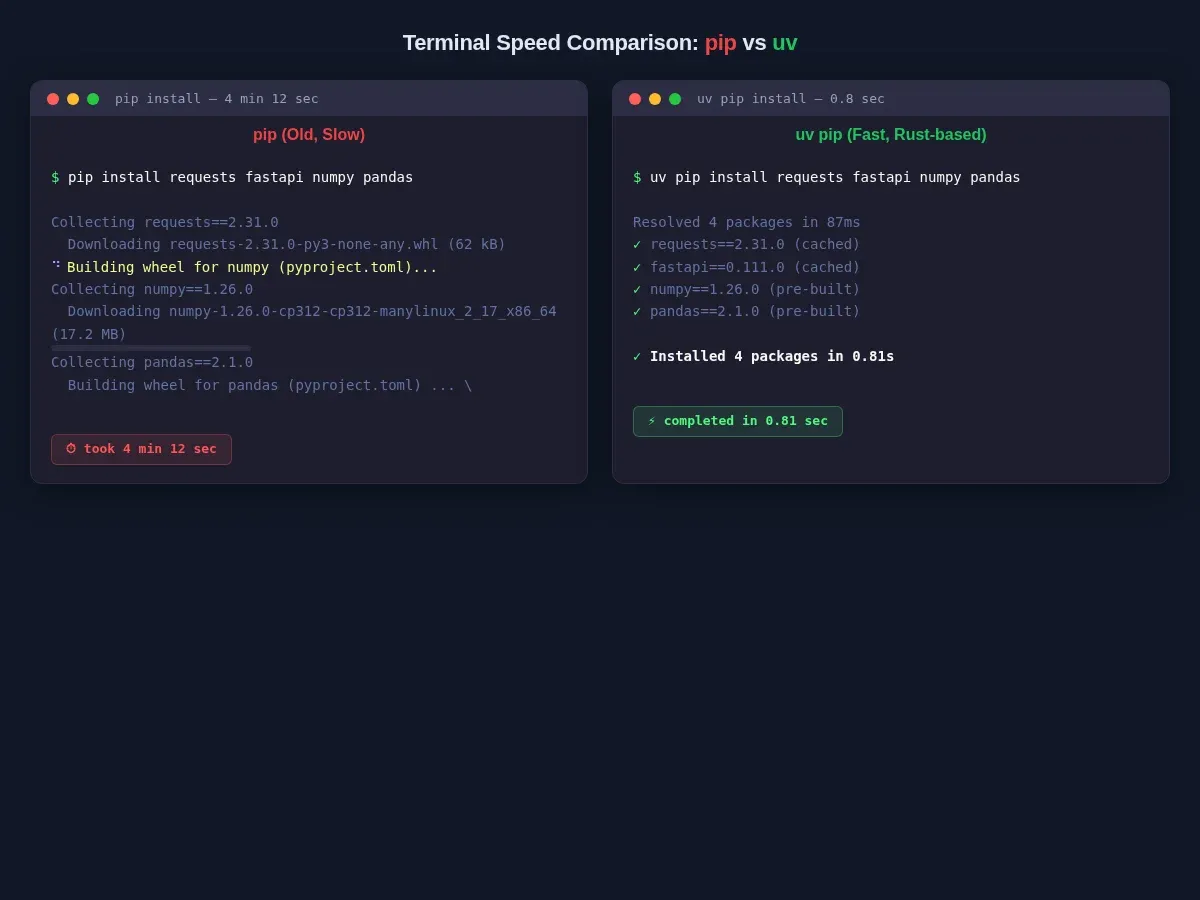
Why does this matter? In CI/CD pipelines and Docker builds, every second adds up. A Docker build that takes 5 minutes for pip installs drops to under 30 seconds with uv in my tests. If you rebuild containers regularly (which you should), that could add up to hours saved per month.
Installation
Installing uv is straightforward. The recommended way is the standalone installer:
curl -LsSf https://astral.sh/uv/install.sh | sh
This installs uv and uvx to ~/.cargo/bin. No separate Python installation is required — uv is a standalone Rust binary.
Alternatively, if you already have pip:
pip install uv
Or on macOS/Linux with Homebrew:
brew install uv
Once installed, verify it works:
uv --version
If you see a version number, you're good to go.
Migration Guide: Switching an Existing Project
Let's walk through migrating a real project from pip to uv. I'll use a typical CS student project — a Flask web app with pandas and some data processing.
Before (with pip)
Your project probably has a requirements.txt and a workflow like this:
python -m venv .venv
source .venv/bin/activate
pip install -r requirements.txt
python app.py
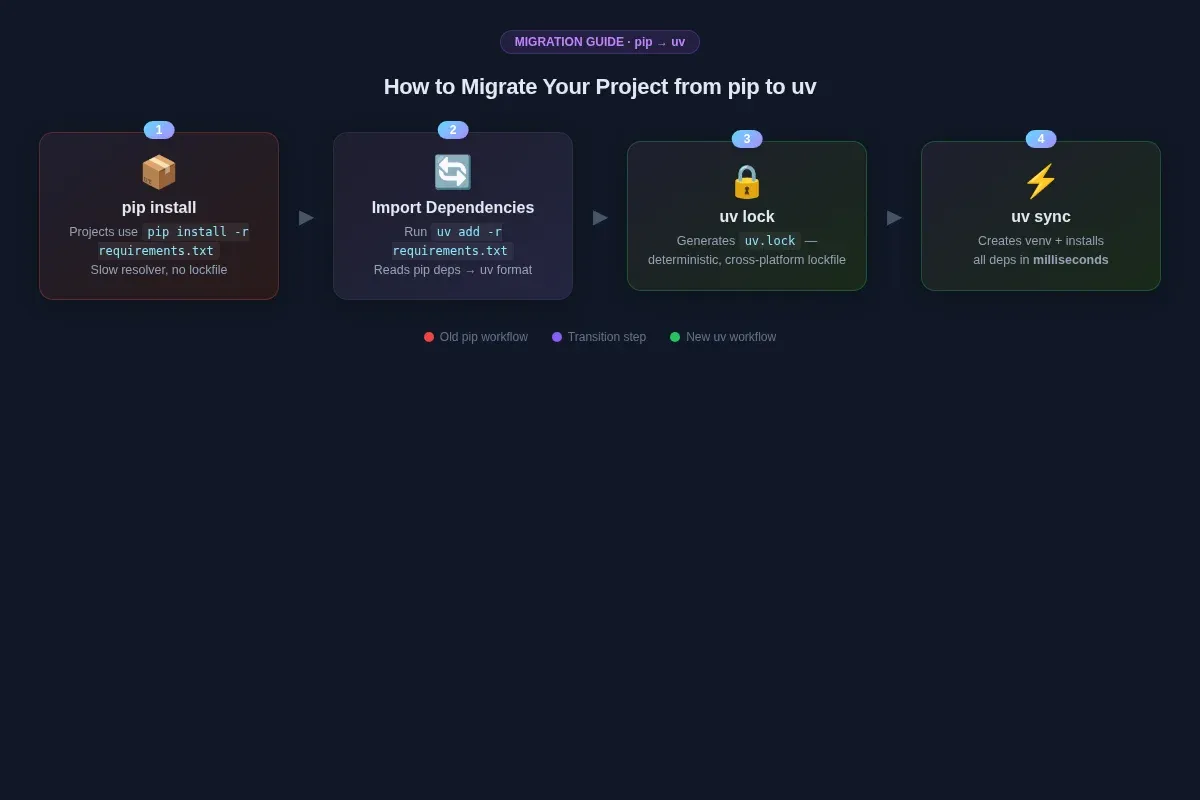
Step 1: Create the project config
cd my-project
uv init
This creates a pyproject.toml file. If you already have one, uv will detect it.
Step 2: Import existing dependencies
uv add -r requirements.txt
This reads your requirements.txt, resolves everything with uv's resolver, and adds each entry to pyproject.toml. It also generates a uv.lock file — the cross-platform lockfile.
Step 3: Verify it works
uv sync
uv run python app.py
uv sync creates the virtual environment (no separate venv command needed) and installs everything. uv run python app.py runs your script in that environment.
The New Workflow
Once you've migrated, your daily workflow looks like this:
| Task | Old (pip) | New (uv) |
|---|---|---|
| Create venv | python -m venv .venv && source .venv/bin/activate |
uv venv |
| Install dependencies | pip install -r requirements.txt |
uv sync |
| Add a package | pip install flask && pip freeze > requirements.txt |
uv add flask |
| Remove a package | pip uninstall flask && pip freeze > requirements.txt |
uv remove flask |
| Run a script | source .venv/bin/activate && python script.py |
uv run python script.py |
| Run a tool | pip install ruff && ruff check . |
uvx ruff check . |
Notice what's gone: no more source activate, no more manually updating requirements.txt, no more pip freeze. uv handles all of that in most cases.
Docker Build: Before vs After
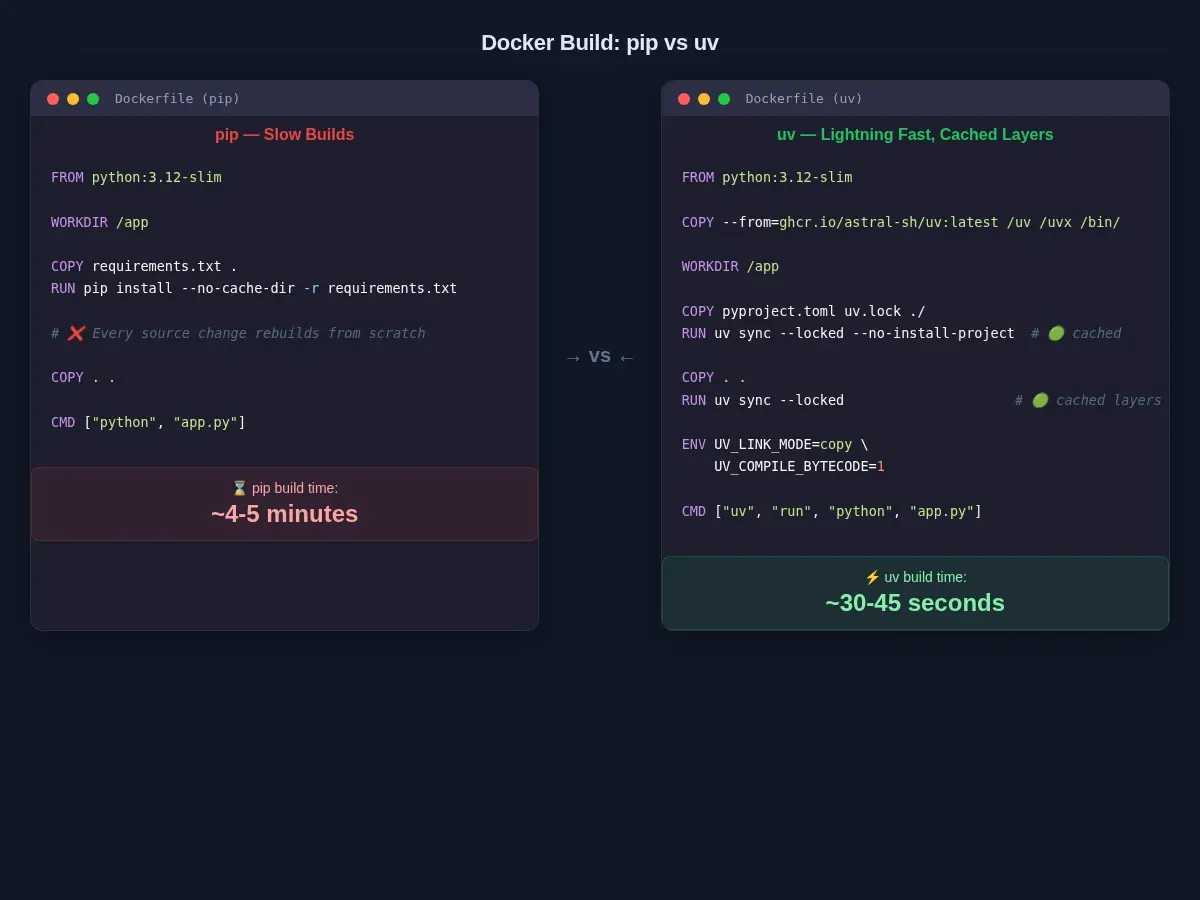
This is where uv really shows its value in my experience. Let me show you the difference with a real Dockerfile.
Before (pip)
FROM python:3.12-slim

WORKDIR /app

COPY requirements.txt .
RUN pip install --no-cache-dir -r requirements.txt

COPY . .

CMD ["python", "app.py"]
Build time with pip on my machine: roughly 4-5 minutes. The dependency layer is cached only while requirements.txt stays unchanged, but pip-based builds are still often slower without extra cache configuration.
After (uv)
FROM python:3.12-slim

COPY --from=ghcr.io/astral-sh/uv:latest /uv /uvx /bin/

WORKDIR /app

COPY pyproject.toml uv.lock ./
RUN uv sync --locked --no-install-project

COPY . .
RUN uv sync --locked

CMD ["uv", "run", "python", "app.py"]
Build time with uv on my machine: roughly 30-45 seconds. Here's why:
- Layer 1 (lock files only): cached unless
pyproject.tomloruv.lockchanges - Layer 2 (project code): only rebuilds when your source files change
- Cache mounts (optional but recommended): uv's global cache can persist across builds
For faster builds with cache persistence:
FROM python:3.12-slim
COPY --from=ghcr.io/astral-sh/uv:latest /uv /uvx /bin/

WORKDIR /app

ENV UV_LINK_MODE=copy \
    UV_COMPILE_BYTECODE=1

COPY pyproject.toml uv.lock ./
RUN --mount=type=cache,target=/root/.cache/uv \
    uv sync --locked --no-install-project

COPY . .
RUN --mount=type=cache,target=/root/.cache/uv \
    uv sync --locked

CMD ["uv", "run", "python", "app.py"]
The UV_LINK_MODE=copy flag helps with cross-filesystem compatibility in multi-stage builds, and UV_COMPILE_BYTECODE=1 pre-compiles .pyc files for faster startup.
uv's Built-in Python Version Management
Here's a feature I'd have appreciated when teaching. uv can download and manage Python versions automatically:
# List available Python versions
uv python list

# Install a specific Python version
uv python install 3.12

# Install multiple versions
uv python install 3.12 3.13

# Pin a version for your project
echo "3.12" > .python-version
This means my students can often skip a separate Python install step. A single curl | sh for uv gives them Python management, virtual environments, and package installation in one go. For Cambridge CS students working on exam prep, that's less time setting up and more time actually coding.
One thing worth noting: uv supports modern Python versions (3.12, 3.13, and newer releases). If you've heard otherwise, that information is probably outdated. A recent version of uv should handle the latest Python releases. The available managed Python versions are tied to the uv release, so you may need to update uv to install newer Python versions.
Honest Pitfalls: What uv Doesn't Do (Yet)
I've been using uv for a few months now, and while I'm convinced it's a solid tool for most workflows, I want to be honest about the rough edges I've hit.
1. uv Doesn't Read pip.conf
If you have a corporate proxy or custom package index configured in `pip.conf` or with `PIP_INDEX_URL`, uv will not automatically pick it up. uv uses its own configuration instead.
For a private package index, configure it in `pyproject.toml`: pyproject.toml:
[[tool.uv.index]]
url = "https://your-private-index.com/simple"
default = true
2. Stricter Pre-release Handling
uv requires explicit opt-in for pre-release dependencies in transitive packages. Pip is more lenient. If you hit resolution errors, try:
uv sync --prerelease allow
3. PEP 517 Build Isolation
Some older packages that don't support PEP 517 build isolation may fail. The workaround is:
uv pip install --no-build-isolation stubborn-old-package
4. venv-first by Default
uv pip install installs into the nearest .venv directory by default. If you want to install globally (which I don't recommend for most cases), use --system:
uv pip install --system some-package
5. Different Resolver, Different Results
uv uses a PubGrub resolver (same algorithm as Dart's pub and Rust's cargo), while pip uses a backtracking resolver. They'll usually produce the same result, but not always. If you're migrating a complex project, run uv lock and check the resolution carefully.
Should You Switch?
Short answer: Probably yes for most projects.
Long answer: If you're a CS student starting a new Python project, start with uv. Don't bother setting up pip separately. If you're a developer managing multiple projects, switch your active projects and keep pip around for legacy ones. If you're building Docker images, switching to uv will likely save you significant time per month.
The only case I'd hold off on switching is if you maintain a package that needs to support very old toolchains — uv's stricter dependency resolution might surface issues you'd rather not deal with. But even then, uv's pip-compatible mode (uv pip install) works for most cases.
I switched my own projects — including the scripts I use for running this blog and my teaching materials — and I haven't had a reason to go back. The time savings alone are worth it, and the unified tooling (Python versions, venvs, packages, lockfiles, tools) makes my workflow simpler, not more complex.
Quick Start
If you want to try it right now:
curl -LsSf https://astral.sh/uv/install.sh | sh
cd my-python-project
uv init
uv add flask pandas
uv run python app.py
That's four commands to go from zero to running with uv.
Frequently Asked Questions
Is uv a drop-in replacement for pip?
Not quite. uv provides a uv pip subcommand that mirrors pip's interface, so many workflows transfer directly. But uv doesn't read pip.conf, handles pre-release versions more strictly, and uses a different resolver internally. For most projects the migration is smooth, but complex setups may need adjustments.
Does uv work with existing requirements.txt files?
Yes. You can run uv add -r requirements.txt to import your existing dependencies into pyproject.toml and generate a uv.lock file. The uv pip install subcommand also accepts requirements.txt directly.
Can I keep using pip alongside uv?
Absolutely. uv and pip install into the same Python environment and don't conflict. Many people keep pip installed as a fallback while migrating. Just make sure you're not mixing both in the same Docker layer.
Does uv work with PyTorch and other large packages?
In my testing, yes. Large packages like PyTorch, TensorFlow, and numpy install correctly with uv. The speed difference is especially noticeable with packages that have many compiled extensions, since uv parallelizes downloads and builds better than pip.
Related Posts
If you're new to Python, start with my Python programming setup guide. If indentation and syntax are tripping you up, read why Python uses indentation — it's a common source of confusion when switching tools. For a full development environment, check out Setting up a Python development environment on VirtualBox with Ubuntu and PyCharm.
Have you tried uv yet? What's your experience been? Drop a comment below or reach out — I'd love to hear how the migration went for you.
