


Number systems are one of those topics that show up in every IGCSE Computer Science exam. Binary to denary. Denary to hex. Binary arithmetic. And I've seen students lose easy marks because they rush the conversions.
In this guide, I'll walk through each conversion type step by step. Every example is worked out and re-checked — so you can copy the method and use it in your exam.
Here's what we'll cover:
- 🔢 Denary (Base 10) — what you already know
- 💻 Binary (Base 2) — how computers actually count
- ➕ Binary arithmetic — addition and subtraction with worked examples
- 🔢 Hexadecimal (Base 16) — why programmers love it
- 🔄 All the conversions: binary ↔ denary, hex ↔ denary, binary ↔ hex
- 🎯 Why hexadecimal matters in the real world
Here's how it all works.
🔢 Denary (Base 10) — Where You Start
Denary is your everyday number system. You've been using it your whole life without thinking about it. It uses ten digits: 0, 1, 2, 3, 4, 5, 6, 7, 8, 9.
Every position in a denary number represents a power of 10. Take the number 3,742:
\n\n| Thousands (10³) | \nHundreds (10²) | \nTens (10¹) | \nUnits (10⁰) | \n
|---|---|---|---|
| 3 | \n7 | \n4 | \n2 | \n
| 3×1000 | \n7×100 | \n4×10 | \n2×1 | \n
So 3,742 = (3 × 1000) + (7 × 100) + (4 × 10) + (2 × 1).
That's your starting point. Binary and hexadecimal work the same way — they just use different base values and fewer (or more) digits.
💻 Binary (Base 2) — How Computers Think
Computers don't have ten fingers. They have millions of tiny switches that can be either on or off. That's it. Two states.
Binary uses just two digits: 0 and 1. Each position represents a power of 2 instead of a power of 10. If you're new to this, check out the Binary number system post for a beginner-friendly intro.
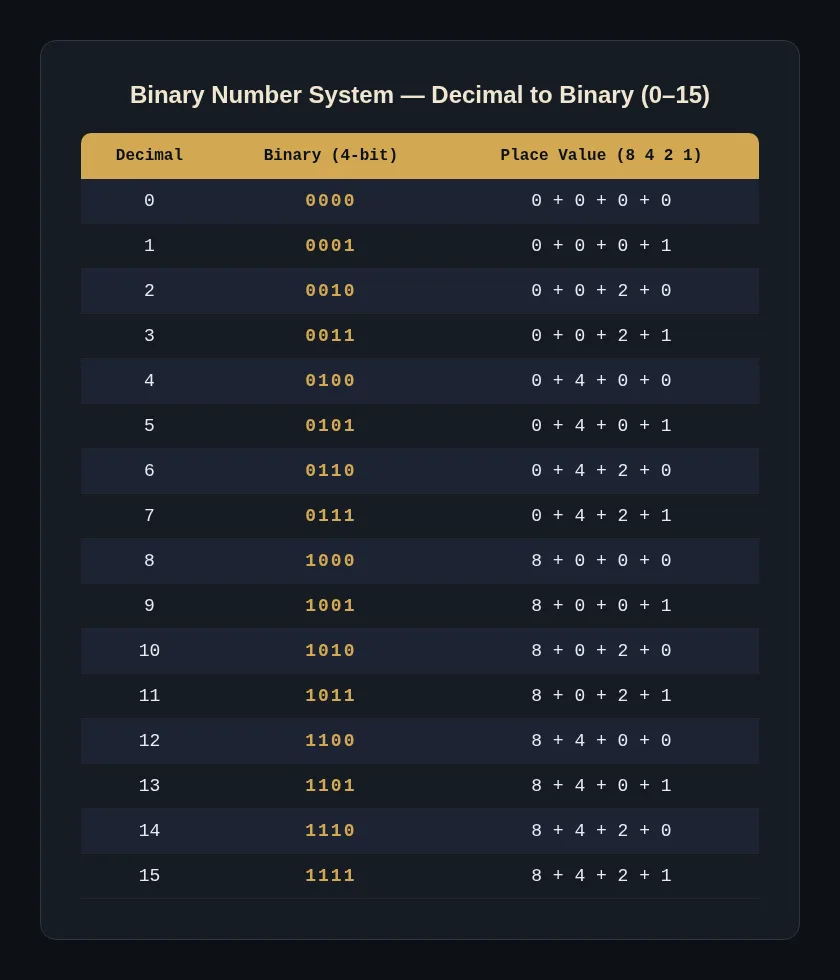
The place values in an 8-bit binary number are:
\n\n| 128 | \n64 | \n32 | \n16 | \n8 | \n4 | \n2 | \n1 | \n
|---|---|---|---|---|---|---|---|
| 2⁷ | \n2⁶ | \n2⁵ | \n2⁴ | \n2³ | \n2² | \n2¹ | \n2⁰ | \n
Each 1 means "add this place value." Each 0 means "skip it."
Binary → Denary: Worked Example
Convert 101101 (binary) to denary.
Write the place values above each bit:
\n\n| 32 | \n16 | \n8 | \n4 | \n2 | \n1 | \n
|---|---|---|---|---|---|
| 1 | \n0 | \n1 | \n1 | \n0 | \n1 | \n
Now add up the values where there's a 1:
(1 × 32) + (0 × 16) + (1 × 8) + (1 × 4) + (0 × 2) + (1 × 1)
= 32 + 0 + 8 + 4 + 0 + 1
= 45
So 101101₂ = 45₁₀. ✅
Denary → Binary: Worked Example
Convert 42 (denary) to binary.
The method: divide by 2 repeatedly, write down the remainders, then read them backwards.
\n\n| Division | \nResult | \nRemainder | \n
|---|---|---|
| 42 ÷ 2 | \n21 | \n0 | \n
| 21 ÷ 2 | \n10 | \n1 | \n
| 10 ÷ 2 | \n5 | \n0 | \n
| 5 ÷ 2 | \n2 | \n1 | \n
| 2 ÷ 2 | \n1 | \n0 | \n
| 1 ÷ 2 | \n0 | \n1 | \n
Read the remainders from bottom to top: 101010
So 42₁₀ = 101010₂. ✅
Quick check: 32 + 8 + 2 = 42. Correct.
Here's a faster way for smaller numbers — find the biggest power of 2 that fits, subtract it, and repeat:
42 − 32 = 10 → put a 1 in the 32s column 10 − 8 = 2 → put a 1 in the 8s column 2 − 2 = 0 → put a 1 in the 2s column Everything else gets a 0.
Same result: 101010. Either method works. Use the one that makes sense to you.
➕ Binary Arithmetic
Binary arithmetic follows the same rules as denary — you just have fewer digits to work with.
Binary Addition
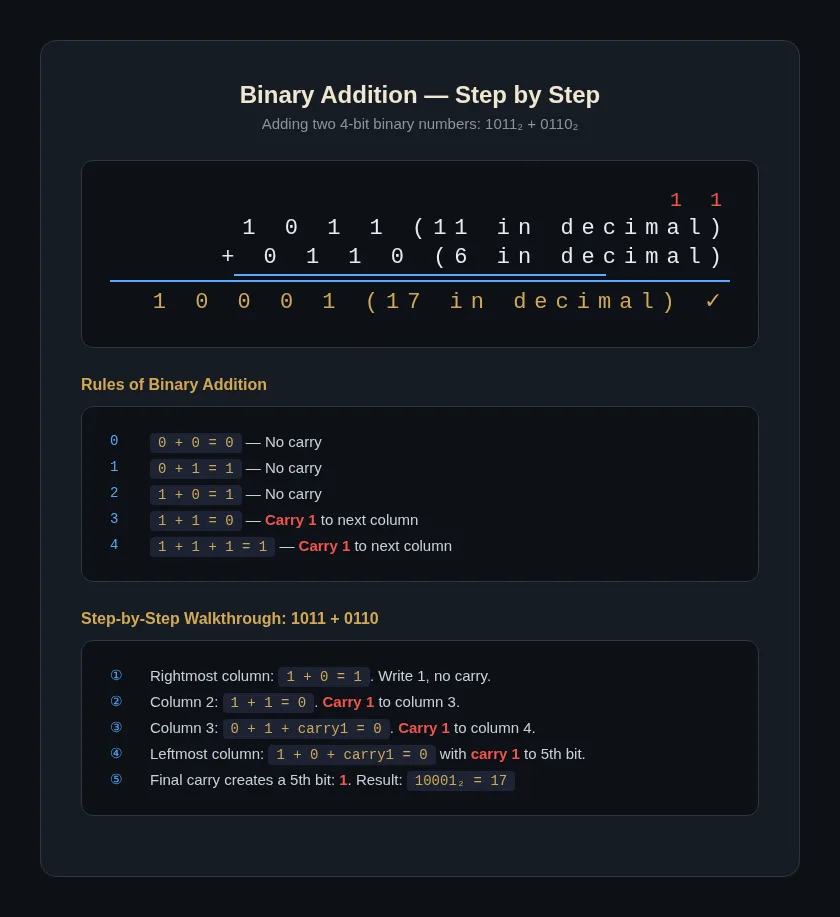
Four rules:
- 0 + 0 = 0
- 0 + 1 = 1
- 1 + 0 = 1
- 1 + 1 = 0, carry 1 to the next column
The "carry 1" is where most mistakes happen. When you add 1 + 1 in binary, the result is 2, which is "10" in binary — so you write 0 and carry the 1.
Worked Example: 01101 + 00111
Let's add 01101 (13) and 00111 (7).
Set it up like regular addition, aligning from the right:
0 1 1 0 1\n+ 0 0 1 1 1\n-----------\nWork from right to left:
- Column 1 (1s): 1 + 1 = 0, carry 1
- Column 2 (2s): 0 + 1 + carry 1 = 0, carry 1
- Column 3 (4s): 1 + 1 + carry 1 = 1, carry 1
- Column 4 (8s): 1 + 0 + carry 1 = 0, carry 1
- Column 5 (16s): 0 + 0 + carry 1 = 1
1 1 1 1 ← carries\n 0 1 1 0 1\n+ 0 0 1 1 1\n-----------\n 1 0 1 0 0\nResult: 10100
Check: 16 + 4 = 20. And 13 + 7 = 20. ✅
Binary Subtraction
Binary subtraction uses borrowing. Four rules:
- 0 − 0 = 0
- 1 − 0 = 1
- 1 − 1 = 0
- 0 − 1 = 1 (borrow 1 from the next column)
When you borrow, you take 1 from the column to the left (which is worth 2 in the current column), then subtract.
Worked Example: 10010 − 01011
Subtract 01011 (11) from 10010 (18).
1 0 0 1 0\n− 0 1 0 1 1\n-----------\nWork from right to left:
- Column 1 (1s): 0 − 1 — need to borrow. Borrow from column 2: 10 − 1 = 1
- Column 2 (2s): Column 2 was 1, but we borrowed it. So it's now 0. 0 − 1 — need to borrow again. Borrow from column 4 (skip column 3 for a moment). Column 4 gives 1 to column 3, then column 3 passes it to column 2. Column 2 becomes 10 − 1 = 1. (Column 3 is now 0 after passing the borrow.)
- Column 3 (4s): Was 0, then we used it for borrowing. Now it's 0 − 0 = 0
- Column 4 (8s): Was 0, then we gave 1 to column 3. Now it's 0 − 1. Borrow from column 5: 10 − 1 = 1
- Column 5 (16s): Was 1, we borrowed it. Now it's 0 − 0 = 0
0 0 1 1 ← borrows\n 1 0 0 1 0\n− 0 1 0 1 1\n-----------\n 0 0 1 1 1\nResult: 00111 (which is 7)
Check: 18 − 11 = 7. ✅
Borrowing takes practice. I've been teaching this for over a decade, and the trick is to go one column at a time and track your borrows with small marks above the number. Don't try to do it in your head.
🔢 Hexadecimal (Base 16)
Hexadecimal is "base 16." It uses 16 digits: 0–9 and A–F. For a deeper look at hex fundamentals, see the Hexadecimal number system guide.
\n\n| Denary | \n0 | \n1 | \n2 | \n3 | \n4 | \n5 | \n6 | \n7 | \n8 | \n9 | \n10 | \n11 | \n12 | \n13 | \n14 | \n15 | \n
|---|---|---|---|---|---|---|---|---|---|---|---|---|---|---|---|---|
| Hex | \n0 | \n1 | \n2 | \n3 | \n4 | \n5 | \n6 | \n7 | \n8 | \n9 | \nA | \nB | \nC | \nD | \nE | \nF | \n
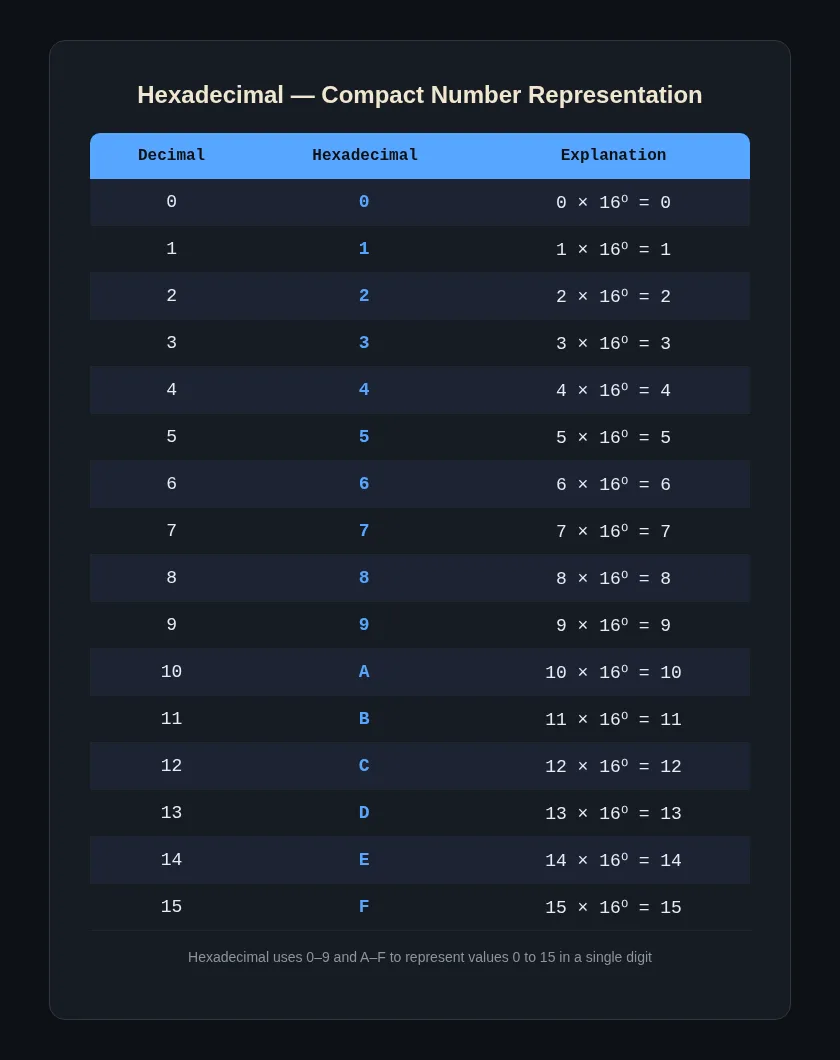
Memorise A=10 through F=15. You'll use them constantly.
Each hex position is a power of 16:
\n\n| 4096 (16³) | \n256 (16²) | \n16 (16¹) | \n1 (16⁰) | \n
|---|---|---|---|
| \n | \n | \n | \n |
For IGCSE CS, you'll mostly work with two-digit hex numbers (0 to FF, which is 0 to 255).
Hex → Denary: Worked Example
Convert 3A (hex) to denary.
3A = (3 × 16) + (A × 1)
Remember: A = 10.
= (3 × 16) + (10 × 1) = 48 + 10 = 58
So 3A₁₆ = 58₁₀. ✅
Denary → Hex: Worked Example
Convert 237 (denary) to hex.
Same idea as binary: divide by 16 repeatedly, read remainders backwards. But this time remainders above 9 become letters.
\n\n| Division | \nResult | \nRemainder | \n
|---|---|---|
| 237 ÷ 16 | \n14 | \n13 → D | \n
| 14 ÷ 16 | \n0 | \n14 → E | \n
Read from bottom to top: ED
So 237₁₀ = ED₁₆. ✅
Check: (14 × 16) + 13 = 224 + 13 = 237. Correct.
Binary → Hex: Worked Example
This is the fastest conversion once you get the hang of it. Each hex digit represents exactly 4 binary digits (bits).
Convert 11010110 (binary) to hex.
- Split into groups of 4 bits, starting from the right:
1101 0110
- Convert each group:
- 1101 = 8 + 4 + 0 + 1 = 13 → D
- 0110 = 0 + 4 + 2 + 0 = 6
- Put them together: D6
So 11010110₂ = D6₁₆. ✅
Hex → Binary: Worked Example
Convert 4F (hex) to binary.
- Convert each hex digit to 4 bits:
- 4 = 0100
- F = 15 = 1111
- Put them together: 01001111
So 4F₁₆ = 01001111₂. ✅
This is why programmers love hex — it's a shorthand for binary. Four bits turn into one hex digit. Much easier to read.
🎯 Why Hexadecimal? Real-World Uses
Students often ask me, "Why can't we just use denary for everything?"
Fair question. Here's where hex actually matters:
Memory addresses. When you look at a memory dump or debug a program, addresses are displayed in hex. An address like 0x7FFF is much shorter than its binary equivalent (0111 1111 1111 1111). Imagine debugging with 16-digit binary addresses.
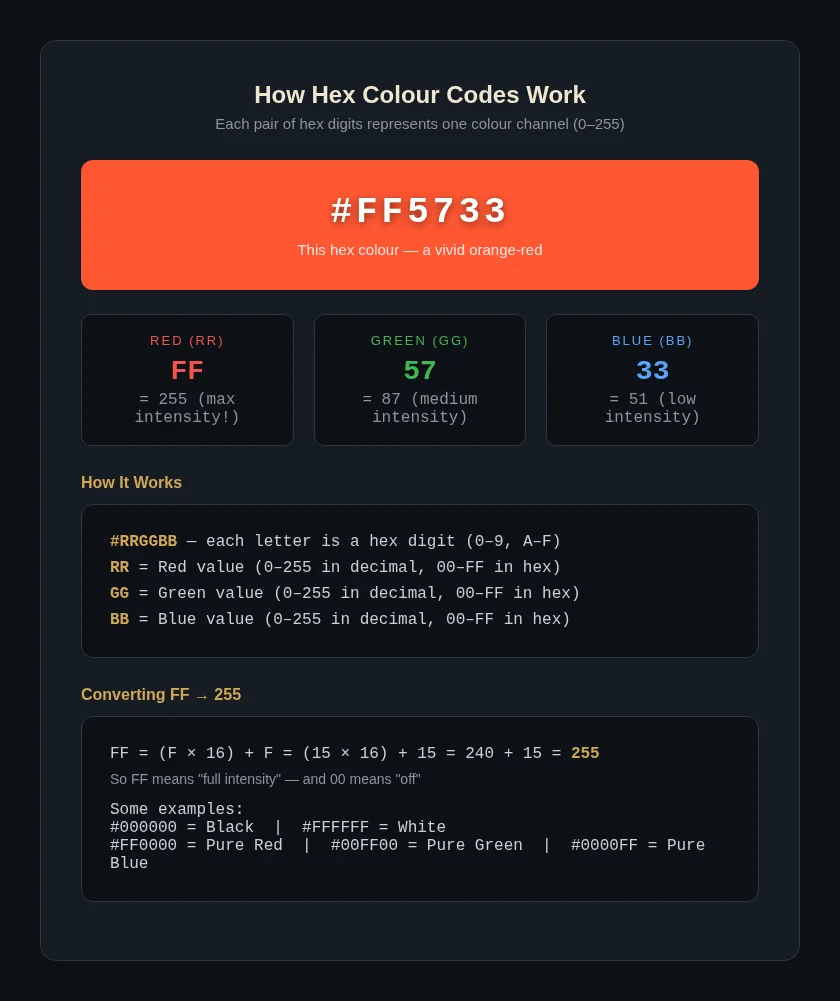
Colour codes in web design. Every colour on the web is a hex triplet. #FF5733 means Red=255, Green=87, Blue=51. You've seen these in CSS — now you know what they actually mean.
MAC addresses. Every network device has a unique MAC address like 00:1A:2B:3C:4D:5E. That's six pairs of hex digits. Without hex, it would be 00000000:00011010:00101011:00111100:01001101:01011110. Which would you rather type?
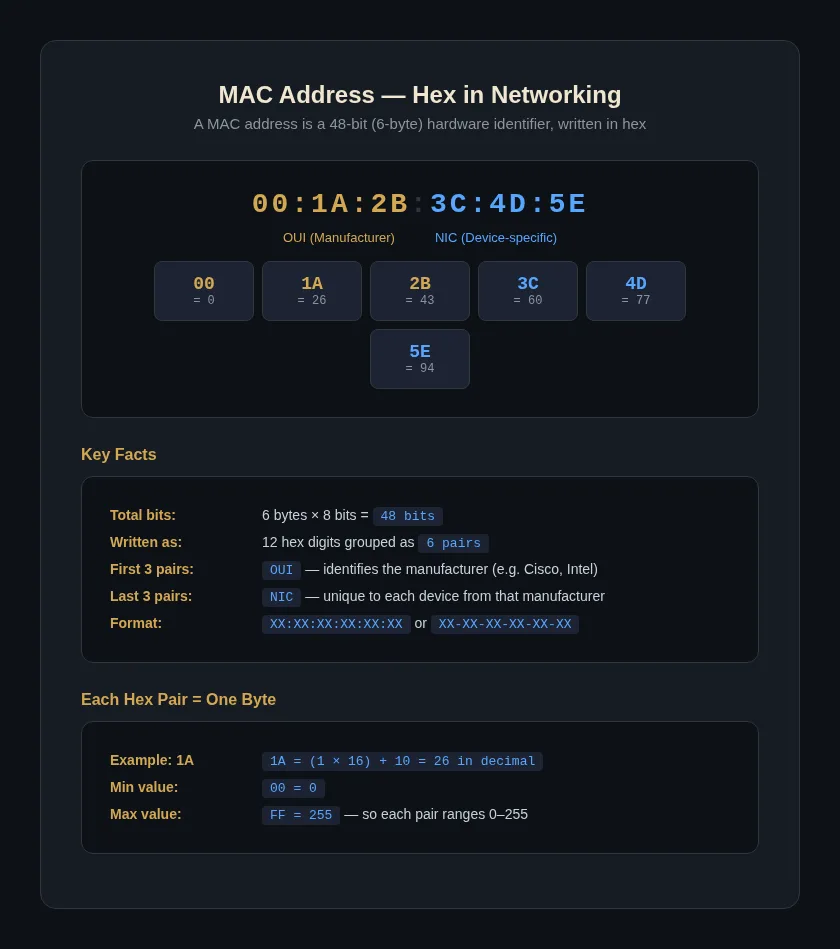
Assembly language and debugging. When you're working at the machine level, hex is the standard. The A-Level Computer Science syllabus covers this in more depth — check out the Cambridge AS & A Level Computer Science June 2025 Paper 1 (9618/12) – Von Neumann, Number Systems & AI post for the advanced stuff.
📝 Quick Reference: Denary ↔ Binary ↔ Hex (0–15)
This table is worth memorising. It covers everything you need for the basic conversions in IGCSE CS. Once you know these 16 pairs, the binary↔hex conversion becomes instant — each 4-bit binary chunk maps directly to one hex digit, no maths required.
\n\n| Denary | \nBinary | \nHex | \n
|---|---|---|
| 0 | \n0000 | \n0 | \n
| 1 | \n0001 | \n1 | \n
| 2 | \n0010 | \n2 | \n
| 3 | \n0011 | \n3 | \n
| 4 | \n0100 | \n4 | \n
| 5 | \n0101 | \n5 | \n
| 6 | \n0110 | \n6 | \n
| 7 | \n0111 | \n7 | \n
| 8 | \n1000 | \n8 | \n
| 9 | \n1001 | \n9 | \n
| 10 | \n1010 | \nA | \n
| 11 | \n1011 | \nB | \n
| 12 | \n1100 | \nC | \n
| 13 | \n1101 | \nD | \n
| 14 | \n1110 | \nE | \n
| 15 | \n1111 | \nF | \n
📋 Summary
Here's what you should take away:
- Binary (Base 2): Computers use it. Two digits (0, 1). Each place is a power of 2.
- Denary (Base 10): What humans use. Ten digits (0–9). Each place is a power of 10.
- Hexadecimal (Base 16): Shorthand for binary. Sixteen digits (0–9, A–F). Each place is a power of 16.
- Binary ↔ Denary: Add up the place values where there's a 1. Or divide by 2 repeatedly.
- Denary ↔ Hex: Divide by 16 repeatedly. Remainders above 9 become A–F.
- Binary ↔ Hex: Group binary into 4-bit chunks. Convert each chunk to its hex digit. Fastest conversion once you know the 0–15 table.
If you're working through an IGCSE Computer Science past paper and need to apply these conversions in context, check out the IGCSE ICT June 2025 Paper 1 (0417/12) – Security, File Transfer & ATM Processing walkthrough to see how number systems connect to broader computing topics.
Got a conversion method that works better for you? Or stuck on a specific example? Drop a comment and I'll help you work through it.
