

Pressing Ctrl+C looks simple until the day it stops working.
You hit it in a terminal. One Python script exits immediately. A Docker container hangs for ten seconds before disappearing. A runaway process ignores you completely until kill -9 ends the argument.
That difference is signals.
I teach Cambridge Computer Science, and this is the gap the syllabus never bridges cleanly. Students learn hardware interrupts, interrupt priority levels, and the interrupt dispatch table. Then they sit down at a Linux terminal and meet SIGINT, SIGTERM, and SIGKILL with no explanation of how those ideas connect. In practice, signals are the missing link. They are how the kernel talks to processes.
My view is blunt: signals should be taught right after interrupt handling, not left as Unix trivia for students to trip over later.
Ctrl+C is SIGINT, not magic
When you press Ctrl+C, the terminal sends SIGINT to the foreground process group. The default action is termination, but a program can catch it and decide what to do next.
That is why a shell script can react to it:
trap 'echo "Caught SIGINT"; exit' INT
while true; do
  sleep 1
  echo "still running"
done
Run that, press Ctrl+C, and the script does not just vanish. It receives a signal, runs the handler, prints the message, and exits cleanly.
Python does the same thing in its own way. When you press Ctrl+C during a Python program, Python translates SIGINT into KeyboardInterrupt. Students often think the traceback is the problem. It is actually the clue. The interpreter is telling you that the kernel interrupted the process and Python surfaced it in a readable form.
This matters because it shows the first rule of signals: a signal is not always an instant kill switch. Sometimes it is a request. The process gets a chance to respond.
SIGTERM is the polite knock
If you run kill 1234 with no extra option, Linux sends SIGTERM.
That is the normal shutdown signal. It tells the process to finish what it is doing and leave properly. A well-behaved process catches SIGTERM, flushes buffers, closes files, saves state, and exits with dignity.
This is the distinction I care about on my own Linux boxes. When I stop services on a Docker host, I do not want a process ripped out of memory halfway through a write. I want it to shut down cleanly.
Here is the simplest Python example:
import signal
import time
import sys

running = True

def shutdown(signum, frame):
    global running
    print(f"Received signal {signum}. Closing cleanly...")
    running = False

signal.signal(signal.SIGTERM, shutdown)
signal.signal(signal.SIGINT, shutdown)

while running:
    time.sleep(1)
    print("working...")

print("Buffers flushed. Connections closed.")
sys.exit(0)
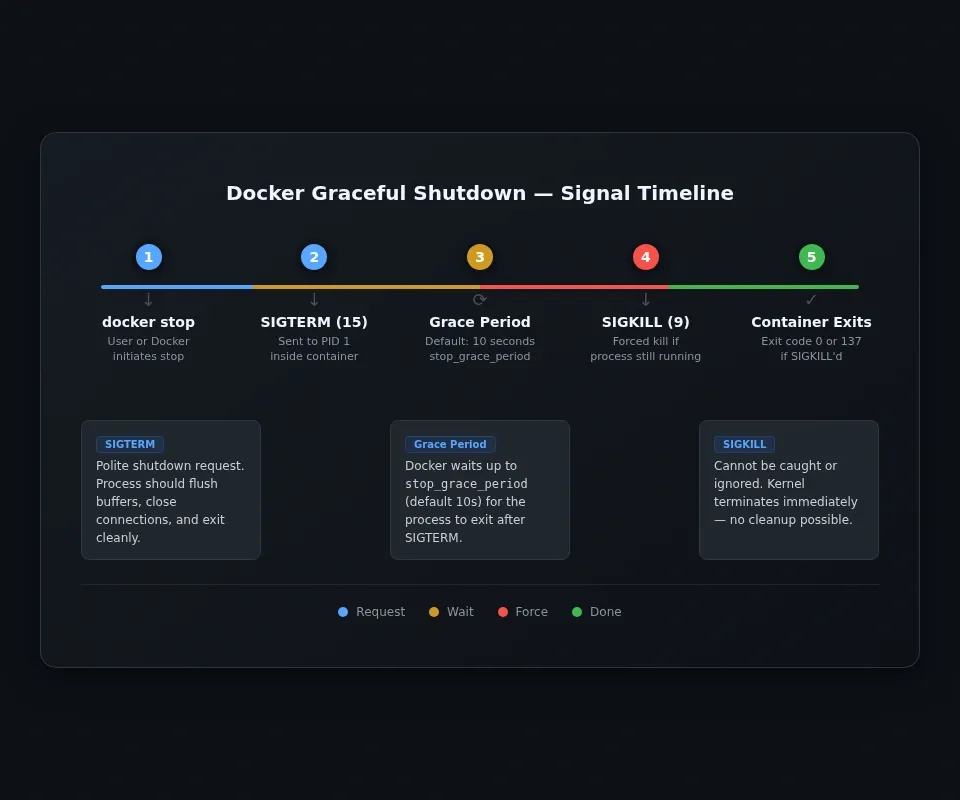
It also explains what Docker is doing. docker stop does not begin with SIGKILL. It sends SIGTERM first, waits for the grace period, then escalates only if the process refuses to go.
That is why a bad container shutdown usually looks like a ten-second pause. Docker is giving PID 1 inside the container time to behave.
If you have read my post on building a container engine from scratch, this is the practical side of the same kernel mechanics. Containers are just processes with isolation wrapped around them. They still live and die by signals.
The Redis example is a good one here. In my Redis 8.8 homelab guide, the container is useful only if its shutdown is clean. Databases, caches, and queue workers need time to flush work to disk. If you know Docker sends SIGTERM first and SIGKILL later, stop_grace_period stops looking like a random YAML setting and starts looking like what it really is: extra time for the process to do the right thing.
SIGKILL is the last resort
Signal 9 cannot be caught, blocked, or ignored. The kernel does not negotiate. It removes the process from the scheduler, tears down its resources, and that is the end of it.
This is why kill -9 works when Ctrl+C does not.
You can prove the difference with a deliberately stubborn script:
import signal
import time

signal.signal(signal.SIGINT, signal.SIG_IGN)

while True:
    time.sleep(1)
Run it. Press Ctrl+C. Nothing happens, because the process is ignoring SIGINT.
Now find the PID:
pgrep -af python
Then send:
kill -9 <PID>
Students remember this one because it feels dramatic, but the real lesson is not to reach for kill -9 as a habit. The real lesson is the opposite. Use it only when the polite options failed.
SIGKILL gives the process no chance to flush, save, or clean up. If you fire it at a database, log writer, or container doing disk work, you are choosing force over correctness.
It matters in container land too. Docker eventually escalates to SIGKILL for the same reason you do: sometimes a process is stuck and has to go. The Linux OOM killer may terminate a process using SIGKILL. A container killed with SIGKILL commonly exits with code 137. Running out of memory is one possible cause.
The signals students meet without realising it
Here are the ones worth knowing first. If you want the canonical reference for default actions and edge cases, the Linux signal(7) page at man7.org is the one worth bookmarking.
| Signal | Number | Default action | What it usually means |
|---|---|---|---|
| SIGHUP | 1 | Terminate | Terminal closed, or daemon reload |
| SIGINT | 2 | Terminate | Ctrl+C from keyboard |
| SIGKILL | 9 | Terminate | Forced kill by kernel or admin |
| SIGSEGV | 11 | Core dump | Invalid memory access |
| SIGPIPE | 13 | Terminate | Wrote to a pipe with no reader |
| SIGTERM | 15 | Terminate | Normal shutdown request |
| SIGCONT | 18 | Continue | Resume a stopped process |
| SIGSTOP | 19 | Stop | Forced stop that cannot be ignored |
| SIGTSTP | 20 | Stop | Ctrl+Z from terminal |
SIGPIPE: why yes | head -5 stops
This one is all over Linux even if nobody names it.
Run:
yes | head -5
yes would happily print forever. head reads five lines and closes its end of the pipe. When yes tries to write again, the kernel sends SIGPIPE. Default action: terminate.
That is why the command ends cleanly instead of flooding your terminal forever.
If you have already worked through my post on Linux pipes and redirection, this is the next piece of the picture. Pipes are not just text plumbing. They are kernel objects with rules, and one of those rules is that a writer with no readers gets told to stop.
SIGHUP: why a remote job dies when SSH drops
SIGHUP began as the hangup signal for a terminal line going away. The name is old, but the behaviour still matters.
A student starts a long-running script over SSH, closes the laptop, comes back later, and the process is gone. That is usually not mysterious. The session closed, the shell's children got SIGHUP, and the default action terminated them.
The fix is not magic either. Use nohup, tmux, or screen so the process is not tied to that one terminal session.
SIGSTOP and SIGCONT: pausing a process without killing it
Start a job:
sleep 1000
Press Ctrl+Z and the shell sends SIGTSTP, which is the terminal stop signal. Then you can continue it with fg or send SIGCONT yourself.
You can also force the stop with:
kill -STOP <PID>
kill -CONT <PID>
That maps nicely onto Cambridge process states. A stopped process is not finished. It is paused until the kernel allows it to continue.
Segmentation faults are signals too
A segmentation fault is usually SIGSEGV, signal 11. The process touched memory it was not allowed to touch, so the kernel terminated it. That is process protection doing exactly what it should do.
This is one of the clearest places where operating system theory becomes real. The OS is enforcing memory boundaries between processes. Without that rule, one broken program could scribble over everything else in RAM.
So when you see:
Segmentation fault (core dumped)
that is not just an error message. It is the kernel reporting a memory protection failure and sending the signal that ends the process.
The Cambridge connection: signals and interrupt handling
This is the part students should be taught explicitly.
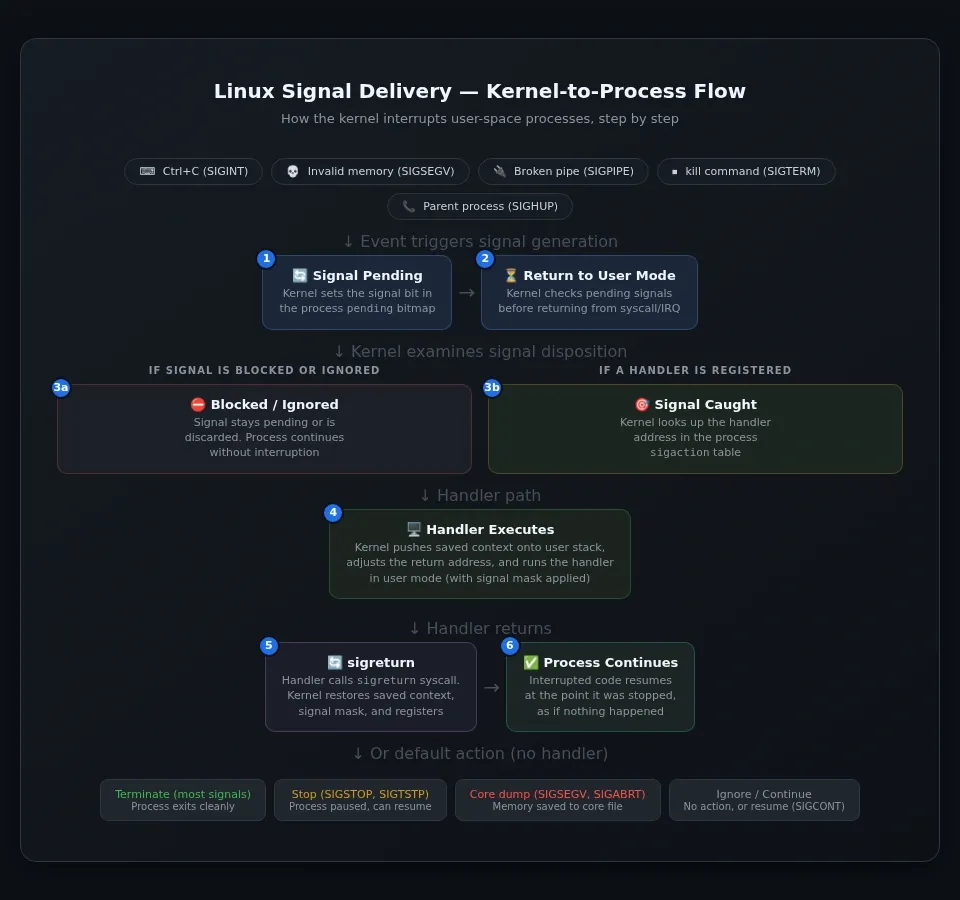
In Chapter 16, Cambridge students learn the interrupt model: a device raises an interrupt, the CPU saves state, the interrupt dispatch table is consulted, a service routine runs, then the previous state is restored and execution continues.
Signal delivery follows the same pattern at process level.
- An event occurs: keyboard interrupt, parent command, broken pipe, invalid memory access.
- The kernel marks a signal as pending for the process or thread.
- When control is returning to user mode, the kernel checks whether that signal is blocked, ignored, or caught.
- If a handler exists, the kernel arranges for that handler to run.
- After the handler finishes,
sigreturnrestores the saved state. - The process continues, exits, stops, or dumps core depending on the signal and disposition.
That is not a loose analogy. It maps neatly onto the same interrupt pattern students already know, just at process level rather than hardware level.
In You're the OS, I teach interrupt handling as a game because students understand it faster when they have to make the decisions themselves. Signals fit that same lesson perfectly. The kernel is still the traffic controller. The only difference is that now the conversation is between the kernel and a process rather than the CPU and a hardware device.
You can even inspect part of this on a live Linux system in /proc/<pid>/status. Try grep -E "Sig(Pnd|Blk|Ign|Cgt)" /proc/1/status and you will see the signal bitmaps immediately. Fields such as SigPnd, SigBlk, SigIgn, and SigCgt show which signals are pending, blocked, ignored, or caught. That is not abstract theory. That is the kernel's process-control dashboard sitting in plain text.
What students should remember
If you remember only four things, remember these:
Ctrl+CsendsSIGINT.killsendsSIGTERMby default.kill -9sendsSIGKILL, and the process gets no say in the matter.- A lot of weird Linux behaviour is not weird at all once you know which signal fired.
That includes broken SSH jobs, stuck containers, dead pipelines, and segfaults.
Signals are not obscure Unix trivia. They are core process control. They explain how the kernel interrupts, stops, resumes, warns, and kills running programs. For CS students, they are the cleanest bridge between textbook interrupt handling and the real behaviour of a Linux system.
The next time a process ignores Ctrl+C, ask a better question: which signal did it get, and what is it allowed to do with it?