

Every internet-connected server lives in a shooting gallery.
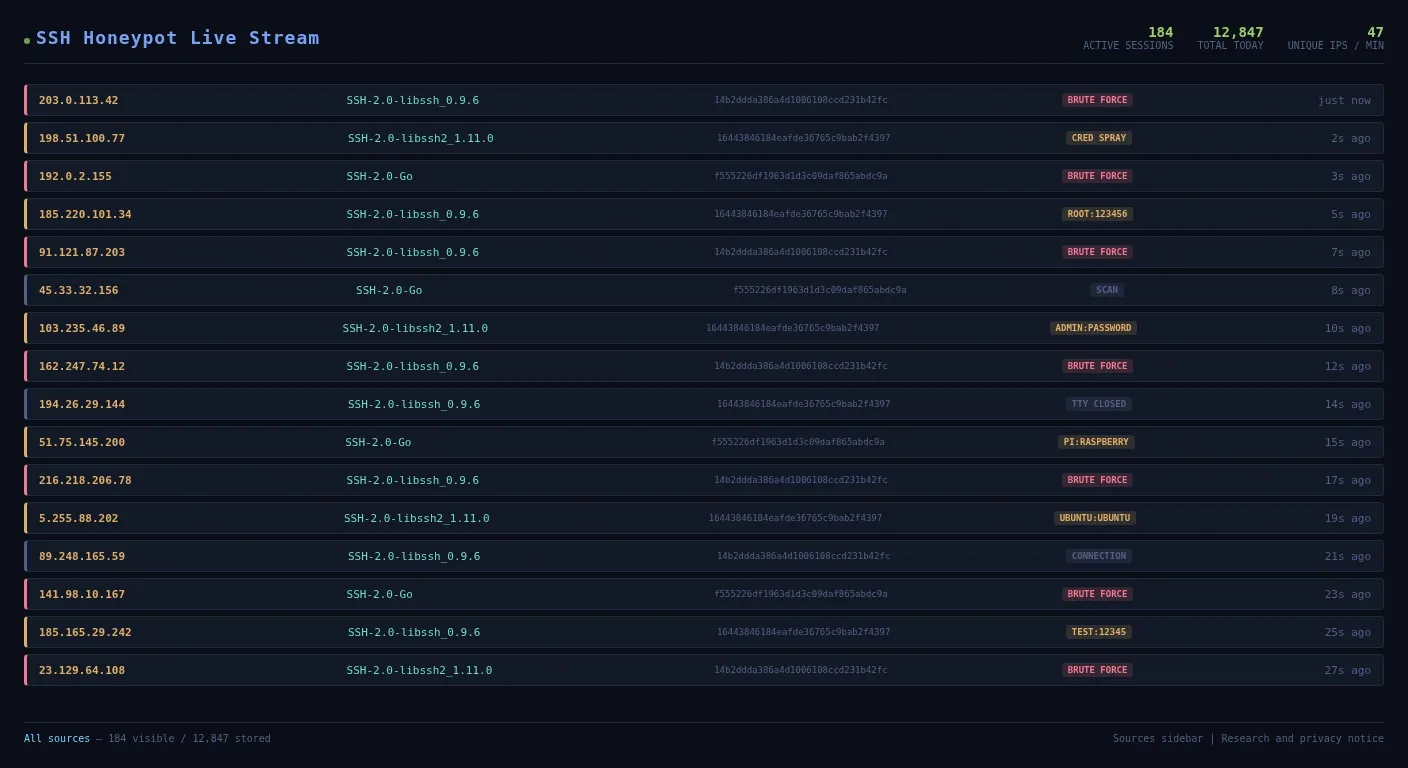
Open https://honeypotlive.cc/ for a minute and the point lands immediately. The screen fills with source IPs, login attempts, usernames, guessed passwords, and commands being fired at a fake Linux box by machines that think they have found a real one. There is no drama needed here. This is just what the internet does to exposed SSH.
That is why I like the project so much as a teaching tool. Cowrie, the Python SSH and Telnet honeypot behind it, strips the theory out of network security and replaces it with evidence. Students do not have to imagine a brute force attack. They can watch one. They do not have to memorise that weak credentials are risky. They can see bots trying root, admin, pi, ubuntu, 123456, and password in real time.
I use SSH constantly, whether that is tunnelling into a box, checking a service, or fixing something late at night. I wrote about the practical side of that in my SSH tunnels guide. The security side is less comfortable. If you leave SSH exposed to the internet, bots start work long before you have finished your coffee.
I think that is one of the most useful lessons a CS student can learn early: the question is not whether a service will be probed. The question is what you put in front of it when that probing starts.
What the honeypot is actually showing you
The attraction of honeypotlive.cc is that it does not hide the messy bits. You see the boring repetition that real attack traffic is built from.
Most of it is not clever. It is industrial.
A bot connects, guesses a username, guesses a password, then moves on. Another one does the same thing from somewhere else. Then another. On a busy public SSH honeypot, that pattern keeps repeating all day. Community data around Cowrie deployments regularly shows root as one of the most targeted usernames, with admin, pi, ubuntu, test, and user close behind. The passwords are exactly as bad as you would expect: 123456, password, admin, 12345, 1234, root.
That is useful because students tend to imagine attackers as individuals picking targets one by one. Most early attack traffic is not personal. It is automated scanning plus credential spraying at scale.
Cowrie records all of that. Every login attempt. Every command. Every file transfer if the attacker gets that far. That gives you something far better than a textbook paragraph. It gives you data you can sort, count, graph, and argue about.
My own logs tell the same story from the defensive side
The live honeypot is the public demo. My own security logs are the quieter version of the same lesson.
On my own setup, the Hermes host at 192.168.1.117 is a private LAN machine, and public-facing services reach it through Cloudflare Tunnel rather than a directly exposed SSH port. My Proxmox node at 192.168.1.25 is also tucked away properly. That is deliberate. I use Cloudflare Tunnel and other layers in front of services because exposed admin ports are an invitation.
When I wrote about the CISA GitHub leak and homelab security, I showed the fail2ban output I actually use on Linux boxes that need protecting:
Status for the jail: sshd
|- Filter
|  |- Currently failed: 3
|  `- Total failed:     19
`- Actions
   |- Currently banned: 1
   `- Total banned:     4
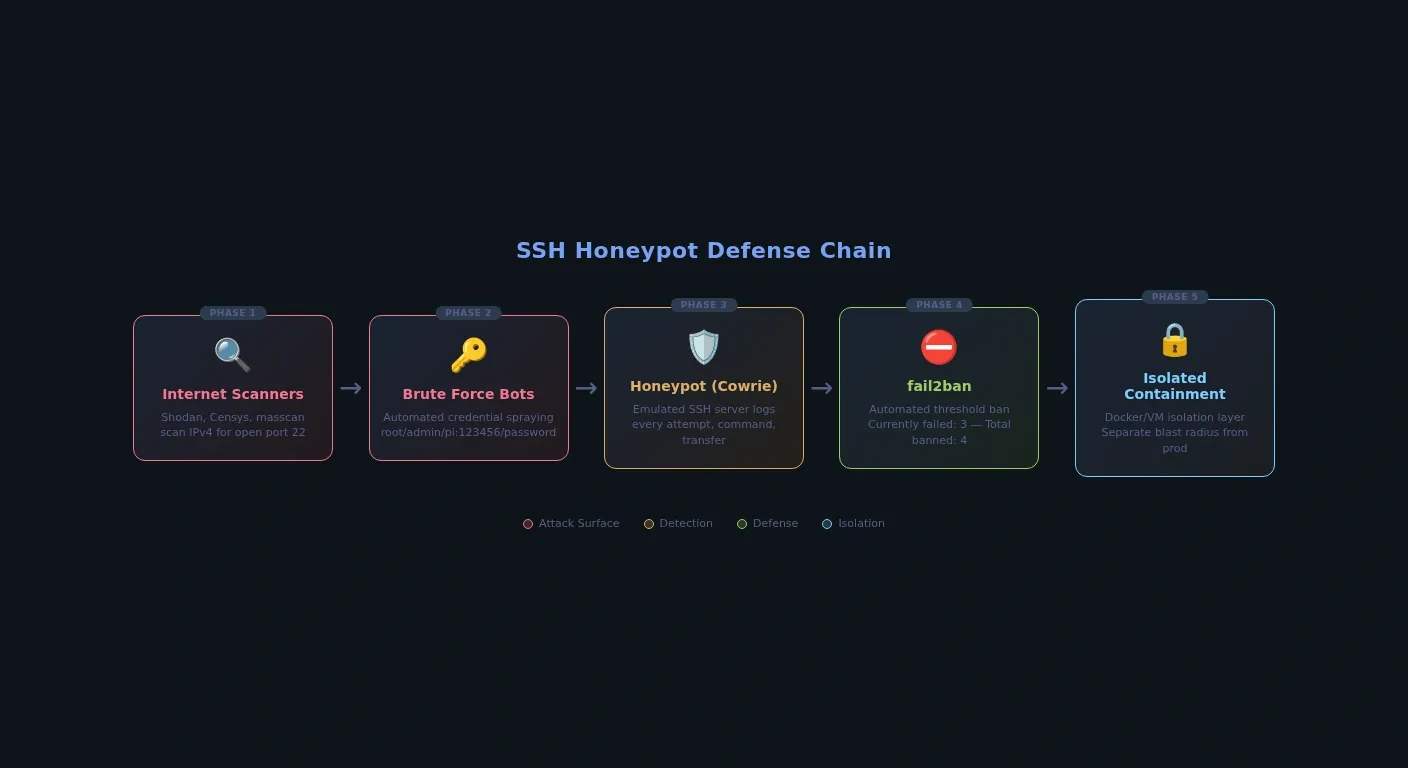
That is the same story as the honeypot, just from the side that is trying to keep the gate shut. Failed attempts accumulate. IPs cross a threshold. Bans get applied. The traffic is not theoretical and it is not rare. I covered that defensive playbook in my CISA GitHub leak post. The honeypot is the visual proof of why that playbook exists.
This is the part students remember. "Defense in depth" sounds vague until they can match it to a sequence of events. A scan finds the host. SSH answers. Credentials get guessed. fail2ban notices. The firewall limits what else is reachable. An authentication layer stops the next mistake becoming a breach.
That chain is much easier to understand when each step leaves a visible trace.
How bots find a fresh SSH server so quickly
The speed shocks people the first time they see it.
Put a basic VPS online with SSH exposed and it does not stay undiscovered for long. Internet-wide scanners such as Shodan and Censys are built to catalogue exposed services, and tools like masscan can sweep huge parts of IPv4 at absurd speed. That is how fresh SSH services get noticed and indexed so quickly. The failed logins usually come from a different layer of cheap brute-force bots and credential-spray scripts that follow once exposed SSH is easy to find.
This is also where weak security advice starts to fall apart.
People sometimes talk about changing the SSH port as if it is either magic or useless. It is neither. Against a determined scan that checks every port, obscurity is thin. Against the enormous amount of lazy automation that only bangs on port 22, it still cuts noise. Students should understand both truths at the same time. Network security is full of that kind of answer: one measure is not enough, but one measure can still be worth having.
That is also why I keep pointing people toward stronger patterns such as tunnels and proper access layers. If you need a cleaner model for that, my Cloudflare self-managed OAuth write-up and my self-hosting toolkit post both make the same point in different ways: do not expose admin surfaces casually when a better route exists.
The hidden lesson: even the honeypot has failure modes
A honeypot is a security tool, but it is still software, and software still breaks in ordinary ways.
That is one reason I would use this topic in class. Honeypots also teach the ordinary systems failures that sit underneath security monitoring.
A Cowrie deployment in Docker, for example, can fail silently if the log directory is bind-mounted with the wrong ownership. The container runs, accepts SSH sessions, and looks healthy enough. Meanwhile the logs do not get written because the cowrie user inside the container cannot write to the host directory. That is exactly the kind of bug students miss at first because the service appears to be working.
Busy honeypots also create very normal infrastructure problems. JSON logs grow fast. A mid-size public deployment can collect thousands of login attempts per day, and every attempt is another event written to disk. SFTP capture adds a different problem again: now the system is storing whatever malware, tools, or junk an attacker uploads. One careless setup on a cheap VPS and your "monitoring box" becomes a disk-space lesson.
Containment matters too. Cowrie emulates a shell and filesystem well enough to keep attackers interested, which is the whole point. But that also means isolation is not optional. Run it in Docker or a separate VM. Do not place a honeypot beside production services and pretend that is good enough. I have already written about sensible homelab separation in
 Techie Mike
The same rule applies here: if a security tool can attract hostile traffic, it deserves its own blast radius.
Why this maps neatly onto the CS syllabus
This is the rare security topic that lands in both the logs and the exam specification.
Cambridge IGCSE Computer Science already asks students to understand brute force attacks, hacking, malware, data interception, and security measures. A live SSH honeypot gives them a concrete picture for several of those terms at once. The repeated login attempts are brute force. The guessed credentials show why weak passwords fail. The source IP churn hints at distributed infrastructure. The fail2ban response is a clear example of an automated security measure.
It also turns networking topics into something less sterile. Ports stop being numbers in a table and become doors that attract traffic. IP addressing stops being a diagram and becomes the reason a scanner can find a box on the public internet. Encryption stops being an abstract property and becomes the awkward reality that attackers are trying to abuse a legitimate secure protocol rather than break the maths underneath it.
That is why I would rather teach this than another tidy slide deck full of definitions. Students learn security terms faster when the system misbehaves in front of them.
The simplest experiment is still the best one
If you want the lesson without building a whole project, keep it small.
Spin up a cheap VPS. Lock it down properly first: use SSH keys, disable password authentication, and never test with real or reused credentials. Then install fail2ban.
sudo apt install fail2ban
sudo systemctl enable --now fail2ban
Then watch the logs:
grep "Failed password" /var/log/auth.log | tail -20
sudo fail2ban-client status sshd
If you want the fuller demonstration, run Cowrie in isolation. The current Cowrie README on the main branch still uses this quick-start container example:
docker run -p 2222:2222 cowrie/cowrie:latest
Port 2222 makes a cleaner demo and avoids throwing a default SSH service straight onto 22, but it also means you will not attract the same volume or pattern of lazy bot traffic that a public port-22 service gets.
Now compare what your own logs show against what honeypotlive.cc streams publicly. That is a better network security lesson than most classroom worksheets because it answers the question students usually care about first: "What is actually happening out there?"
And the answer is blunt. Bots are already trying. They do not care whether the box belongs to a student, a hobbyist, or a government agency. The traffic is the same. The difference is whether you left the door open, whether you can see the attempts, and whether your defences are awake when they arrive.
That is why I like SSH honeypots so much. They make network security stop sounding like advice and start looking like evidence.