


I teach Cambridge IGCSE and A-Level Computer Science. Every year, the examiner reports say the same thing: candidates struggle with operating system functions. The 2025 IGCSE examiner report put it bluntly — "Candidates found this question challenging. It would be beneficial for candidates to have a greater understanding of what is involved in the key functions of an operating system, such as memory management."
The problem isn't the content. It's the delivery. Textbook definitions about "the kernel managing process state transitions between ready, running, and blocked" mean nothing to a sixteen-year-old who's never seen an OS crash.
So I tried something different. Instead of explaining what the OS does, I made my students be the OS.
Here's how it works — and how you can run the same exercise in your classroom.
The Setup: You're Now the Kernel
I split the class into three teams. Each team gets a set of decision cards and one rule: keep the system running. No crashes. No starved processes. No memory leaks.
The "game" has three arenas, matched to three core OS management tasks from the Cambridge 9618 syllabus. We play them in order.
Arena 1: Process Management — Who Gets the CPU?
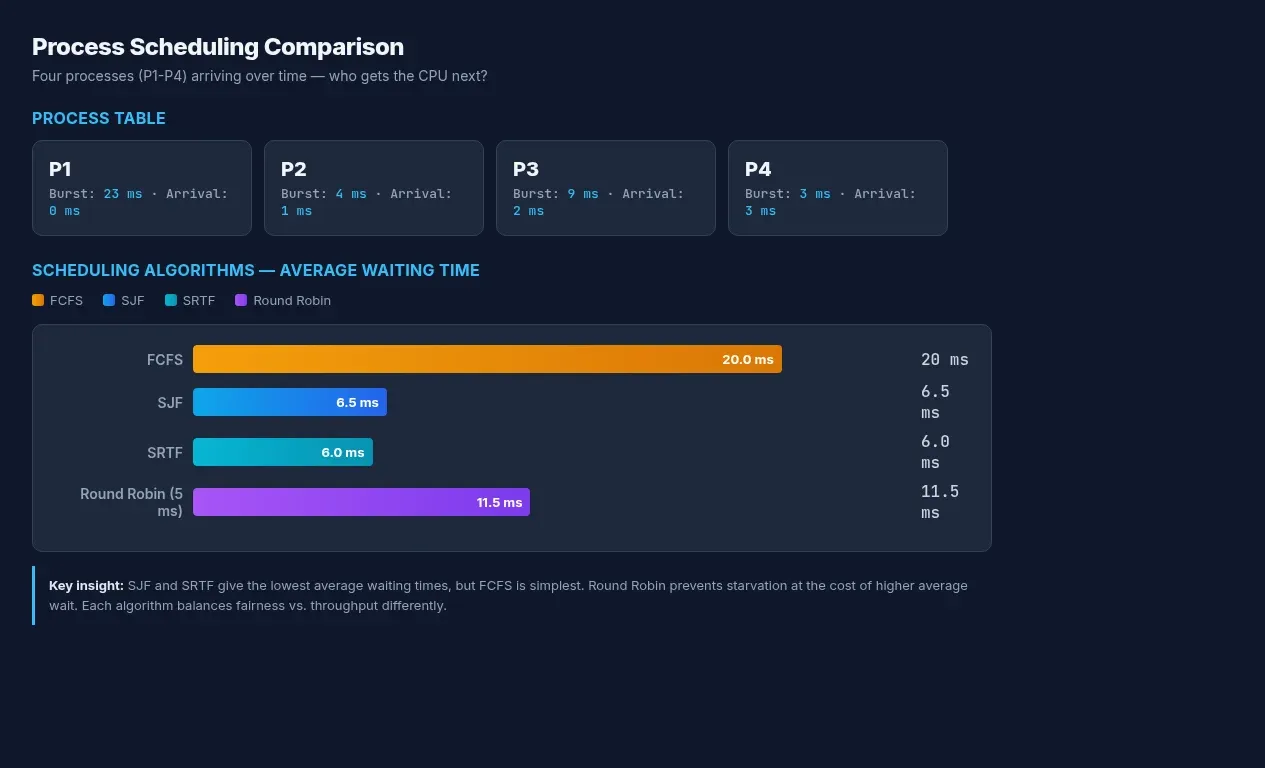
The CPU can only run one process at a time. Four processes arrive, each with a burst time (how long they need the CPU) and an arrival time (when they showed up). Your job: decide the running order.
Here's the scenario I handed my A-Level class:
| Process | Burst Time (ms) | Arrival Time (ms) |
|---|---|---|
| P1 | 23 | 0 |
| P2 | 4 | 1 |
| P3 | 9 | 2 |
| P4 | 3 | 3 |
I ask one student — let's call her the FCFS scheduler — to just run them in the order they arrive. P1, P2, P3, P4. Average waiting time: 20 ms. P2 and P4 are screaming. They need 4 and 3 milliseconds but they're stuck behind P1's 23-millisecond marathon.
Then I ask another student — the SJF scheduler — to pick the shortest job first. If all four processes are already in the ready queue, SJF gives an average waiting time of 6.5 ms. P4 runs almost immediately. P1 waits longest, but it was going to take ages anyway.
Then we introduce preemption with SRTF: P1 starts, but at 1 ms, P2 arrives with a shorter burst. P1 gets yanked. P2 runs. At 3 ms, P4 arrives, but P2 only has 2 ms remaining, so P2 keeps the CPU. P4 runs next. Average waiting time drops to 6 ms.
The lightbulb moment comes when we try round robin. Each process gets a 5 ms time slice. P1 runs for 5, gets kicked back to the queue. P2 runs for 4 and finishes. P3 runs for 5, gets kicked back. No one starves. But the average waiting time (about 11.5 ms) is worse than SJF.
Now the students are debating. "SJF is faster, but what if a long process never gets to run?" That's starvation. They've just discovered it organically — no textbook required.
Process Scheduling as Game Matchmaking
Think of process scheduling like matchmaking in a multiplayer game. FCFS is a single queue — first to join, first to play. SJF is the matchmaker prioritising quick 1v1 duels over a 12-player raid. Round robin is turn-based combat: everyone gets their action, then passes.
Context switching — saving and restoring process state when the CPU changes hands — is the game autosaving before a boss fight. If the power cuts, you reload from the save. The PCB (process control block) stores your HP, position, and inventory exactly where you left off.
Arena 2: Memory Management — Where Does Everything Go?
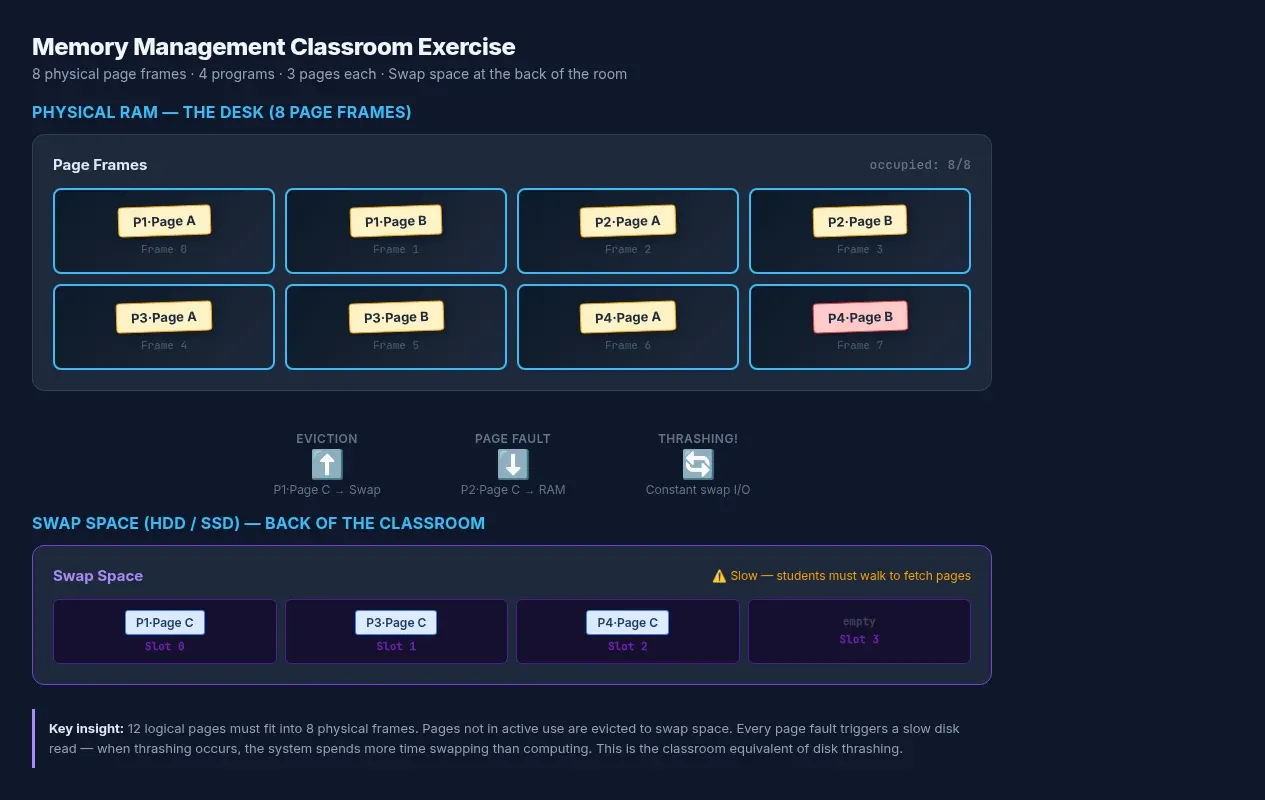
Same class. New problem. Four programs need memory, but RAM has only 8 page frames. Each program needs 3 pages. That's 12 pages into 8 frames. Something has to give.
I hand out sticky notes. Each student is a page of logical memory. The desk is physical RAM — 8 slots. They have to place themselves in the slots. When a new process arrives and there's no room, they must decide: which page gets evicted?
Here's where virtual memory clicks. I introduce the "swap space" — a separate table (the HDD) at the back of the room. A page can be moved there, but it's slow. Every time you need it back, someone has to walk across the classroom. That's disk thrashing, and the students feel it. The system grinds to a halt while pages shuttle back and forth.
Then we try page replacement algorithms:
- FIFO: the oldest page always gets evicted. Simple. But then someone notices Belady's anomaly — adding more page frames somehow causes more page faults. The class is suspicious. I show them the textbook example. Minds blown.
- LRU (least recently used): evict the page nobody's touched in the longest time. Better hit rate, but now you need to track access timestamps. More overhead.
- Optimal: look into the future and evict the page you won't need for the longest. The students laugh — obviously impossible in practice. But it's the theoretical gold standard, and understanding why it's optimal teaches more than any algorithm.
Memory Management as Inventory Management
Paging is inventory management in an RPG. Your backpack (RAM) has 8 slots. Your stash (swap space) is back at the base. Every time you swap items, you stop moving. Too much swapping and your character freezes mid-combat — that's disk thrashing.
Virtual memory is the "bag of holding" — a D&D item that's bigger on the inside. It gives you the illusion of unlimited inventory by shuffling items to a pocket dimension (your SSD). The catch: retrieval takes time, and if you overuse it, everything slows to a crawl.
The page table is your inventory grid screen. Slot 1 holds the health potion, slot 2 the sword. The MMU (memory management unit) translates your "page number" into a physical RAM address, just like the game engine maps your inventory slot to an actual memory location.
Arena 3: I/O Management — What About Everything Else?
Processes don't just compute — they talk to hardware. Keyboards, printers, disks. These are orders of magnitude slower than the CPU — the same hardware components that make up every computer system.
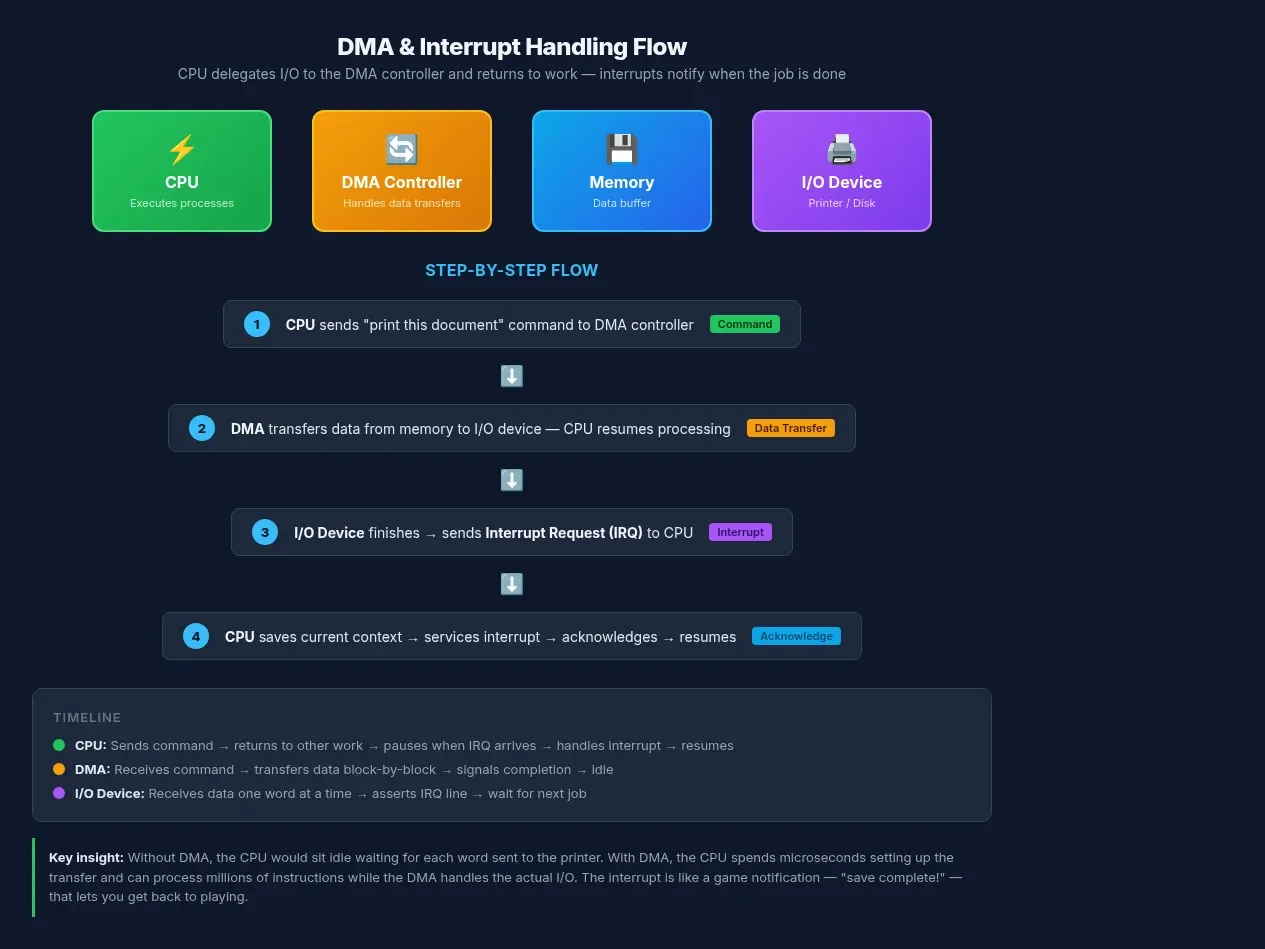
I set up the printer scenario. One student is the CPU. Another is a laser printer — they can only write one word every five seconds in our simulation (simulating how much slower I/O devices are compared with the CPU). The CPU blasts through a document in milliseconds, then sits idle waiting for the printer.
Enter the DMA controller — a third student. The CPU says "print this" and goes back to work. The DMA handles the actual data transfer. When it's done, it sends an interrupt: "Printer finished." The CPU acknowledges it and moves on.
This is the concept that connects to real-world computing. When you click "save" in a game, the CPU doesn't wait for the disk write to complete. It hands the job to the DMA controller and keeps rendering frames. The save confirmation pops up when the interrupt arrives.
I/O Handling as Game Notifications
Interrupts are in-game notifications. Your screen flashes red — you've taken damage (a high-priority interrupt, IPL ~30). A popup says "autosave complete" (low priority, IPL ~20). The CPU drops what it's doing, services the critical interrupt, and returns.
Device drivers are the middleware translating game commands into hardware. When you press "W" to move forward, the keyboard driver translates that scan code into an input event the game engine understands. Without the driver, your keyboard is just a collection of plastic switches.
Buffering is the game pre-loading the next level while you're fighting the current boss. The I/O buffer fills asynchronously, so when you walk through the door, the next area is already in memory.
Why This Works in the Classroom
Textbook definitions aren't sticky. Experiences are. The examiner reports make this clear year after year: students who can only recite definitions — "memory management is the part of the operating system that controls main memory" — lose marks on application questions.
The students who played the OS can explain why SJF has lower average wait time but risks starvation. They understand that paging eliminates external fragmentation but introduces internal fragmentation. They've seen disk thrashing slow a system to a halt because they walked across the classroom to fetch swapped pages.
You don't need special software. Sticky notes, a whiteboard, and a willingness to embarrass yourself acting out an interrupt handler are all it takes. It's the same principle behind my visual guide to binary and hexadecimal for IGCSE CS — abstract concepts stick when students can see and touch them.
If you want to go deeper, the Cambridge 9618 Chapter 16 syllabus covers process states (running, ready, blocked), all four scheduling algorithms, paging vs segmentation, virtual memory, page replacement algorithms, and interrupt handling — exactly the content this exercise targets. And if you're teaching IGCSE 0478, Chapter 4 covers the foundations: memory management, multitasking, interrupts, and buffers at the level this exercise makes tangible.
The Bigger Picture
An operating system is a resource manager. It juggles CPU time, memory, and I/O. It lies to processes — telling each one it has the machine to itself. It hides hardware complexity behind device drivers and system calls.
When students understand these three arenas — process scheduling, memory management, and I/O — they understand what every OS does, from Windows to Linux to the firmware in a microwave. The principles don't change. Only the constraints do.
In fact, the same isolation primitives — namespaces, cgroups, and resource management — are what Docker packages into containers. If you want to see OS concepts in production, building a container engine from scratch will show you the kernel syscalls behind every docker run.
And when the exam asks them to describe memory management, they won't write a memorised definition. They'll remember being the page that got evicted.
If your students are heading into A-Level coursework or paper 2 practicals, my
 Techie Mike
covers traceback reading and practical debugging — skills that pair well with the system-level understanding this exercise builds.
