Passkeys have reached the annoying phase.
That is usually how you can tell a technology is real.
This week a Hacker News thread titled "Passkeys were invented by engineers with zero understanding of consumer brain" blew up. Two years earlier, firstyear's "Passkeys: A shattered dream" did even more damage to the happy marketing story. That post is worth reading because it is not anti-crypto nonsense. It is a technical complaint from someone who actually builds WebAuthn software.
I think both threads are right in the same way. The security model is better. The rollout has been messy.
I use Bitwarden passkeys daily. I also run an Authentik-based login layer in my homelab, with the same nginx auth pattern I have used elsewhere. So this is not a theory post for me. It is the next layer after the transport side I covered in TLS Certificates for Internal Services. Last month was the padlock on the wire. This is the proof of who is at the keyboard.
What a passkey actually is
A passkey is not magic. It is a public-private key pair created on your device.
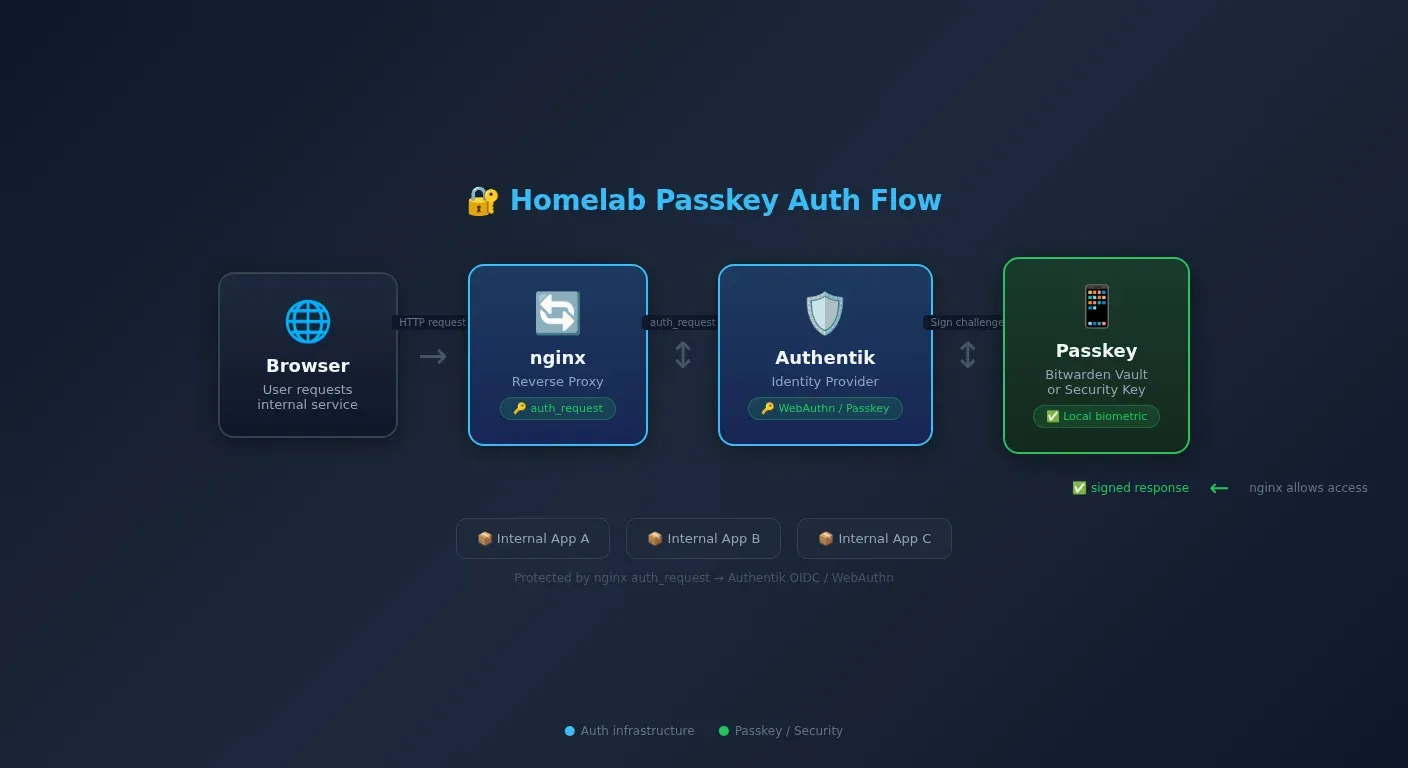
The server stores the public key. Your phone, laptop, password manager, or security key keeps the private key. When you log in, the server sends a challenge. Your device signs it with the private key. The server verifies the signature with the public key. That is why this matters so much for teaching. It is Cambridge 9618 Chapter 6 authentication and Chapter 17 asymmetric cryptography turned into a login screen.
The old password model says, "send me the secret again." The passkey model says, "prove you hold the secret without sending it."
That difference removes three common password problems immediately.
First, there is no password for a fake site to phish out of you. Second, there is no password database to leak in the usual way because the server stores a public key, not a reusable shared secret. Third, the biometric step stays local. Touch ID, Face ID, Windows Hello, or a PIN unlocks the private key on your device. The biometric is not what the website receives.
If you teach A-Level Computer Science, this is one of the cleanest real-world examples you can put in front of a class. Students learn public and private keys, digital signatures, and authentication. Passkeys put all three in one system they already recognise.
Where passkeys live decides whether they feel brilliant or awful
This is the part vendors do not put on the poster.
A passkey can live in three places.
Platform keychains come first. Apple wants iCloud Keychain. Google wants Google Password Manager. Microsoft wants Windows Hello and its own ecosystem. These are convenient until your device mix stops matching the vendor's fantasy of your life.
Password managers are the second option. Bitwarden's Autofill Passkeys documentation is the reason I take passkeys seriously in everyday use. The passkey sits in the vault, the vault syncs across devices, and the browser or mobile app can autofill it like any other credential. That is the escape hatch from platform lock-in.
The third option is a hardware security key. This is still the cleanest model if you want a separate physical authenticator, but it has real limits. The complaints in GitHub's public passkey beta feedback thread and in firstyear's post keep coming back to the same point: resident key storage is finite, and older hardware keys can fill up fast.
If passkeys only work well when you stay obediently inside one vendor's ecosystem, that is not a solved authentication problem. That is a product strategy.
For homelab users, the best compromise is obvious. Put the passkeys in a password manager you control. I use Bitwarden. If you want the full self-hosted route, that points naturally towards Bitwarden/Vaultwarden-style setups rather than handing your whole login future to Apple, Google, or Microsoft.
The recovery question is the one normal people ask first
Every security enthusiast wants to talk about phishing resistance. Normal people ask a simpler question.
What happens when I lose my phone?
That is not a silly question. It is the whole trust test.
The answer depends on where the passkey lives. Platform sync works if you stay inside the platform family. If your iPhone dies but you still have a Mac or iPad on the same Apple account, the passkey is still there. Password-manager sync works the same way, except it is not tied to one vendor's hardware stack. Bitwarden, 1Password, and similar tools turn passkeys into another item in an encrypted vault rather than another reason to stay loyal to one phone brand.
There is also cross-device authentication, where a site shows a QR code and your phone completes the sign-in. It exists. It works. It is also slower and clumsier than typing a password when you are on a borrowed machine. I would not sell that flow as elegant.
Most services still keep a backup route as well. Recovery codes matter. Backup passwords still matter in plenty of deployments. Passkeys are replacing passwords, but the migration is not finished.
My own rule is simple. I keep passkeys in Bitwarden, I keep recovery codes, and I do not trust a single device with my whole identity. That is the difference between a nice demo and a setup I would actually live with.
The ugly part: passkeys still break in very ordinary ways
This is where the critics have a point.
firstyear's blog post documents Apple Keychain deleting passkeys on multiple occasions. The GitHub feedback discussions are full of the other class of problems: credentials saved on the client but not the server, duplicate entries, Android bugs, full resident-key slots, and devices that need resets before they behave properly.
That does not mean passkeys are a failure. It means the weakest part of the system is now the account and device plumbing around the cryptography.
This is the same lesson I made in my
 Techie Mike
Security failures are often boring. They are not spectacular cryptographic breaks. They are operational mistakes, storage mistakes, sync mistakes, and recovery mistakes.
So if you are moving to passkeys, do it with your eyes open.
- Keep recovery codes.
- Do not rely on one device.
- Prefer a cross-platform vault if you use mixed hardware.
- Expect some sites to implement the UX badly.
That last point matters. Plenty of websites support passkeys in a way that still makes you fight the browser, the phone, and the fallback screen before you are allowed in. The protocol is better than the product design.
What this looks like in a homelab
This is the part that matters to me most.
A lot of homelab services still do not support passkeys directly. Some do OIDC well. Some do it badly. Some have no business being exposed without an auth layer in front of them.
That is why I keep coming back to identity at the edge. Authentik's OAuth2 and OpenID Connect provider docs and Pocket ID's OIDC provider overview both point in the right direction: centralise the sign-in flow, then let applications trust the identity provider instead of rolling their own login logic.
For services that do not speak OIDC cleanly, the reverse proxy can still do useful work. Authentik's current nginx proxy integration docs use the outpost path /outpost.goauthentik.io/auth/nginx, which is the shape I would point people at now:
location / {
    auth_request /outpost.goauthentik.io/auth/nginx;
    error_page 401 = @goauthentik_proxy_signin;
    auth_request_set $auth_cookie $upstream_http_set_cookie;
    add_header Set-Cookie $auth_cookie;
    proxy_pass http://127.0.0.1:11434;
    proxy_set_header Host $host;
}

location /outpost.goauthentik.io {
    proxy_pass http://authentik.company:9000/outpost.goauthentik.io;
    proxy_set_header Host $host;
    proxy_set_header X-Original-URL $scheme://$http_host$request_uri;
    proxy_pass_request_body off;
    proxy_set_header Content-Length "";
}
That is not a full WebAuthn setup by itself. It is the shape of the gate. nginx hands the auth decision to Authentik's outpost, and the application behind it does not need to know anything about passkeys directly.
This is why I think the passkeys conversation makes more sense in homelabs than on random borrowed devices. I control the browser, the phone, the password manager, and the identity layer. That removes most of the chaos people hit in enterprise fleets or public computers.
It also completes the security picture from the TLS post. TLS proves you reached the right server. Passkeys prove the right user is logging in. And if you already liked the least-privilege argument I made in the Cloudflare self-managed OAuth post, passkeys feel like the same idea applied to human sign-in.
Why CS students need to care now
Because this is not optional background knowledge any more.
Students already learn authentication, biometrics, digital signatures, TLS, and asymmetric encryption as separate syllabus ideas. Passkeys are one of the first mainstream systems that make all of them visible in one place.
A good exam question almost writes itself.
Explain how a website using passkey-based authentication is more secure than one using only passwords.
The model answer is short.
For the passkey credential, the server stores a public key rather than a reusable shared secret. The client signs a challenge with a private key instead of sending a reusable secret. The signature proves possession of the key. The biometric or PIN unlock happens locally on the device, so the secret does not leave the client.
That is Chapter 6 and Chapter 17 with a real browser in front of it.
The other reason students should care is practical. Enterprise platforms are pushing hard towards passwordless sign-in, and Microsoft Entra is part of that direction even if the user experience is still catching up. By the time today's students hit serious workplace systems, passkeys will not be an optional curiosity. They will be normal. And if you want a parallel lesson in what happens when self-hosted authentication is treated casually, read my piece on self-hosted AI security.
My view after using them
Passkeys are not an upgrade you install. They are an architectural shift.
That is why the transition feels messy. Passwords were simple, portable, and terrible. Passkeys are stronger, less phishable, and tied to real devices, but they expose every weak assumption vendors made about sync, recovery, and platform control.
I am still on the side of passkeys.
Not because the current UX is perfect. It is not. I am on their side because the old model has run out of road. We have spent years teaching people to make longer passwords, store them properly, avoid phishing, rotate them after leaks, and stop reusing them. That advice still matters, but it is maintenance on a bad design.
Passkeys replace the bad design.
That is why I think they are the death of passwords, even if the funeral is taking longer than the vendors promised.