

Most homelab TLS setups stop at the front door.
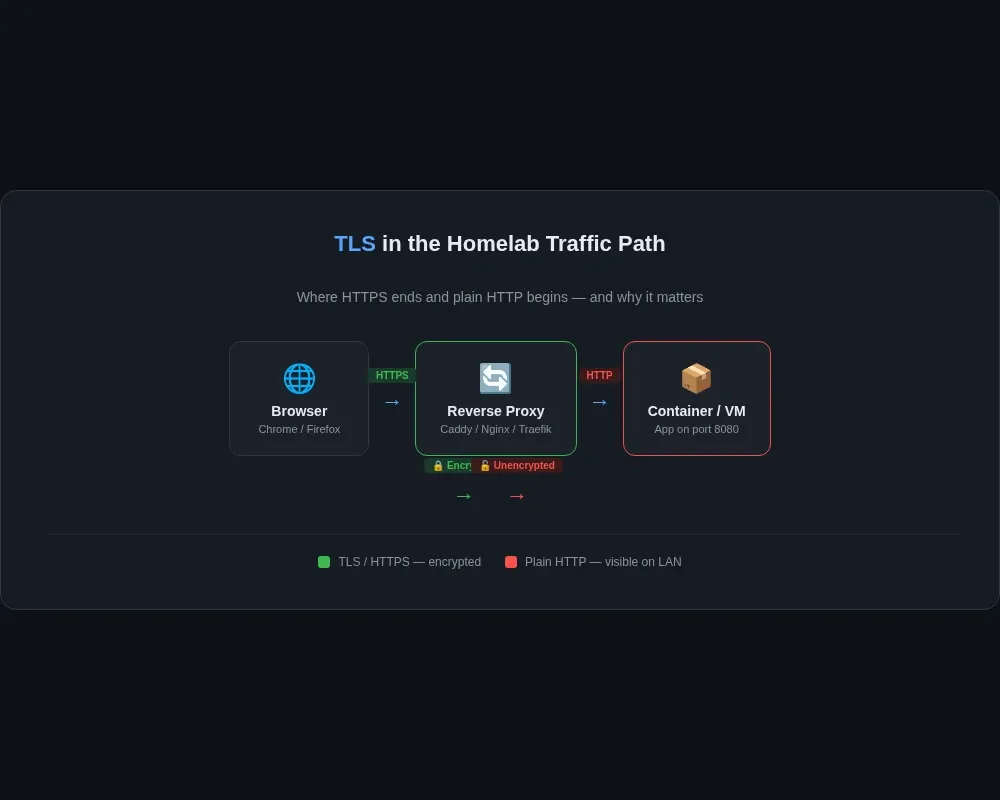
You put Caddy, Nginx, or Traefik in front, get a valid certificate for app.example.com, and call it done. From the browser to the reverse proxy, everything is encrypted. From the reverse proxy to the actual container, it is often plain HTTP on port 80 or 8080.
That is not automatically wrong. On a single mini PC with a couple of containers, internal TLS is rarely the first problem I would fix. Weak passwords, overexposed dashboards, and lazy network rules usually matter more.
But once a homelab grows beyond "one box, three containers," plain HTTP starts spreading everywhere. A reverse proxy talks to one VM over HTTP. A helper container calls another API with no encryption. A dashboard sends session cookies across the LAN because "it's only internal." That is the point where internal TLS stops being cosmetic and starts being decent housekeeping.
My view is simple: if a service is worth exposing through a nice hostname, it is probably worth deciding how you want to trust it internally too.
Where plain HTTP sneaks back in
The usual pattern looks like this:
- Browser to reverse proxy: HTTPS
- Reverse proxy to upstream app: HTTP
- App to database: whatever the default was
- Admin tool to API endpoint: plain HTTP because it lives on the same subnet
That can be acceptable in a tiny setup where everything runs on one host and nothing else can reach the traffic path. I still would not call it a long-term design. The moment you add another VM, another Docker host, or a tunnel back into the network, your "internal only" assumption gets weaker.
This came up for me while thinking about the same problem I discussed in my
 Techie Mike
Once you start putting tools behind reverse proxies and opening remote admin paths, the old habit of "just use HTTP inside" sticks around long after the setup stopped being small.
Internal TLS does not make a homelab secure. It does do three practical things:
- It reduces casual packet snooping on segments you do not fully trust.
- It lets you test the same HTTPS assumptions internally that you expect externally.
- It stops you from building workflows that silently depend on insecure defaults.
That third one matters more than people admit. If your automation only works when certificate checks are disabled, you have already taught your stack a bad habit.
The three approaches that actually make sense
I would ignore the endless certificate-tool rabbit hole and stick to three realistic options.
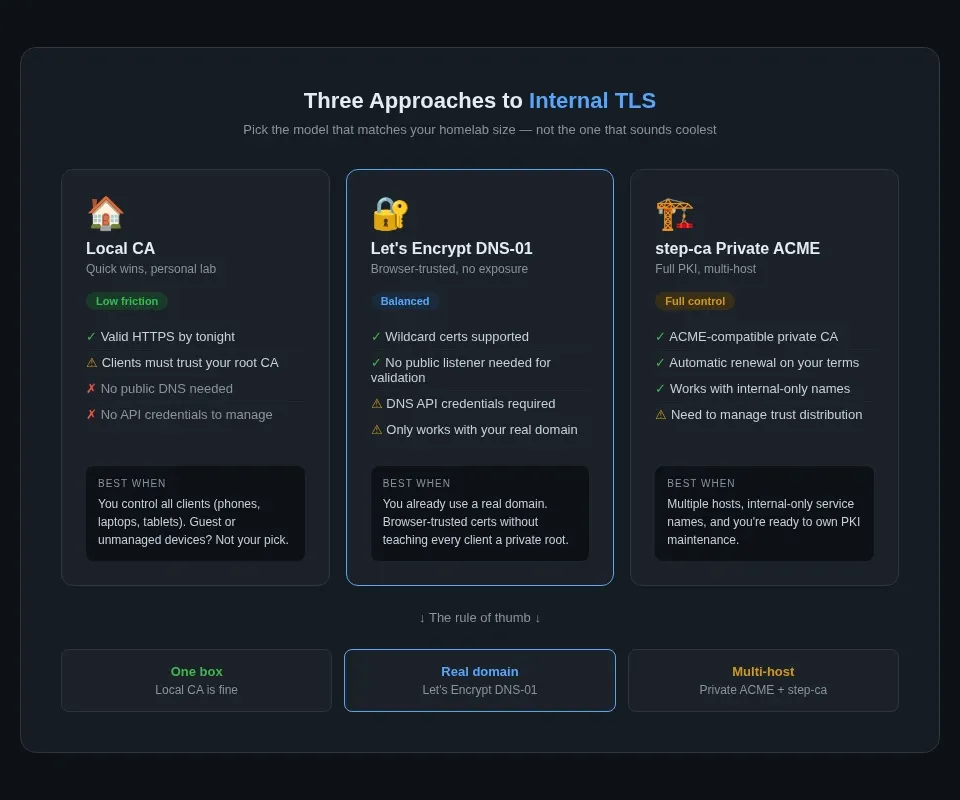
1. Local CA for quick wins
If your goal is "I want valid-looking HTTPS inside the lab by tonight," a local CA is the low-friction option.
Caddy has a local_certs option that tells it to issue certificates internally instead of using a public ACME CA. That makes it useful for development environments and small private networks where you control the clients. The catch is the same as every private CA setup: the clients have to trust your root certificate first.
This is the best fit when:
- you mostly browse services from your own machines
- you control the phones, laptops, or tablets that need trust installed
- you want HTTPS warnings gone without involving public DNS
This is the worst fit when:
- guests or unmanaged devices need access
- you do not want to distribute a root CA to every client
- you expect native apps to behave nicely with an untrusted chain
In other words, local CA is tidy for a personal lab, messy for a shared one.
2. Let's Encrypt with DNS-01 for services under your real domain
If your internal services already use names under a public domain you control, DNS-01 is usually the cleanest answer.
Let's Encrypt's DNS-01 challenge docs explain that your ACME client places a TXT record under _acme-challenge for the domain. Those docs also note two details that matter here: DNS-01 can issue wildcard certificates, and it only makes sense when your DNS provider has an API you can automate.
That means you can issue certificates for names under your domain without exposing the service itself on the public internet, as long as you can update DNS records for the validation step.
This is the setup I would reach for if you already use a real domain for your homelab and want browser-trusted certificates without teaching every client to trust a private root.
It works especially well with reverse proxies that already understand ACME. Traefik's ACME docs explicitly support dnsChallenge, and the same docs note that ACME v2 wildcard certificates require a DNS-01 challenge.
The downside is operational, not conceptual. You now have DNS API credentials in the mix. That is manageable, but it deserves the same care I talked about in the Cloudflare self-managed OAuth post: narrowly scoped credentials beat one giant token that can edit everything.
3. Private ACME with step-ca when the lab stops being small
If you have multiple machines, multiple services, and want certificates to renew automatically without public DNS hacks, this is where step-ca starts making sense.
The useful part is not just "run your own CA." The step-ca ACME basics docs show that step-ca supports ACME, so standard ACME clients can request certificates from your own certificate authority instead of from a public provider. That means you can keep the familiar issuance flow while staying fully inside your own trust model.
This is the option I would choose when:
- you have several hosts, not just several containers
- internal service names are not part of public DNS
- you want one internal CA instead of one-off self-signed certs everywhere
- you are prepared to manage trust distribution properly
This is also the point where you need to be honest with yourself. A private CA is not hard because of certificate issuance. It is hard because every client needs the root certificate installed correctly, and you need a plan for renewal, revocation, and what happens when you rebuild devices.
If that sounds annoying, that is because PKI is annoying. The tooling got better. The responsibility did not.
My rule of thumb
Here is the version I would give to anyone building a real homelab instead of a PKI hobby project.
- One box, mostly personal devices, low stakes: local CA is fine.
- Public domain already in use, want normal browser trust: Let's Encrypt with DNS-01.
- Several hosts, several internal names, long-term setup: private ACME with step-ca.
What I would not do is collect five half-solutions at once.
I have seen a lot of homelabs end up with one self-signed cert for Grafana, a reverse proxy wildcard from Let's Encrypt, one app running plain HTTP forever, and a note to "fix later" on the service that matters most. That is not a design. That is archaeology.
What to test before you call it done
After you flip a service to HTTPS, test the boring parts.
These examples are worth keeping around:
curl -vk https://service.example.internal/
openssl s_client -connect service.example.internal:443 -servername service.example.internal </dev/null
curl -k is useful for checking what the service is presenting before the trust chain is fixed on the client. openssl s_client is useful when you want to see the certificate chain and the server name negotiation more directly.
Then check the stuff people skip:
- Does the reverse proxy still verify the upstream certificate?
- Did you leave a fallback HTTP listener running?
- Do mobile apps trust the chain, or only browsers?
- Are health checks still pointed at
http://out of habit? - Did you disable certificate verification anywhere just to "get it working"?
That last one is the trap. If the final configuration includes "skip verification" on the client side, you have paid most of the complexity cost of TLS without getting the authentication benefit of verification.
Is internal TLS worth it?
Usually, yes. Immediately, not always.
If you are still at the stage where your homelab needs a better backup routine, fewer exposed ports, or clearer remote access, fix those first. My SSH tunnels guide is a better use of an evening than building a private CA you will not maintain.
But if the lab already has multiple services, multiple trust boundaries, or admin tools that cross the network regularly, internal TLS is worth doing. Not because it makes the setup invincible. It does not. It is worth doing because it removes one more lazy default from a system you are going to keep expanding.
And that is the part people miss.
Homelab security is usually not about one dramatic mistake. It is about five convenience decisions that pile up quietly. Plain HTTP inside the network is often one of them.
So no, I would not tell every beginner to spend Saturday morning standing up a full CA.
I would tell them to pick one of the three models above, use it consistently, and stop pretending the word internal automatically means trustworthy.