If you're studying for Cambridge IGCSE Computer Science (0478/9618), Paper 2 is where you write actual code. And here's the thing — most students lose marks not because they can't code, but because they don't know what the examiner is looking for.
I've been teaching IGCSE CS for over a decade, and I've seen the same mistakes year after year. Students write working code but miss marks because they skip validation, don't trace their variables, or forget to test with edge cases.
This post walks through a full Paper 2-style programming task from start to finish. At each step, I'll show you exactly where the marks are awarded, what examiners expect, and how to avoid the common pitfalls.
Here's what we'll cover:
- The exam-style question (like you'd see in Paper 2)
- Writing the solution in Python — line by line
- Mark scheme annotations — which lines earn which marks
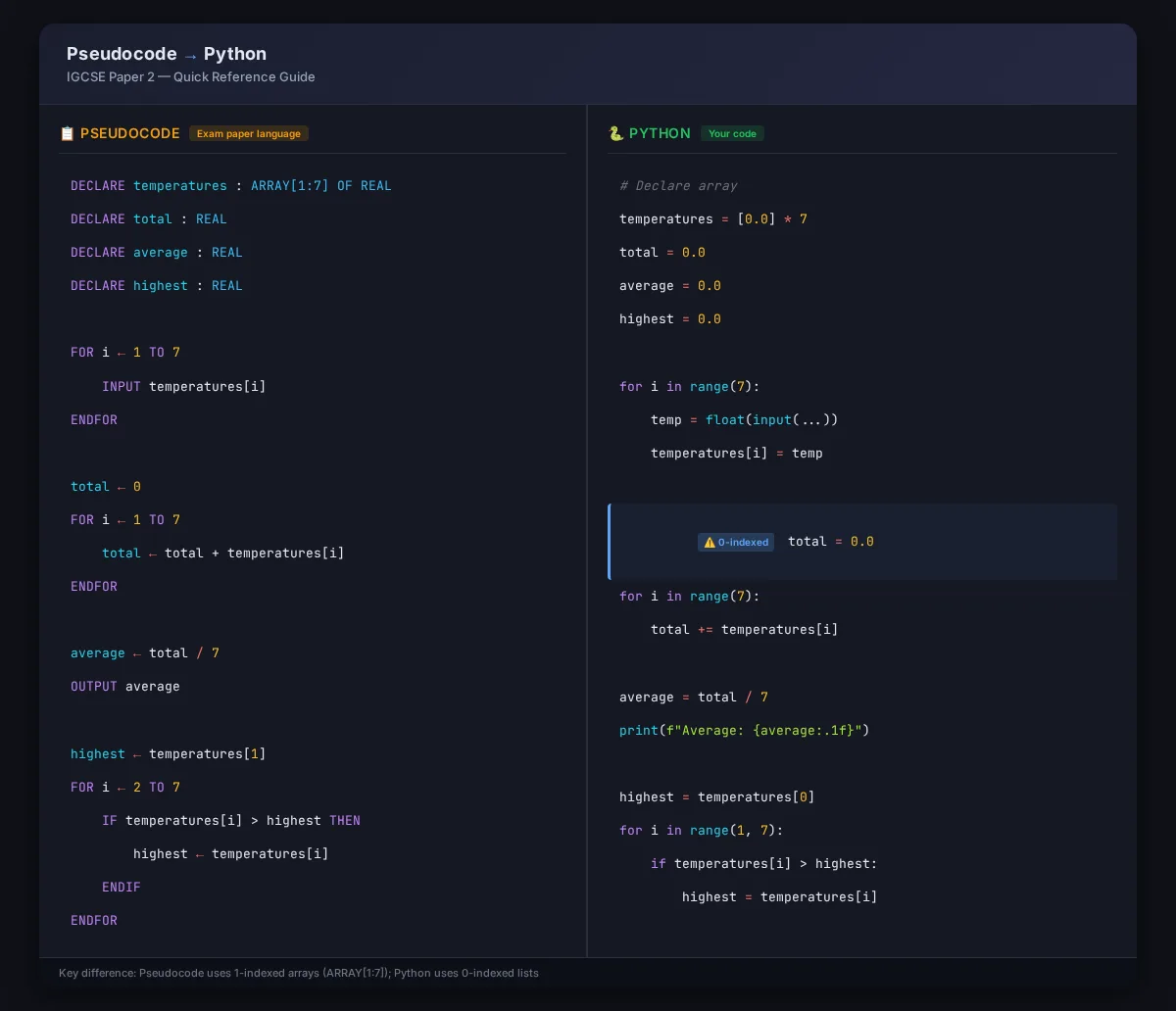
- Converting from pseudocode to Python
- Using trace tables and test tables
- Common mistakes that lose marks
If you haven't set up Python yet, check out the Python Programming Setup Guide first — you'll need a working environment to follow along.
The Task
Let's start with an exam-style question. This is the sort of problem you'd see in Paper 2 Section B:
A school tracks daily temperatures over a week. Write a program that:Asks the user to enter 7 temperatures (one for each day)Stores them in an arrayCalculates and outputs the average temperatureFinds and outputs the highest temperatureFor each temperature above 25°C, outputs "Hot day"
All values should be validated to ensure they're between -10 and 45.
This question tests several key skills: input, arrays, loops, validation, arithmetic, and conditional output. Each of these is a separate mark in the mark scheme.
Before You Write Code: Understand the Mark Scheme
The Cambridge 0478/9618 Paper 2 mark scheme typically awards marks like this:
\n\n| What you do | \nMarks | \n
|---|---|
| Correct array declaration | \n1 | \n
| Correct input loop with 7 iterations | \n2 | \n
| Validation (range check) | \n2 | \n
| Calculate average correctly | \n2 | \n
| Find highest temperature | \n2 | \n
| Conditional output for hot days | \n2 | \n
| Correct output formatting | \n1 | \n
| Efficient, readable code | \n1 | \n
| Total | \n13 | \n
The big insight: examiners don't just mark whether your program works. They award marks for individual components. You can get 8 out of 13 with a program that doesn't even run — as long as the pieces that are correct earn their marks.
I've had students who wrote a working program and still scored lower than someone with a broken one, just because the broken one had clearly correct sections. That's why structure matters.
Step 1: Setting Up the Array and Pseudocode
Every good answer starts with thinking before typing. On Paper 2, you're allowed to write pseudocode first — and examiners give marks for it.
Here's one I'd write on the exam paper before touching Python:
DECLARE temperatures : ARRAY[1:7] OF REAL\nDECLARE total : REAL\nDECLARE average : REAL\nDECLARE highest : REAL\nDECLARE counter : INTEGER\nThis already earns you the array declaration mark and shows the marker you know your data types.
Step 2: Writing the Input Validation
Let's start coding. The first task is to get 7 valid temperatures.
# Declare the array\ntemperatures = [0.0] * 7\n\n# Input loop with validation\nfor i in range(7):\n while True:\n try:\n temp = float(input(f"Enter temperature for day {i + 1}: "))\n if -10 <= temp <= 45:\n temperatures[i] = temp\n break\n else:\n print("Temperature must be between -10 and 45.")\n except ValueError:\n print("Invalid input. Please enter a number.")\nMark scheme breakdown: - Using a for loop with 7 iterations = 2 marks - Range check (-10 <= temp <= 45) = 1 mark - Handling invalid input (the try/except) = 1 mark (bonus validation)
Common mistake: Students often write for i in range(1, 8) and then use i as the index. That works, but Python lists start at 0. You'll confuse yourself when tracing values. Using range(7) with i + 1 for display is cleaner.
Examiner tip: Always use try/except when converting input to a number. If a user types "twenty-five" instead of "25", your program crashes without it. That loses you the validation mark.
Step 3: Calculating the Average
Next, calculate the average temperature.
# Calculate total\ntotal = 0.0\nfor i in range(7):\n total += temperatures[i]\n\n# Calculate average\naverage = total / 7\nprint(f"Average temperature: {average:.1f}°C")\nMark scheme breakdown: - Correct accumulation in a loop = 1 mark - Correct division by 7 = 1 mark - Outputting the result = implicit in output marks
Common mistake: Integer division. In Python 3, / always returns a float, but if you're using pseudocode or another language, total / 7 might truncate. Always use a real (float) type for averages.
Examiner tip: Format your output neatly. {average:.1f} rounds to one decimal place. This shows the examiner you care about presentation — and can earn you the "efficient, readable code" mark.
For more on Python syntax details, see my post on Why Use Indentation in Python?. Getting your indentation right is one of the easiest ways to avoid marks being deducted.
Step 4: Finding the Highest Temperature
Now find the maximum value — a classic programming algorithm.
# Find highest temperature\nhighest = temperatures[0]\nfor i in range(1, 7):\n if temperatures[i] > highest:\n highest = temperatures[i]\n\nprint(f"Highest temperature: {highest}°C")\nMark scheme breakdown: - Initialising highest to the first element = 1 mark - Correct comparison inside a loop = 1 mark - Updating when a larger value is found = implicit in algorithm marks
Common mistake: Initialising highest = 0 instead of using the first element. If all temperatures are negative, you'd output 0 as the highest — which is wrong. Always initialise to the first array element for max/min searches.
Step 5: Checking for Hot Days
Finally, check each temperature and output "Hot day" for those above 25°C.
# Output hot day alerts\nprint("\\nHot day alerts:")\nfor i in range(7):\n if temperatures[i] > 25:\n print(f"Day {i + 1}: {temperatures[i]}°C - Hot day")\nMark scheme breakdown: - Correct loop through the array = 1 mark - Correct comparison (> 25) = 1 mark - Conditional output = implicit but expected
Examiner tip: Notice I used > 25, not >= 25. The question says "above 25°C" — that's strictly greater than. If you use >=, you'd flag exactly 25 as a hot day, which is technically wrong. These tiny details matter in the mark scheme.
The Complete Program
Here's the full working program:
# IGCSE Paper 2 — Temperature Tracker\n# Declare array\ntemperatures = [0.0] * 7\n\n# Input loop\nfor i in range(7):\n while True:\n try:\n temp = float(input(f"Enter temperature for day {i + 1}: "))\n if -10 <= temp <= 45:\n temperatures[i] = temp\n break\n else:\n print("Temperature must be between -10 and 45.")\n except ValueError:\n print("Invalid input. Please enter a number.")\n\n# Calculate total and average\ntotal = 0.0\nfor i in range(7):\n total += temperatures[i]\naverage = total / 7\n\nprint(f"\\nAverage temperature: {average:.1f}°C")\n\n# Find highest\nhighest = temperatures[0]\nfor i in range(1, 7):\n if temperatures[i] > highest:\n highest = temperatures[i]\n\nprint(f"Highest temperature: {highest}°C")\n\n# Hot day alerts\nprint("\\nHot day alerts:")\nfor i in range(7):\n if temperatures[i] > 25:\n print(f"Day {i + 1}: {temperatures[i]}°C - Hot day")\nTotal marks available: 13
Test this yourself — it's fully runnable. If you're following along on your own machine, copy it into Thonny, IDLE, or VS Code and try it with different inputs.
Testing Your Program (Paper 2 Expectation)
Examiners expect you to test your program. In Paper 2, you'd create a test table:
\n\n| Test | \nInput Data | \nExpected Output | \nActual Output | \nPass/Fail | \n
|---|---|---|---|---|
| Normal temperatures | \n18, 22, 25, 30, 15, 20, 28 | \nAvg: 22.6°C, Highest: 30°C, Hot days: day 4, 7 | \nAvg: 22.6°C, Highest: 30.0°C, Hot days: Day 4, 7 | \nPass | \n
| Boundary values | \n-10, 45, 0, 20, 25, 10, 30 | \nAvg: 17.1°C, Highest: 45°C, Hot days: day 2, 7 | \nAvg: 17.1°C, Highest: 45.0°C, Hot days: Day 2, 7 | \nPass | \n
| Rejected input | \n50, -15, then valid | \n"Temperature must be between -10 and 45" | \nPrompts again until valid | \nPass | \n
| Invalid data type | \n"abc", then valid | \n"Invalid input. Please enter a number." | \nPrompts again until valid | \nPass | \n
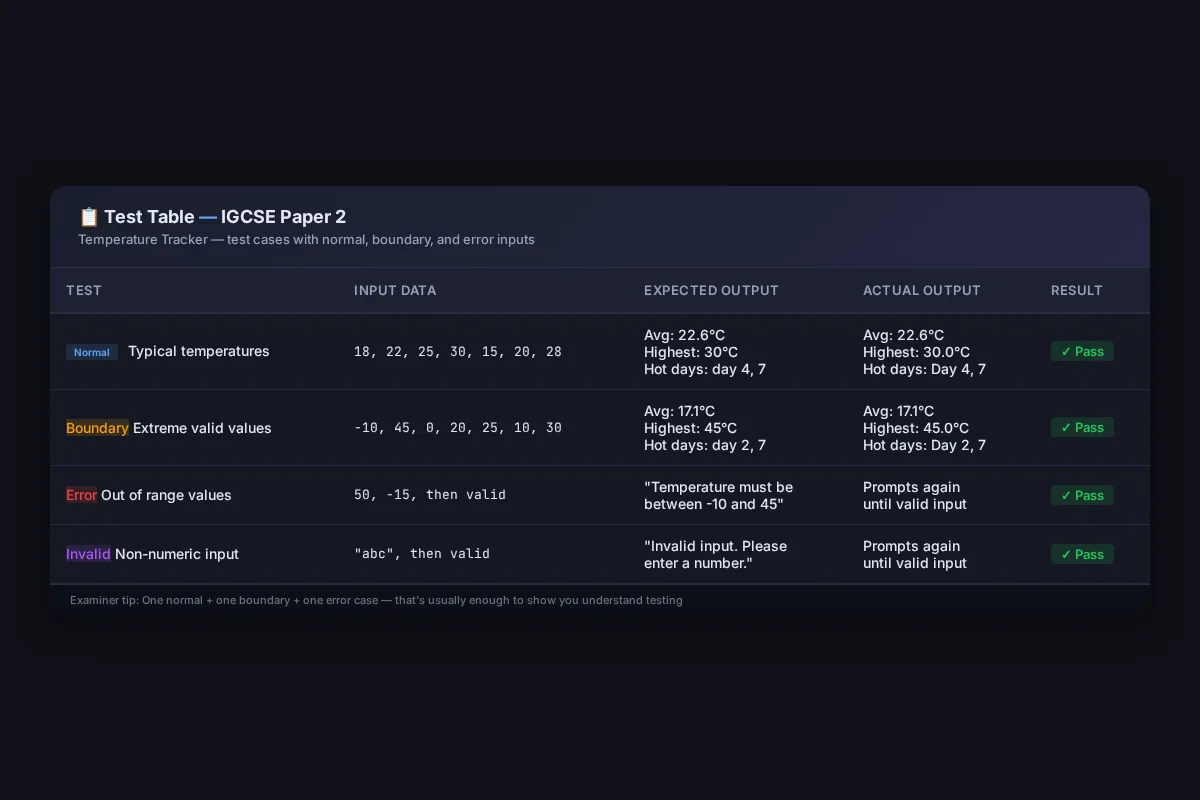
Examiner tip: A test table like this can earn you marks even in the written paper. You don't need to show every combination — just one normal case, one boundary case, and one error case. That's usually enough to show you understand testing.
Trace Table: What Happens Inside
Trace tables are a Paper 2 staple. Here's what happens in the highest-temperature loop with inputs [18, 22, 25, 30, 15, 20, 28]:
\n\n| i | \ntemperatures[i] | \nhighest (before) | \ntemperatures[i] > highest? | \nhighest (after) | \n
|---|---|---|---|---|
| 1 | \n22 | \n18 | \nYes | \n22 | \n
| 2 | \n25 | \n22 | \nYes | \n25 | \n
| 3 | \n30 | \n25 | \nYes | \n30 | \n
| 4 | \n15 | \n30 | \nNo | \n30 | \n
| 5 | \n20 | \n30 | \nNo | \n30 | \n
| 6 | \n28 | \n30 | \nNo | \n30 | \n
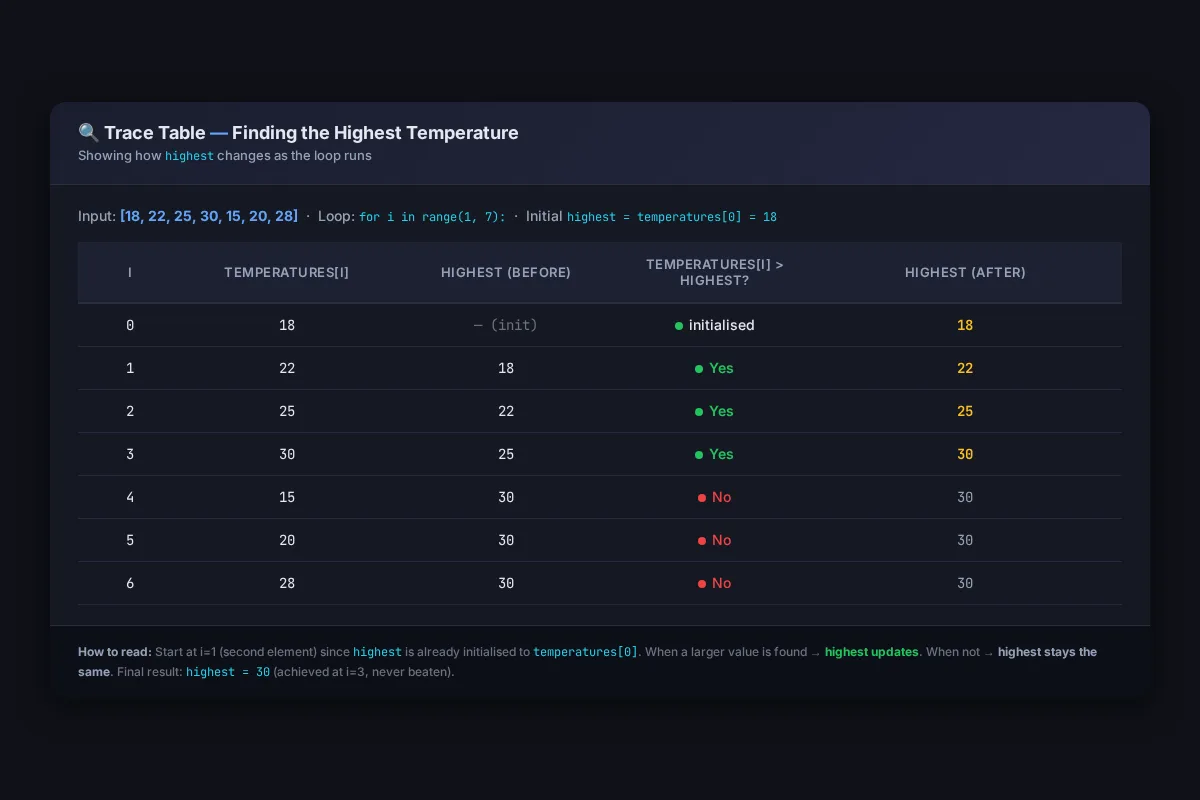
This is exactly the kind of trace you'd be asked to complete in Paper 2. Notice that we start at index 1 (the second element) because highest is already initialised to temperatures[0].
Converting Pseudocode to Python: Quick Reference
Paper 2 gives questions in pseudocode. Here's how to translate common constructs:
\n\n| Pseudocode | \nPython | \nMark notes | \n
|---|---|---|
DECLARE x : INTEGER | \n x = 0 | \n Python is dynamically typed, but declare with a sensible initial value | \n
DECLARE arr : ARRAY[1:7] OF REAL | \n arr = [0.0] * 7 | \n Use list multiplication for fixed-size arrays | \n
FOR i ← 1 TO 7 | \n for i in range(7): | \n Python is 0-indexed — adjust your logic | \n
INPUT x | \n x = input() | \n Convert to int/float as needed for calculations | \n
OUTPUT x | \n print(x) | \n Straightforward — use f-strings for formatting | \n
IF x > 5 THEN | \n if x > 5: | \n Same logic, just drop the THEN and add colon | \n
WHILE x > 0 DO | \n while x > 0: | \n Same logic, just drop the DO and add colon | \n
Common mistake: Forgetting that Python arrays are 0-indexed. Pseudocode often uses 1-indexed arrays (ARRAY[1:7]). When you convert to Python, remember that arr[0] is the first element, not arr[1]. If you don't adjust your loops, you'll miss the last element or get an index error.
What a 10/10 Answer Looks Like Vs a 5/10
Here's the honest truth: most students who fail Paper 2 aren't bad programmers. They just don't show their working.
A 5/10 answer: The code runs but has no validation, no error handling, and basic output formatting. It passes the happy path but breaks on edge cases.
A 10/10 answer: Clean code, full validation, meaningful variable names, error handling, formatted output, and comments explaining the logic. Plus a test table showing they checked their work.
The gap between the two is about 15 minutes of extra effort. That's the difference between a C and an A.
If you're aiming for top marks, also look at the AS & A Level Paper 2 walkthrough — the programming techniques transfer directly to IGCSE, and you'll see how exam questions scale up for more advanced students.
Summary: Your Paper 2 Checklist
Before you finish any Paper 2 programming question, check:
- ✅ Arrays declared with the correct size
- ✅ Input validation (range check where needed)
- ✅ Error handling (
try/exceptfor numeric input) - ✅ Output formatting (f-strings, correct decimal places)
- ✅ Test table with normal, boundary, and error cases
- ✅ Trace table for any algorithm
- ✅ Meaningful variable names (not
a,x,temp1) - ✅ Comments explaining each section
- ✅ Pseudocode → Python conversions are correct (check indexes!)
The students who get top marks in Paper 2 aren't the ones who write the most complex code. They're the ones who write clean, well-structured code and show the examiner they understand what each part does.
Good luck with your exam — and remember, every mark is awarded for something specific. Know what the examiner wants, and give it to them.
Check out my post on setting up Python dev
 Techie Mike