


The June 2026 Cambridge AS/A-Level Computer Science Paper 1 (9618) has just been sat. If you took it, you're probably wondering how you did. If you're preparing for a future sitting, you want to know what topics come up and how to score full marks.
I've been teaching Cambridge A-Level CS for over a decade, and I've seen the same patterns repeat across every Paper 1 — the same topics, the same question styles, and the same mistakes that cost students easy marks.
This guide covers the AS theory topics assessed in Cambridge 9618 Paper 1: sections 1–8 of the syllabus. For each section, I'll show you what examiners look for, the question styles that commonly appear, model answers, and the pitfalls that catch students out.
If you sat the 2025 paper, you can also check out my full June 2025 Paper 1 walkthrough series for comparison.
Paper 1 at a Glance
Paper 1 tests theory — no programming. It's worth 75 marks over 1 hour 30 minutes. The questions cover the AS syllabus: sections 1–8.
These are the topic areas that commonly appear, along with the relative weight examiners tend to give them:
| Section | Topic | Common Revision Areas |
|---|---|---|
| 1 | Information representation | Binary, hex, two's complement, BCD, sound and image representation |
| 2 | Communication | Protocols, packet switching, network topologies, internet technologies |
| 3 | Hardware | Logic gates, Boolean algebra, input/output/storage devices |
| 4 | Processor fundamentals | Von Neumann architecture, registers, fetch-execute cycle, interrupts, assembly language |
| 5 | System software | Operating systems, utility software, language translators, IDEs |
| 6 | Security, privacy and data integrity | Threats, security measures, encryption, validation vs verification |
| 7 | Ethics and ownership | Professional ethics, copyright, software licensing, AI impact |
| 8 | Databases | Primary/foreign keys, SQL, normalisation |
Examiners award marks for individual components — not just whether your answer is right. You can pick up 6 out of 8 marks on a question even if your final answer is incomplete, as long as each correct part earns its allocation.
1. Information Representation
This section appears on every paper and tests conversion fluency. You need to convert between denary, binary, hexadecimal, two's complement, and BCD without hesitation. For a deeper dive into binary and hex with visual examples, see my Number Systems Visual Guide.
Binary → Denary → Hex
| Denary | Binary (8-bit) | Hex |
|---|---|---|
| 45 | 0010 1101 | 2D |
| 170 | 1010 1010 | AA |
| 255 | 1111 1111 | FF |
Two's Complement
Two's complement represents negative numbers so the CPU can perform subtraction using addition. To find the two's complement: invert all bits, then add 1.
Example — Represent –45 in 8-bit two's complement: 1. Write +45 in 8-bit binary: 0010 1101 2. Invert all bits (one's complement): 1101 0010 3. Add 1: 1101 0011
So –45 is 1101 0011 in 8-bit two's complement.
Range: 8-bit = −128 to +127, 16-bit = −32,768 to +32,767.
Common mistake: Mixing up the range formula. For n bits: −2^(n−1) to +2^(n−1) − 1.
BCD (Binary-Coded Decimal)
Represent each decimal digit as its own 4-bit binary number. Used where exact decimal representation matters (calculators, digital displays).
Example — Represent 257 in BCD: - 2 → 0010 - 5 → 0101 - 7 → 0111 Result: 0010 0101 0111
Common mistake: Converting the whole number to binary (257 = 1 0000 0001) instead of encoding each digit separately.
Sound and Image Representation
Paper 1 often includes questions on how computers represent multimedia:
- Bitmap images: a grid of pixels, each assigned a colour value. Resolution = width × height in pixels. Colour depth = bits per pixel.
- Sound sampling: converting analogue sound to digital by taking samples at regular intervals. Sample rate (Hz) and bit depth determine quality. File size = sample rate × bit depth × duration × channels.
Common mistake: Confusing sample rate (how often we measure) with bit depth (how many bits per measurement).
2. Communication
Protocols
The examiner wants to know what each protocol does, not just its name.
| Protocol | Layer/Purpose | What It Does |
|---|---|---|
| TCP | Transport | Reliable, connection-oriented delivery with error checking, acknowledgements, and sequencing |
| IP | Network | Routes packets across networks using IP addresses — connectionless, no delivery guarantee |
| HTTP/HTTPS | Application | Transfers web pages; HTTPS adds SSL/TLS encryption |
| FTP | Application | Transfers files between client and server |
| SMTP | Application | Sends email from client to server |
| POP3/IMAP | Application | Retrieves email from server to client |
Model answer — "Explain the difference between TCP and IP":
IP handles addressing and routing — it gets packets from source to destination across networks but does not guarantee delivery. TCP runs on top of IP and adds reliability: it numbers packets, acknowledges receipt, retransmits lost packets, and reassembles them in the correct order at the destination.
Packet Switching
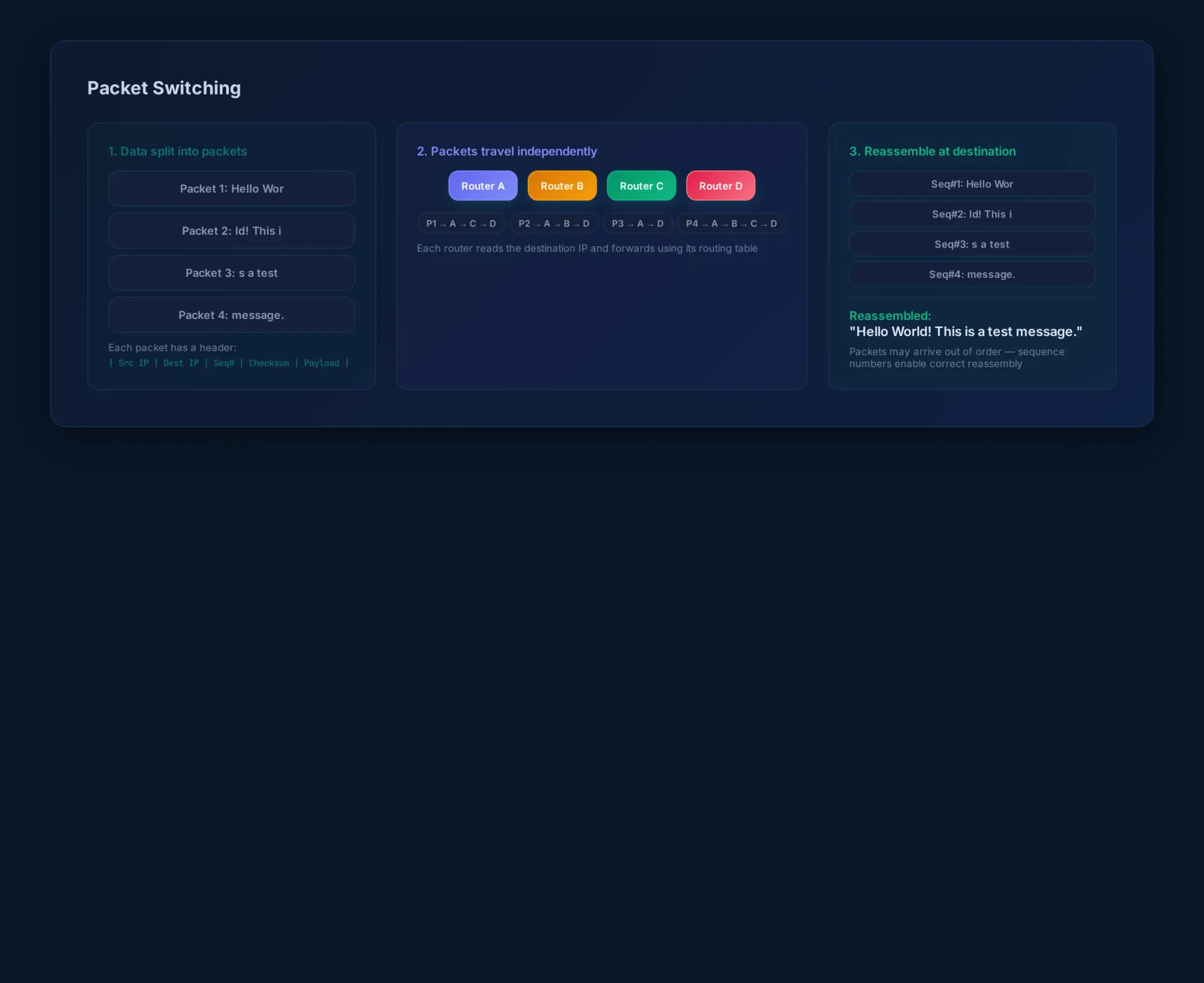
Model answer — "Describe how packet switching works":
Data is split into packets. Each packet contains a header (source/destination IP, sequence number, checksum) and a payload (the data). Packets travel independently across the network through routers. Each router reads the destination address and forwards the packet to the next hop using its routing table. At the destination, packets are reassembled into the correct order using sequence numbers.
Common mistake: Forgetting to mention sequence numbers or reassembly. The fact that packets can arrive out of order is the whole point.
3. Hardware
Logic Gates & Boolean Algebra
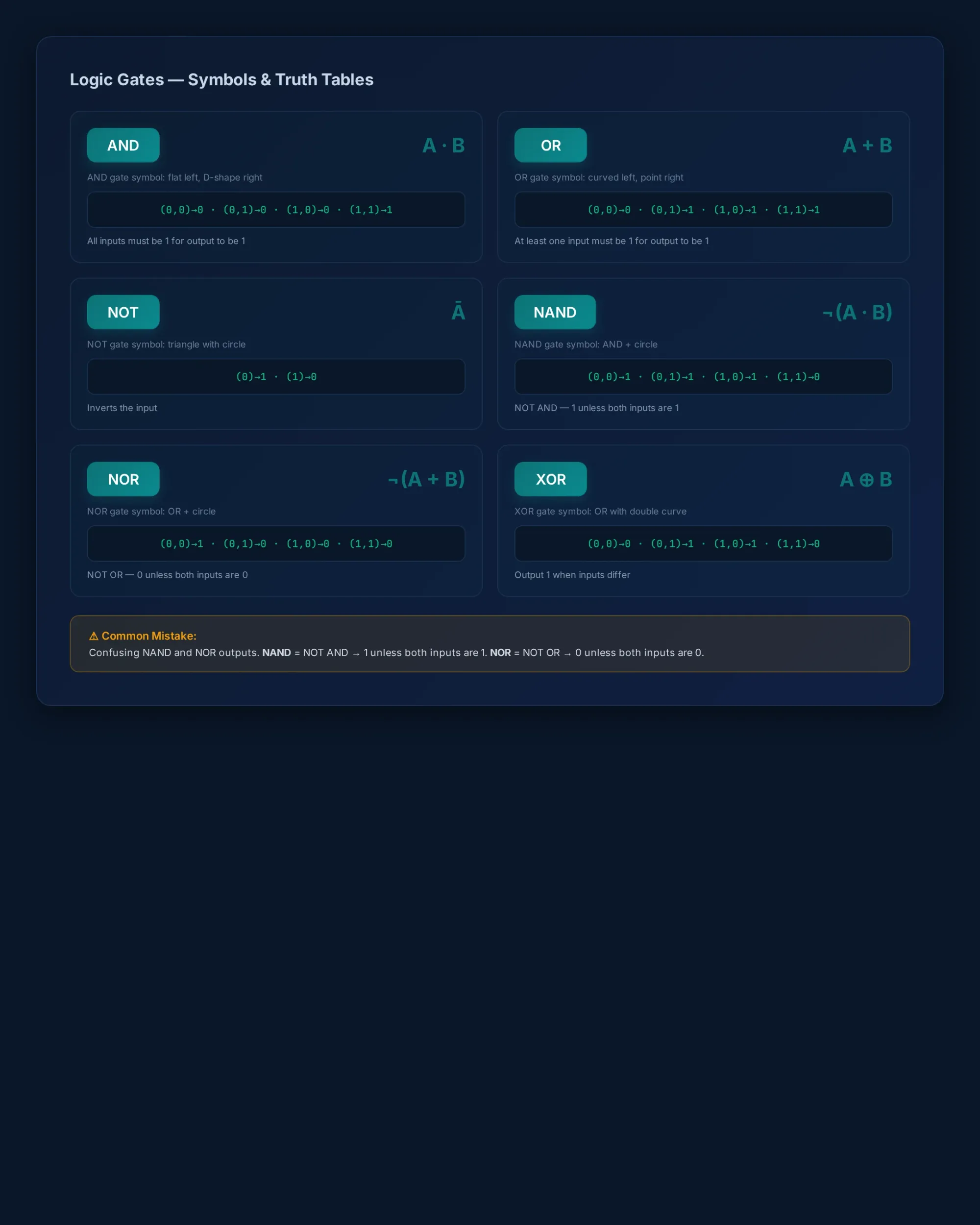
You need to be able to: - Draw logic circuits from Boolean expressions - Complete truth tables for AND, OR, NOT, NAND, NOR, XOR - Simplify expressions using Boolean algebra
| Gate | Symbol | Truth Table (A,B → Output) |
|---|---|---|
| AND | A·B | (0,0)→0, (0,1)→0, (1,0)→0, (1,1)→1 |
| OR | A+B | (0,0)→0, (0,1)→1, (1,0)→1, (1,1)→1 |
| NOT | Ā | 0→1, 1→0 |
| NAND | ¬(A·B) | (0,0)→1, (0,1)→1, (1,0)→1, (1,1)→0 |
| NOR | ¬(A+B) | (0,0)→1, (0,1)→0, (1,0)→0, (1,1)→0 |
| XOR | A⊕B | (0,0)→0, (0,1)→1, (1,0)→1, (1,1)→0 |
Common mistake: Confusing NAND and NOR outputs. NAND = "NOT AND" — it's 1 unless both inputs are 1. NOR = "NOT OR" — it's 0 unless both inputs are 0.
Input and Output Devices
Paper 1 commonly asks you to describe how devices work: - Sensors: measure physical quantities (temperature, light, pressure) and convert them to digital signals via an ADC - Touchscreens: capacitive (detects electrical charge from finger) vs resistive (pressure on two layers) - Printers: laser (toner fused by heat), inkjet (liquid ink sprayed through nozzles), 3D (additive manufacturing)
Common mistake: Describing what a device does instead of how it works. Examiners want the mechanism.
4. Processor Fundamentals
This is almost always Question 1, and it's worth a lot of marks.
Von Neumann Architecture
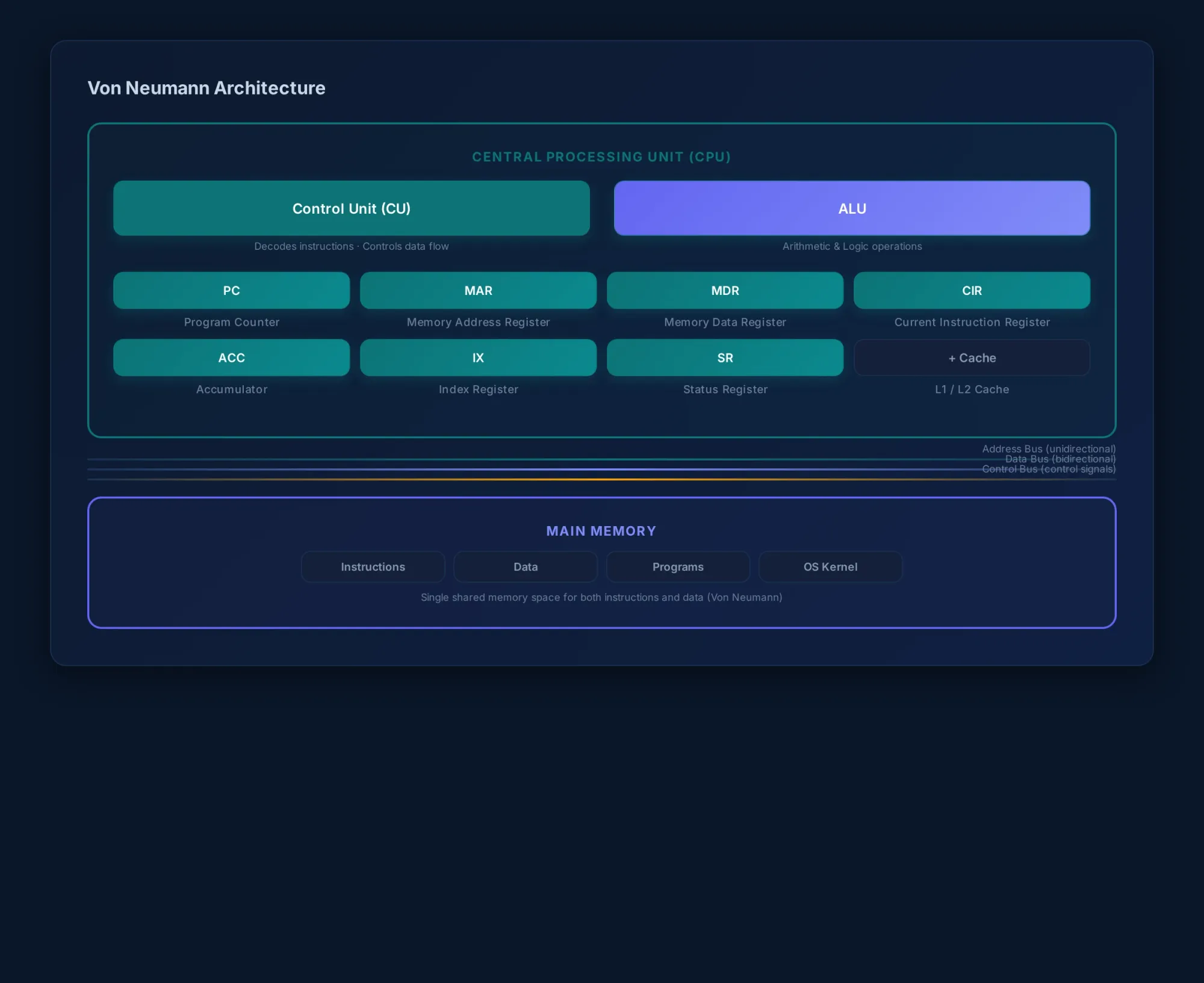
The Von Neumann model uses a single memory store for both data and instructions. Examiners want you to name registers and explain what they do — not just list them.
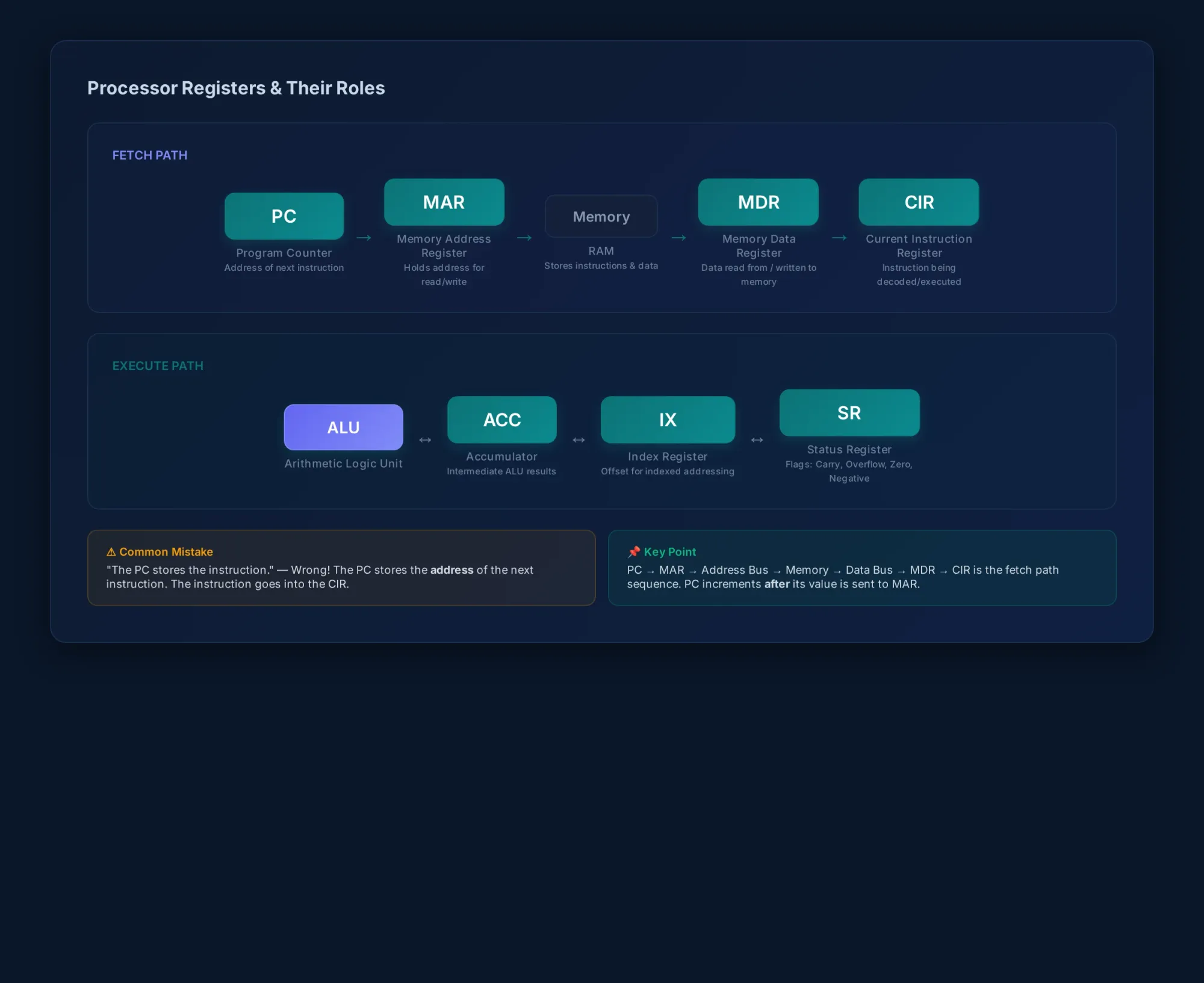
Key registers: - PC (Program Counter): stores the address of the next instruction — not the instruction itself - MAR (Memory Address Register): holds the address being read from or written to - MDR (Memory Data Register): holds the data that has been read from or is about to be written to the address in MAR - CIR (Current Instruction Register): holds the instruction currently being decoded or executed - ACC (Accumulator): stores intermediate results from the ALU - IX (Index Register): used for indexed addressing — modifies operand addresses - Status Register: holds flags (carry, overflow, negative, zero) set by the ALU
Common mistake: Students say "the PC stores the instruction." It stores the address of the next instruction. The instruction itself goes into the CIR after being fetched.
Model answer — "Describe the role of the PC and MAR during the fetch stage":
The PC holds the address of the next instruction to be fetched. This address is copied to the MAR. The MAR sends this address along the address bus to memory. The instruction at that address is then retrieved and placed into the MDR via the data bus, and transferred to the CIR for decoding.
The Fetch-Execute Cycle
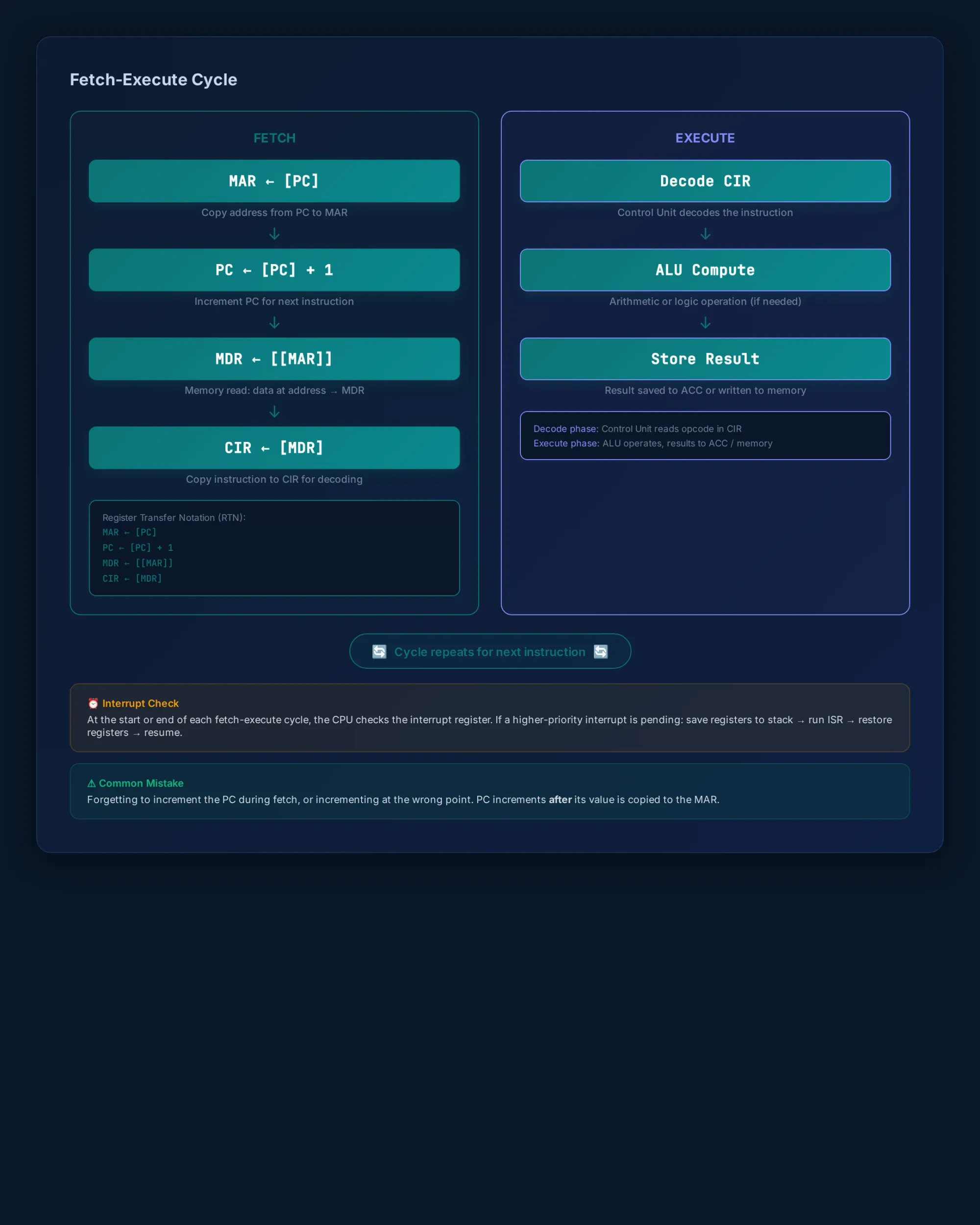
You'll be asked to describe the cycle or annotate Register Transfer Notation (RTN). Here's the sequence:
MAR ← [PC]           // Copy PC to MAR
PC ← [PC] + 1        // Increment PC
MDR ← [[MAR]]        // Fetch instruction from memory
CIR ← [MDR]          // Copy instruction to CIR
// Decode: Control Unit decodes the instruction in CIR
// Execute: Instruction is carried out (may involve ALU, ACC, memory reads/writes)
Common mistake: Forgetting to increment the PC during fetch, or incrementing it at the wrong point. The PC increments after its value is copied to the MAR.
Interrupts
An interrupt is a signal from a device or software that pauses the current process so the CPU can handle something urgent.
Model answer — "Explain how the CPU handles an interrupt from a keyboard":
At the start or end of each fetch-execute cycle, the CPU checks the interrupt register. If an interrupt is present, its priority is compared against the current task. If the interrupt has higher priority, the current contents of registers (PC, ACC, CIR, etc.) are saved to the stack. The CPU then loads and executes the Interrupt Service Routine (ISR) for the keyboard. When the ISR completes, the saved register values are restored from the stack, and the original program resumes.
Common mistake: Students forget to mention the stack, priority checking, or that the interrupt is checked at the start/end of each F-E cycle.
Assembly Language & Addressing Modes
Assembly language uses mnemonics (LDM, ADD, STA, CMP, JMP) instead of machine code. Each instruction translates to an opcode + operand.
| Mode | Operand Is | Example |
|---|---|---|
| Immediate | The actual value | LDM #45 loads value 45 |
| Direct | A memory address | ADD 10 adds contents of address 10 |
| Indirect | A pointer to the address | LDM (20) uses contents of address 20 as pointer to data |
| Indexed | Base address + offset | LDM 100,X loads from address (100 + contents of IX) |
| Relative | Offset from current instruction | JMP -6 jumps backward 6 instructions |
Common mistake: Thinking immediate addressing uses a memory address. The # symbol tells you it's immediate — the operand is the value.
5. System Software
This section tests your understanding of what keeps a computer running beyond the hardware.
Operating System Functions
An operating system manages: - Memory management: allocating RAM to programs, freeing it when programs close, preventing programs from accessing each other's memory - Process management: scheduling which program runs on the CPU at any moment (round-robin, priority-based) - File management: organising files into a directory structure, controlling read/write access - Security management: user accounts, passwords, access rights - Hardware management: communicating with devices through device drivers
Common mistake: Listing OS functions without explaining what each one actually does. "The OS manages memory" doesn't get full marks. Say how — allocates, tracks, frees.
Utility Software
Utilities perform specific maintenance tasks: - Disk defragmentation: reorganises fragmented files into contiguous blocks for faster access (only needed on HDDs, not SSDs) - Virus checkers: scan files for known malware signatures - Backup software: creates copies of data for recovery - File compression: reduces file size for storage or transmission
Language Translators
| Translator | What It Does | Pros | Cons |
|---|---|---|---|
| Assembler | Converts assembly code to machine code | Fast execution, direct hardware access | Platform-specific, harder to write |
| Compiler | Translates whole source code to machine code at once | Fast execution, optimised output | Slow during development — must recompile after every change |
| Interpreter | Translates and executes line by line | Faster debugging, no compile step | Slower execution, must be present to run |
Common mistake: Saying a compiler "runs" the code. It translates it. The compiled executable runs.
6. Security, Privacy and Data Integrity
Security Threats
- Malware: viruses (self-replicating, attaches to files), worms (spreads across networks without user action), spyware (monitors user activity)
- Hacking: unauthorised access to a computer system
- Phishing: fraudulent emails or websites that trick users into revealing personal data
- Pharming: redirecting a legitimate website's traffic to a fake site
Security Measures
| Measure | What It Does |
|---|---|
| Firewall | Monitors and filters incoming/outgoing network traffic based on rules |
| Encryption | Scrambles data so only authorised parties with the key can read it |
| Access rights | Restricts what users can read, write, or execute |
| Antivirus | Scans for and removes known malware using signature databases |
| Digital signatures | Verifies the authenticity and integrity of a message or document |
Model answer — "Explain two security measures a school network should implement":
A firewall should be installed to filter incoming and outgoing traffic, blocking unauthorised access attempts. User accounts with passwords and access rights should be set up so students can only access their own files and appropriate network resources.
Validation vs Verification
This is a classic exam question. Students regularly confuse the two.
- Validation: checking whether data is reasonable or meets specified criteria before it's accepted (range check, length check, format check, presence check)
- Verification: checking whether data has been entered or transferred correctly (double entry, visual check, checksum)
Common mistake: Describing validation as "checking if data is correct." Validation checks if data is possible, not if it's correct. A date of birth of 31/02/2010 passes a format check but is still wrong — only verification catches that.
7. Ethics and Ownership
Professional Ethics
The syllabus expects you to discuss the ethical responsibilities of computer professionals: - Respecting intellectual property and copyright - Protecting user privacy and data - Being honest about system capabilities and limitations - Considering the societal impact of technology
Software Licensing
| Type | Description |
|---|---|
| Free software | Users can run, study, modify, and redistribute (e.g., Linux) |
| Open source | Source code is publicly available; may have restrictions on redistribution |
| Shareware | Free to try for a limited time; payment required for full version |
| Commercial | Requires purchase; source code typically not available |
Common mistake: Using "free software" and "open source" interchangeably. Free software is about user freedom — open source is about code availability. They overlap but aren't the same thing.
AI and Ethics (Brief)
The AS syllabus includes AI ethics in section 7 — not the technical details of how AI works, but its impact on society. Students should be able to discuss: - Employment: AI automating jobs in manufacturing, customer service, and data entry - Bias: AI systems trained on biased data producing discriminatory outcomes - Privacy: AI-powered surveillance and data collection
Keep AI-related answers focused on ethical impact, not technical function. That's what section 7 tests.
8. Databases
SQL questions give you a table structure and ask you to write queries. You need SELECT, INSERT, UPDATE, and DELETE.
Example schema:
Student(StudentID, Name, DateOfBirth, TutorGroup)
Course(CourseID, Title, Department)
Enrolment(StudentID, CourseID, Grade)
Model answer — "List all students in TutorGroup '12A' who have Grade 'A' in any course":
SELECT DISTINCT Student.Name
FROM Student
JOIN Enrolment ON Student.StudentID = Enrolment.StudentID
WHERE Student.TutorGroup = '12A'
AND Enrolment.Grade = 'A';
Common mistake: Forgetting DISTINCT when a student could have multiple A grades, or missing the JOIN condition (causing a Cartesian product).
Primary and Foreign Keys
- Primary key: uniquely identifies each record in a table (e.g., StudentID in Student)
- Foreign key: an attribute in one table that references the primary key of another table (e.g., StudentID in Enrolment references Student.StudentID)
Common mistake: Saying a foreign key is unique in its own table. It's not — the same StudentID appears in many Enrolment rows.
Normalisation
Paper 1 often includes a question about database normalisation: - First Normal Form (1NF): no repeating groups; each cell holds a single value - Second Normal Form (2NF): 1NF + no partial dependencies (every non-key attribute depends on the whole primary key) - Third Normal Form (3NF): 2NF + no transitive dependencies (non-key attributes don't depend on other non-key attributes)
Common mistake: Describing 2NF without first establishing that the table is in 1NF. You must state each form as building on the previous one.
Exam Technique for Paper 1
Over a decade of marking, here's what separates A* candidates from the rest:
- Read the mark allocation. A [1] mark needs one point. A [4] mark needs four distinct points. Don't write a paragraph for a 1-mark question — move on.
- Use the examiner's terminology. If the syllabus calls it "Program Counter," write "Program Counter," not "the thing that holds the next address." You won't lose marks for informal language, but precise terminology shows understanding.
- Show your working for calculations. Even if your final answer is wrong, you can pick up method marks for correct conversions, correct formulas, or correct intermediate steps.
- Don't repeat the question in your answer. "The Program Counter stores the address of the next instruction" gets the mark. "The PC is a register that is used for storing the address" says the same thing with more words.
- For "explain" and "describe" questions, give a reason. "The stack uses LIFO" is a statement. "The stack uses LIFO because the most recently pushed item is always the first one accessed" is an explanation.
- Time management: Paper 1 is 75 marks in 90 minutes — roughly 72 seconds per mark. Don't spend 10 minutes on a 4-mark question. Mark it, move on, come back if you have time.
What This Means for Paper 2
Paper 1 covers the theory. Paper 2 tests practical programming — pseudocode, algorithm design, and problem-solving. If you've just finished Paper 1, here's what to focus on next:
- Writing pseudocode procedures with loops and conditionals
- File handling commands: OPEN, READ, WRITE, CLOSE
- Arrays: declaration, traversal, searching
- Algorithm tracing — given pseudocode and inputs, predict the output
If you need a programming refresher, take a look at:
 Techie Mike
Self-Assessment Checklist
Here's a checklist to mark yourself against after Paper 1. If you can confidently answer "yes" to each, you're in good shape.
- [ ] I can convert between denary, binary, hex, two's complement, and BCD
- [ ] I can explain how sound is sampled and how bitmap images are represented
- [ ] I can describe the role of TCP, IP, HTTP, FTP, SMTP, and POP3/IMAP
- [ ] I can explain how packet switching works — including reassembly
- [ ] I can draw logic circuits from Boolean expressions and complete truth tables for all gates
- [ ] I can describe how sensors, touchscreens, and printers work
- [ ] I can name all 7 key registers and explain the role of each
- [ ] I can describe the fetch-execute cycle step by step
- [ ] I can explain how interrupts are detected and handled — including the stack
- [ ] I can identify addressing modes in assembly language instructions
- [ ] I can describe the five OS management functions with examples
- [ ] I can distinguish between an assembler, compiler, and interpreter
- [ ] I can explain at least three security threats and their corresponding countermeasures
- [ ] I can clearly distinguish validation from verification with examples
- [ ] I can discuss the ethical impact of AI on employment, bias, and privacy
- [ ] I can explain free software vs open source vs shareware vs commercial licensing
- [ ] I can write SQL queries with SELECT, JOIN, WHERE, and INSERT
- [ ] I can explain the difference between primary key and foreign key
- [ ] I can describe 1NF, 2NF, and 3NF
That's the full Paper 1 theory coverage for sections 1–8. If you sat the June 2026 paper, I hope this helps you check your answers. If you're preparing for a future sitting, bookmark this — the syllabus topics don't change, and neither do the marking patterns.
Got questions about a specific topic? Drop them in the comments or find me on the


where I cover CS exam topics in video form.
Good luck with Paper 2.
