

Ollama is the tool I recommend when someone wants their first local model running tonight. It is simple, fast to understand, and good enough for a lot of homelab jobs. Pull a model, hit an API, wire up Open WebUI, done. I already covered that full path in my Docker + Ollama + Open WebUI guide.
But Ollama also nudges you toward one shape of local AI: text models behind a neat API. That is fine until you want more control over image workflows, a cleaner OpenAI-compatible service layer, or one local runtime that can cover chat, speech, embeddings, and image generation from the same box.
That is where the next wave gets interesting.
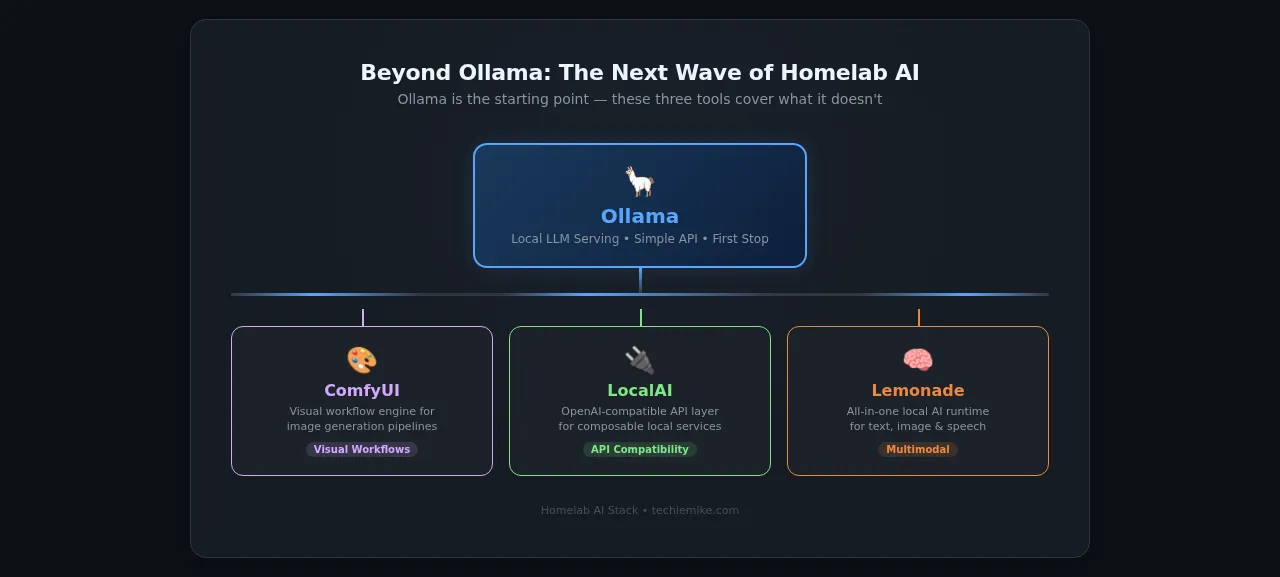
The three projects I would watch right now are ComfyUI, LocalAI, and Lemonade. They are not direct replacements for Ollama in the sense of "uninstall Ollama and forget it exists." They solve different problems:
- ComfyUI is for visual AI workflows where you want to control every step
- LocalAI is for homelabbers who want a broader local API surface with OpenAI-compatible apps
- Lemonade is for people who want to experiment with a broader local AI runtime with chat, image, speech, and standard APIs
My view is simple: Ollama is still the easiest first stop, but it is no longer the whole conversation. If your homelab AI stack stops at Ollama, you are missing some genuinely useful tools.
Why look past Ollama at all?
Ollama does one thing very well: it makes local LLM inference approachable. That matters. A lot of local AI users never move past the "I want a model on my machine" stage, and they do not need to.
Still, three limits show up pretty quickly.
First, Ollama is mostly about model serving, not workflow design. If you want to build a repeatable image pipeline with prompt branches, upscalers, masks, and post-processing, Ollama is the wrong tool.
Second, plenty of apps expect an OpenAI-style API and want more than text generation. LocalAI leans hard into that compatibility layer, and that can save time when you are wiring tools together.
Third, local AI is getting more multimodal. Text alone is no longer the interesting part. Speech to text, text to speech, embeddings, image generation, and agent tooling are all creeping into the same workflows. Lemonade is appealing because it is trying to package that broader stack into one local service.
That does not mean these projects are automatically better. It means they cover ground Ollama does not.
1. ComfyUI: the visual workflow engine
If your local AI curiosity has moved from "run a model" to "build a pipeline," ComfyUI is the one to try next.
ComfyUI's documentation describes it as an AI creation engine for visual professionals who want control over every model, every parameter, and every output. The docs also push two ideas that matter for homelab users: you can run ComfyUI on your own hardware through Comfy Desktop, and the whole product is built around workflows you can load, remix, and iterate on.
That workflow-first approach is the real difference.
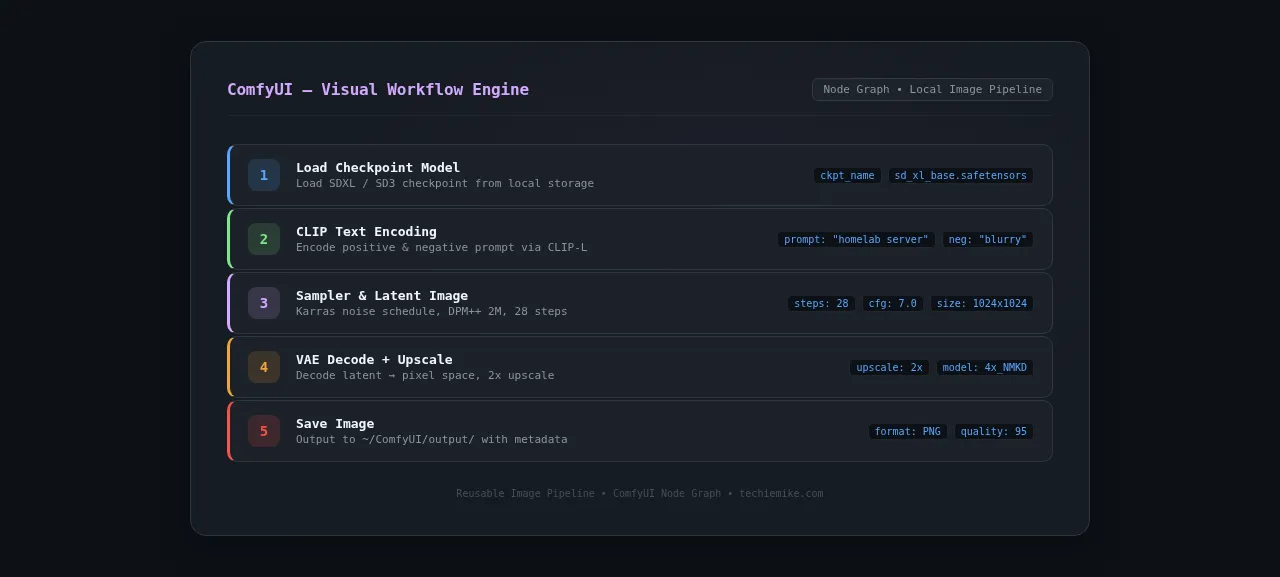
Instead of typing one prompt into a chat box and hoping for the best, you build a graph. One node loads a checkpoint. Another encodes the prompt. Another sets sampler settings. Another upscales. Another handles masks or ControlNet-style conditioning. It feels more like wiring a media pipeline than chatting with a bot.
That is why ComfyUI matters beyond image hobbyists. It teaches a better mental model for local AI. You stop thinking in one-shot prompts and start thinking in reusable systems.
What ComfyUI is good at
For a homelab, I think ComfyUI makes sense in four cases:
- You want stable, repeatable image generation workflows instead of random prompting.
- You are generating assets for a blog, course, or small business and you need consistency.
- You want to understand how visual AI pipelines actually fit together.
- You want to save and reuse workflows instead of rebuilding the same prompt stack every time.
The community workflow library is a big part of the appeal. You can start from a template, inspect how it works, then trim it down to fit your own hardware.
Where ComfyUI gets awkward
The downside is also obvious: ComfyUI asks more from you.
If Ollama feels like docker run plus a chat window, ComfyUI feels like learning a node editor. That is not a flaw. It is the point. But it means the learning curve is real.
It is also the least forgiving option here if your hardware is modest and your expectations are not. Text inference on CPU-only hardware can still be useful, as I found in my old hardware local AI write-up. Image workflows are different. You can run them locally, but speed and model choice matter a lot more.
So my practical advice is this: do not start ComfyUI by chasing the flashiest workflow on social media. Start with a basic community workflow, a smaller model, and one job you actually have. Blog art. Thumbnail variations. Product mockups. Something concrete.
My homelab take on ComfyUI
ComfyUI is the tool in this list that most rewards a dedicated box or VM. If your homelab has a machine with a decent GPU, this is where it earns its keep. If your homelab is just a mini PC with integrated graphics and limited RAM, ComfyUI can still be educational, but I would not make it your first "serious production" local AI service.
That is also why I do not see ComfyUI as an Ollama replacement. I see it as the moment local AI stops being only about chat.
2. LocalAI: the compatibility play
LocalAI is interesting for a completely different reason.
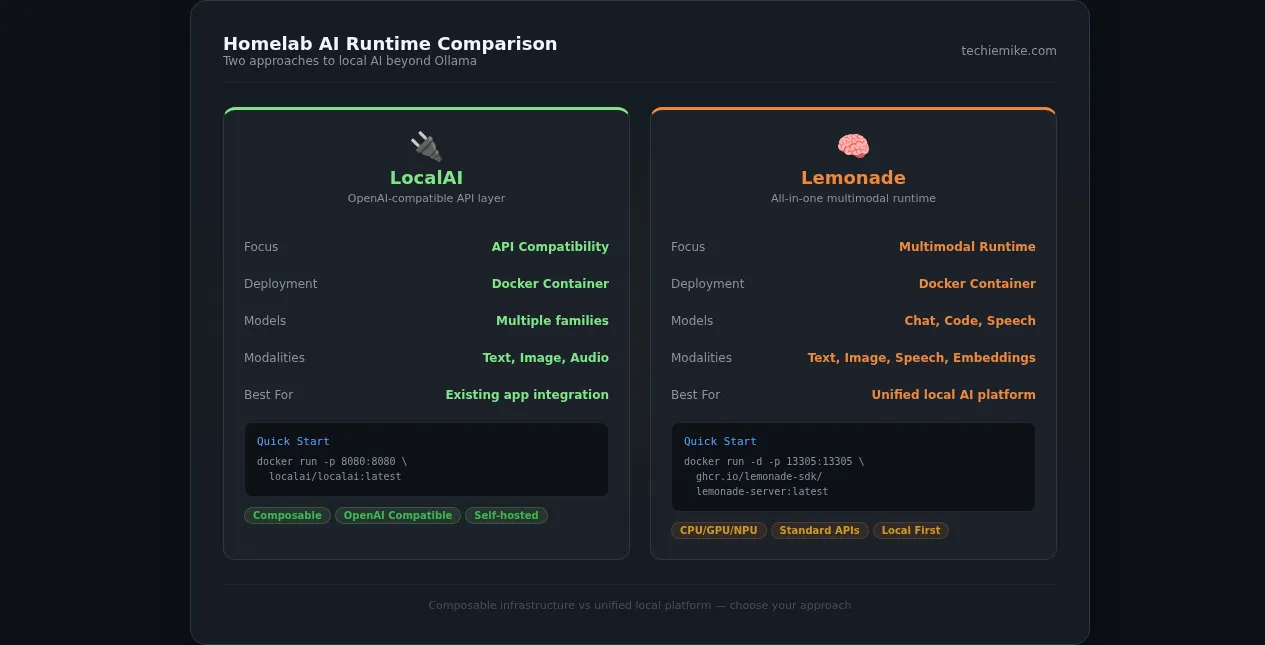
Its homepage makes the pitch very clearly: it is a free OpenAI and Anthropic alternative, built as a small composable AI stack. The LocalAI quickstart also states that it is a drop-in replacement for the OpenAI API, supports multiple model families, and can run language models, images, audio, and more locally. Docker is the recommended installation method, and the quick start is straightforward:
docker run -p 8080:8080 --name local-ai -ti localai/localai:latest
That single detail tells you who LocalAI is for.
It is for the homelabber who already has a pile of tools that expect a familiar API shape and does not want to keep adapting everything around one runtime. If you have scripts, agent tools, or self-hosted apps that speak OpenAI-style endpoints, LocalAI can be easier to slot into place than a more opinionated stack.
What LocalAI is good at
The best part of LocalAI is not that it tries to do everything. It is that it tries to expose local models through interfaces a lot of existing software already understands.
That gives it three obvious uses in a homelab:
- replacing cloud API calls in tools that already support OpenAI-compatible backends
- centralising local inference behind one service instead of a stack of ad hoc wrappers
- experimenting with broader local AI features without locking yourself into a single app UI
I also like the way the project frames itself as composable. That usually matters more in a homelab than polished marketing. You want pieces you can fit into your own stack, not a black box that wants to own the whole machine.
The part people gloss over
OpenAI-compatible does not mean identical behaviour across every app.
This is where a lot of local AI blog posts get sloppy. A compatible API gets you much closer to plug-and-play, but model capabilities, latency, backend support, and edge-case behaviour still vary. The docs promise the API shape. They do not promise every upstream app will behave exactly as if it were talking to OpenAI.
That is not a criticism of LocalAI. It is just the honest version.
If you are the kind of homelabber who likes clean interfaces and clear boundaries, LocalAI is a strong fit. If you want a dead-simple chat setup in ten minutes, Ollama is still easier. If you want a broad local API target for apps and experiments, LocalAI starts to look better.
My homelab take on LocalAI
This is the one I would try first if I were moving from "local toy" to "local platform."
Why? Because a homelab gets messy fast. One service wants text generation. Another wants embeddings. Another expects an OpenAI-style endpoint. Another needs audio later. A compatibility layer matters more than people think.
I would still keep the deployment conservative. Bind it locally first. Put a reverse proxy and auth in front of it if you need remote access. The same local AI security rules I wrote about for Ollama still apply here: do not confuse "self-hosted" with "safe by default."
3. Lemonade: the all-in-one runtime I would keep an eye on
Lemonade is the newest-feeling project in this list, and it is the one I find easiest to imagine on a modern homelab.
Its site pitches Lemonade as local AI for text, images, and speech. The installation flow says it equips your machine with an AI runtime, GUI, CLI, and API endpoints. The Lemonade GitHub project pushes the same idea harder: Lemonade Server exposes standard OpenAI, Anthropic, and Ollama APIs, while the broader platform covers chat, coding, speech, image generation, transcription, and embeddings.
For Docker users, the site shows this quick start:
docker run -d \
  --name lemonade-server \
  -p 13305:13305 \
  -v lemonade-cache:/root/.cache/huggingface \
  -v lemonade-llama:/opt/lemonade/llama \
  ghcr.io/lemonade-sdk/lemonade-server:latest
That is a serious homelab signal. It tells me the project understands how people like us test things: one container, mapped port, persistent volumes, then decide whether it deserves a permanent home.
What Lemonade is good at
What I like here is the ambition.
Lemonade is not saying "here is one local model runner." It is saying "here is a local-first AI runtime that can serve apps and agents, speak familiar APIs, and cover multiple modalities." The README even exposes CLI flows like lemonade run, lemonade pull, and lemonade list, plus a built-in model manager.
That makes Lemonade appealing for a homelab in three situations:
- you want one local runtime for more than chat
- you want a local service that can talk to existing apps over standard APIs
- you want multimodal experiments without stitching five unrelated projects together yourself
There is also a quiet but important detail in the README: Lemonade documents support across CPU, GPU, and in some cases NPU-focused configurations depending on backend and platform. I would not promise all of that on every random mini PC. But the direction is interesting. It feels closer to where local AI is heading.
Why I would still be cautious
The more all-in-one a project becomes, the more you need to be realistic about scope.
Broad capability claims are easy to love in a README and harder to operate in a homelab. Multimodal stacks usually mean more storage, more dependency churn, more model management, and more opportunities to end up debugging the runtime instead of using it.
So I would treat Lemonade as a platform experiment before I treated it as core infrastructure.
That is not an insult. Plenty of the best homelab tools start as platform experiments.
My homelab take on Lemonade
If I wanted one box in the rack to become "the local AI services machine," Lemonade is the project here that best matches that idea.
Not because it is automatically the best at every individual task. It probably is not. But because it is trying to unify text, image, speech, and app-facing APIs into one local runtime. That is a more useful direction than yet another single-purpose model wrapper.
Which one should you choose?
Short version.
Pick ComfyUI if:
- you care about image generation or visual workflows more than chat
- you want to build reusable pipelines, not just send prompts
- you have the patience to learn a node-based tool properly
 Comfy-Org
Pick LocalAI if:
- you want a local OpenAI-compatible service for apps and scripts
- you are building a broader self-hosted AI platform, not just a chat box
- you prefer composable infrastructure over an all-in-one user experience
 mudler
Pick Lemonade if:
- you want one local runtime that reaches beyond text
- you care about chat, speech, embeddings, and image generation in the same stack
- you like the idea of standard APIs plus local-first multimodal tooling
 lemonade-sdk
Stick with Ollama if:
- your real need is still just local text inference
- you want the smallest setup burden
- you value simplicity more than feature breadth right now


That last one matters. There is no prize for making your homelab more complicated than it needs to be.
Practical setup advice before you install any of them
This is the part that matters more than choosing the "right" brand.
1. Separate experiments from core services
Do not dump every AI runtime onto the same VM that already runs your password manager, DNS, and media stack. Give local AI tools their own box, LXC, or VM where possible. They pull big models, eat disk, and change quickly.
If you are planning that separation now, my homelab network design guide is the post I would read before carving out another AI host.
2. Start with one use case, not three
The fastest way to waste a weekend is to install ComfyUI, LocalAI, and Lemonade in one sitting and learn none of them properly. Pick one actual job first.
If the job is image workflows, use ComfyUI. If the job is API compatibility, use LocalAI. If the job is "I want a broader local AI service layer," try Lemonade.
3. Budget storage before you budget hype
Model storage gets out of hand fast. Between checkpoints, embeddings, speech models, caches, and image assets, local AI can eat SSD space long before it maxes out CPU.
4. Keep security boring
Local AI projects are still software stacks with ports, APIs, and update cycles. Keep them off the open internet unless you have a very good reason. Bind locally first. Add auth deliberately. Reuse the same caution you would use for any self-hosted dashboard or API. My Ollama security guide exists for a reason.
My actual opinion
I do not think the next step after Ollama is "the one true replacement." I think the better question is what kind of homelab AI user you are becoming.
If you are becoming a workflow builder, ComfyUI makes sense. If you are becoming an infrastructure person, LocalAI makes sense. If you want a local-first service layer that feels closer to a real AI platform, Lemonade is the one I would watch.
That is why this space is more interesting now than it was six months ago. Local AI is finally splitting into real categories instead of pretending every problem is solved by one model runner and a chat window.
Ollama got a lot of people through the front door. Good. It needed to happen.
But the room is bigger now.
If you want the philosophy behind local-first AI, read
 Techie Mike
If you want the easy starting point, use Ollama. If you want the next layer in a homelab that is starting to do serious work, these three are where I would look next.